Chapter 3 - Parameter List
25
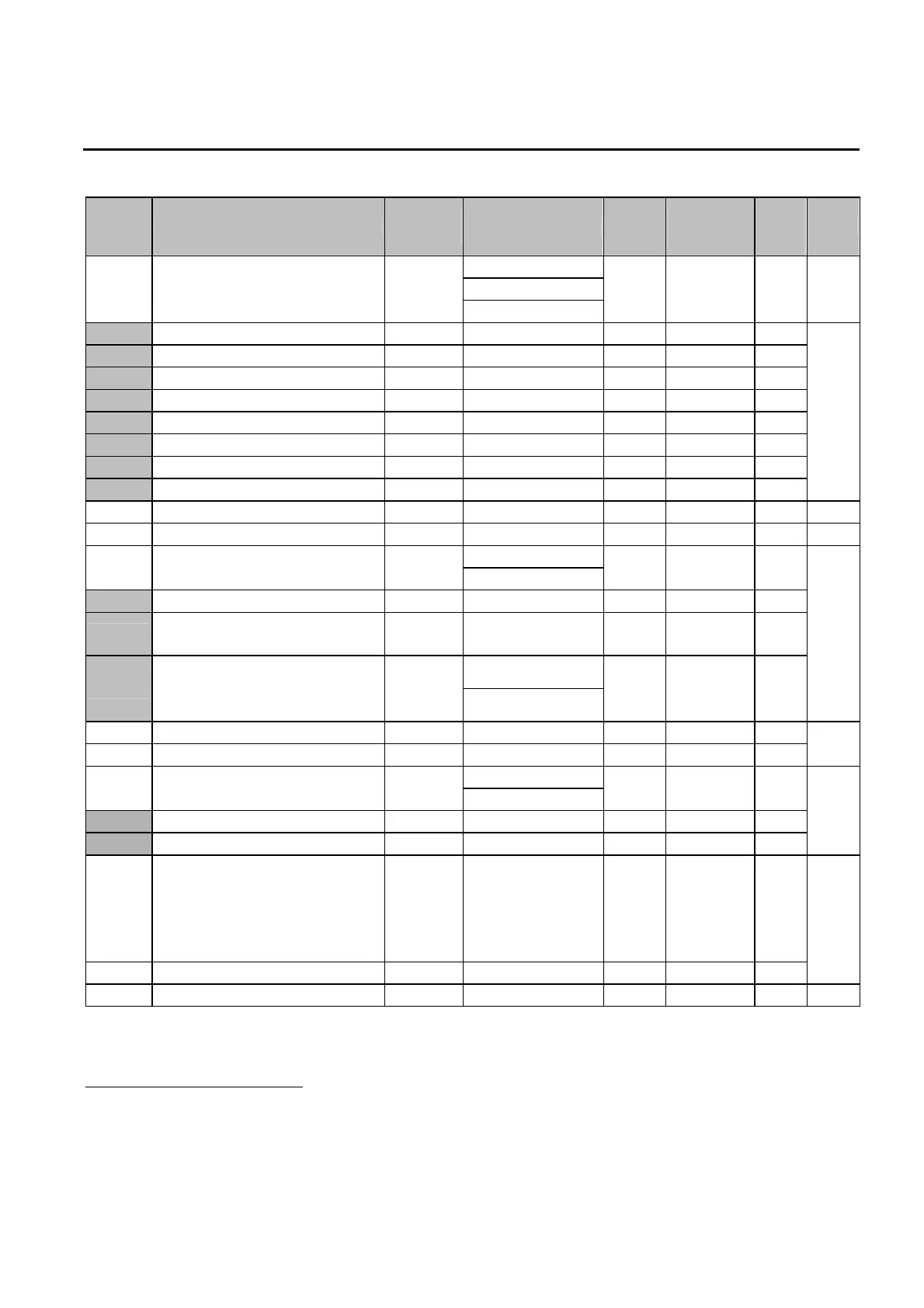
Code Description
Keypad
Display
Setting Range Units
Factory
Default
Adj.
During
Run
Page
0 (Linear)
1 (Square)
FU1-29 Volts/Hz Pattern F 29
2 (User V/F)
- 0 (Linear) No 43
FU1-30
9
User V/F – Frequency 1 F 30 0.00 to (FU1-32) 0.01 15.00 [Hz] No
FU1-31 User V/F – Voltage 1 F 31 0 to 100 [%] 1 25 [%] No
FU1-32 User V/F – Frequency 2 F 32 (FU1-30) to (FU1-34)
0.01 30.00 [Hz] No
FU1-33 User V/F – Voltage 2 F 33 0 to 100 [%] 1 50 [%] No
FU1-34 User V/F – Frequency 3 F 34 (FU1-32) to (FU1-36)
0.01 45.00 [Hz] No
FU1-35 User V/F – Voltage 3 F 35 0 to 100 [%] 1 75 [%] No
FU1-36 User V/F – Frequency 4 F 36 (FU1-34) to (FU1-20)
0.01 50 / 60 [Hz] No
FU1-37 User V/F – Voltage 4 F 37 0 to 100 [%] 1 100 [%] No
43
FU1-38 Output Voltage Adjustment F 38 40 to 110 [%] 0.1 100.0 [%] No 44
FU1-39 Energy Save Level F 39 0 to 30 [%] 1 0 [%] Yes 44
0 (No)
FU1-50 Electronic Thermal Selection F 50
1 (Yes)
- 0 (No) Yes
FU1-51
10
Electronic Thermal Level for 1 Minute F 51 FU1-52 to 250 [%] 1 180 [%] Yes
FU1-52
Electronic Thermal Level for
Continuous
F 52 50 to FU1-51 1 120 [%] Yes
0 (Self-cool)
FU1-53
Electronic Thermal Characteristic
Selection (Motor type)
F 53
1 (Forced-cool)
- 0 (Self-cool) Yes
45
FU1-54 Overload Warning Level F 54 30 to 250 [%] 1 150 [%] Yes
FU1-55 Overload Warning Hold Time F 55 0 to 30 [sec] 0.1 10.0 [sec] Yes
46
0 (No)
FU1-56 Overload Trip Selection F 56
1 (Yes)
- 1 (Yes) Yes
FU1-57
11
Overload Trip Level F 57 30 to 250 [%] 1 200 [%] Yes
FU1-58 Overload Trip Delay Time F 58 0 to 60 [sec] 1 60.0 [sec] Yes
46
FU1-59 Stall Prevention Mode Selection F 59
000 – 111 (bit set)
Bit 0: during Accel.
Bit 1: during Steady
speed
Bit 2: during Decel.
bit 000 No
FU1-60 Stall Prevention Level F 60 30 to 250 [%] 1 200 [%] No
47
FU1-99 Return Code rt - - - 48
9
Code FU1-30 through FU1-37 appears only when FU1-29 is set to ‘User V/F’.
10
Code FU1-51 through FU1-53 appears only when FU1-50 is set to ‘Yes’.
11
Code FU1-57 through FU1-58 appears only when FU1-56 is set to ‘Yes’.


 To Next Page