GOLINK
OUT1
OUT1 OUT2
A T AL1 AL2 AL3 MAN PRO
AUTO
RESET
%
0 20 40 60 80 100
GOLINK
OUT1
OUT1 OUT2
A T AL1 AL2 AL3 MAN PRO
AUTO
RESET
%
0 20 40 60 80 100
GOLINK
OUT1
OUT1 OUT2
A T AL1 AL2 AL3 MAN PRO
AUTO
RESET
%
0 20 40 60 80 100
GOLINK
OUT1
OUT1 OUT2
A T AL1 AL2 AL3 MAN PRO
AUTO
RESET
%
0 20 40 60 80 100
GOLINK
OUT1
OUT1 OUT2
A T AL1 AL2 AL3 MAN PRO
AUTO
RESET
%
0 20 40 60 80 100
GOLINK
OUT1
OUT1 OUT2
A T AL1 AL2 AL3 MAN PRO
AUTO
RESET
%
0 20 40 60 80 100
GOLINK
OUT1
OUT1 OUT2
A T AL1 AL2 AL3 MAN PRO
AUTO
RESET
%
0 20 40 60 80 100
GOLINK
OUT1
OUT1 OUT2
A T AL1 AL2 AL3 MAN PRO
AUTO
RESET
%
0 20 40 60 80 100
GOLINK
OUT1
OUT1 OUT2
A T AL1 AL2 AL3 MAN PRO
AUTO
RESET
%
0 20 40 60 80 100
GOLINK
OUT1
OUT1 OUT2
A T AL1 AL2 AL3 MAN PRO
AUTO
RESET
%
0 20 40 60 80 100
GOLINK
OUT1
OUT1 OUT2
A T AL1 AL2 AL3 MAN PRO
AUTO
RESET
%
0 20 40 60 80 100
GOLINK
OUT1
OUT1 OUT2
A T AL1 AL2 AL3 MAN PRO
AUTO
RESET
%
0 20 40 60 80 100
13
6. Operations
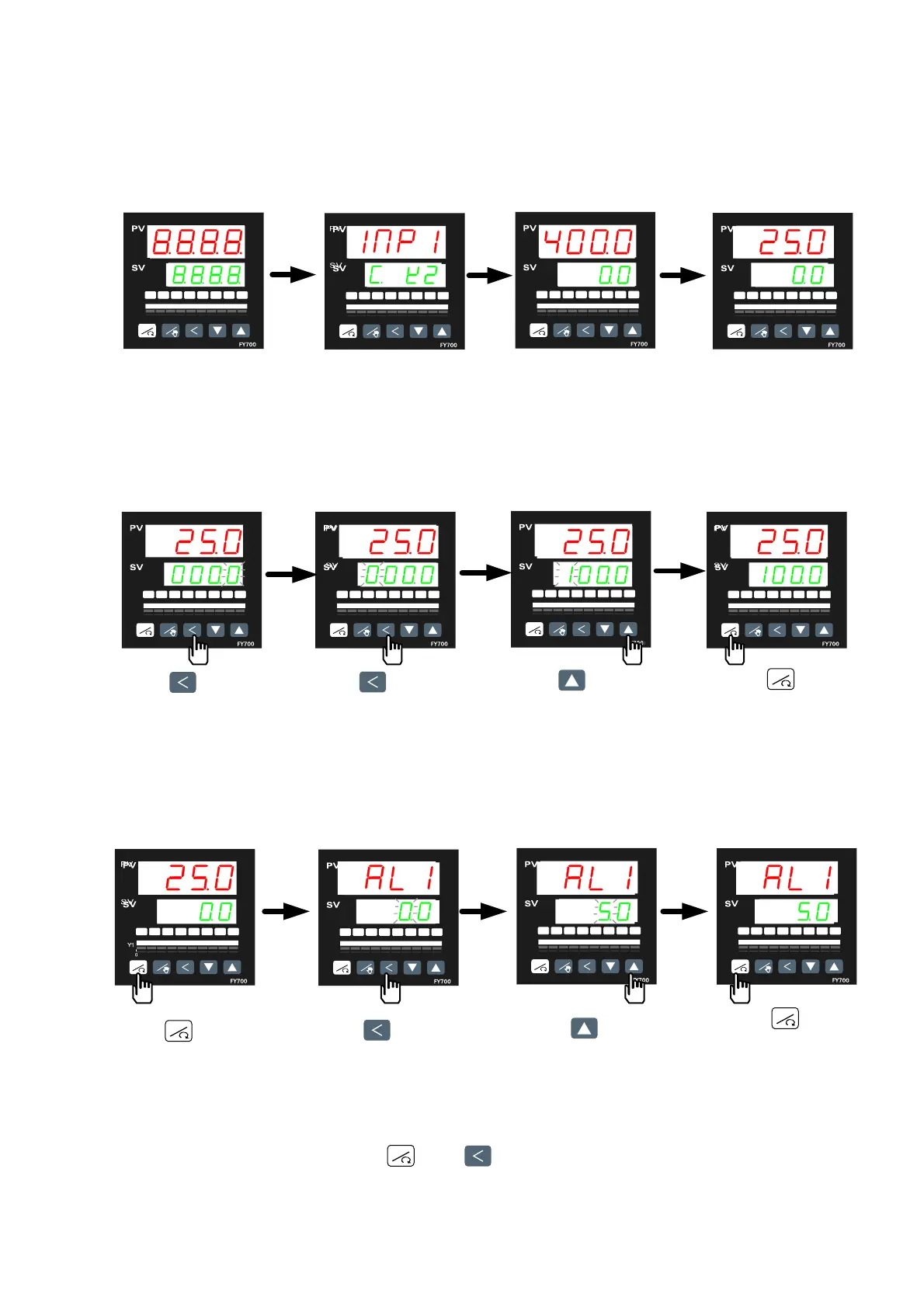
6.1 Power On
Controller will display as below
Display input type
(K2)
Display range
(0
.0~400.0)
Ready for use
displays will be lighted
6.2 Change the Set Value (SV)
Change SV from 0.0 to 100.0
Press key. The SV
number started to flash.
The flashing digit indicates
which digit c
an be set.
Press key
to sel
ect the hundreds digit.
Press key
to
change the number to 1
Press key
to store the new
set value.
6.3 Change the Alarm Value
Change AL1 value to “5.0” (AL1 active, if PV exceeds SV over 5.0)
Press key
to display parameter AL1
Press key
to change AL1 value
Press key
increase AL1 value
Press key
sto
re the new value
of AL1
* The are total 16 alarm mode types, please referred with “alarm mode” in page 30
* To change alarm mode, press + key 5 seconds to enter Level 3 (Input
Level) and then change ALD1/ALD2/ALD3 value.
RESET
RESET
RESET
RESET



 To Next Page
 Loading...