GOLINK
OUT1
OUT1 OUT2
A T AL1 AL2 AL3 MAN PRO
AUTO
RESET
%
0 20 40 60 80 100
GOLINK
OUT1
OUT1 OUT2
A T AL1 AL2 AL3 MAN PRO
AUTO
RESET
%
0 20 40 60 80 100
GOLINK
OUT1
OUT1 OUT2
A T AL1 AL2 AL3 MAN PRO
AUTO
RESET
%
0 20 40 60 80 100
GOLINK
OUT1
OUT1 OUT2
A T AL1 AL2 AL3 MAN PRO
AUTO
RESET
%
0 20 40 60 80 100
14
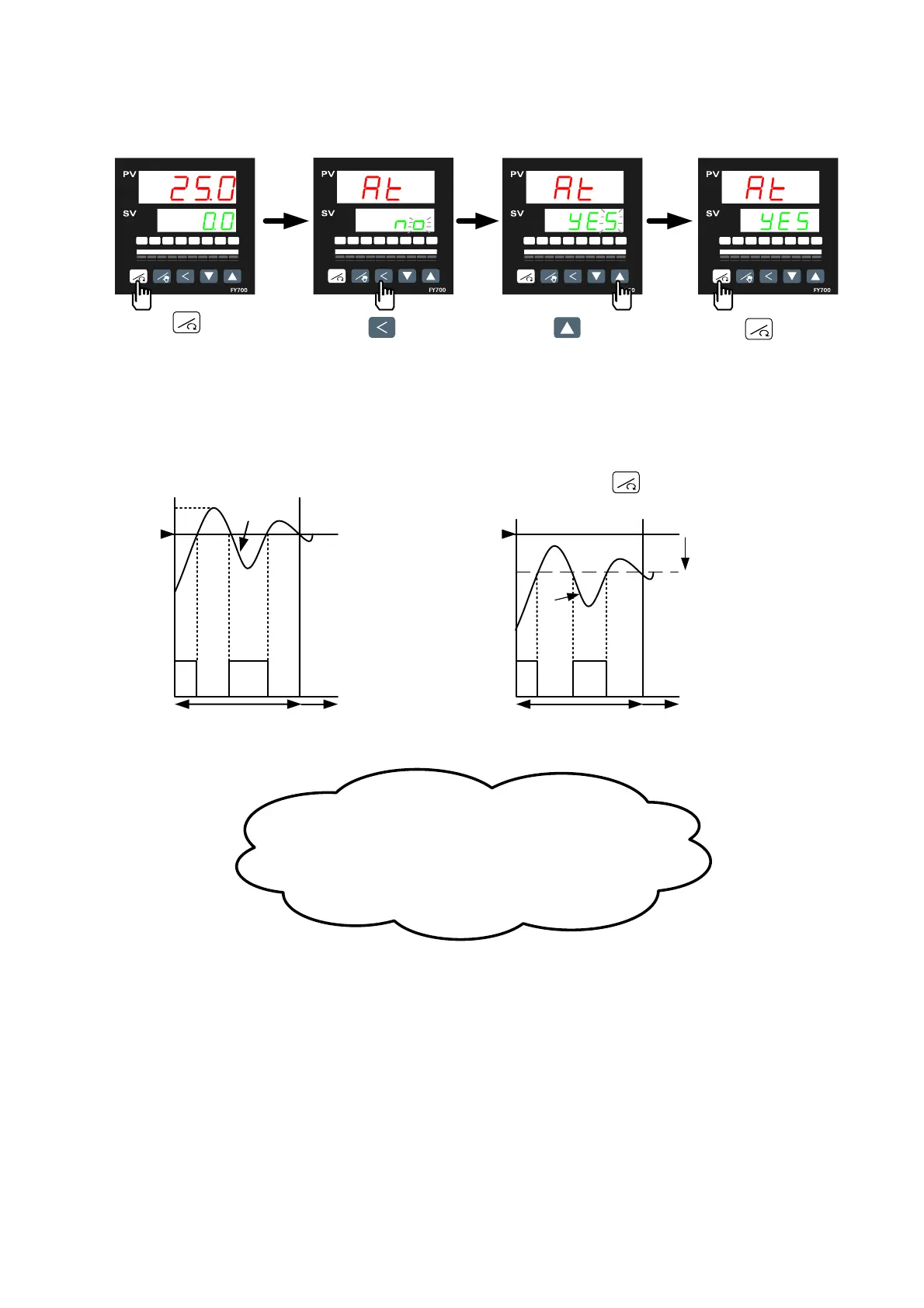
6.4 Autotuning (AT)
Use AT function to automatically calculate and set the optimize PID value for your system.
Press key
to
display parameter AT.
Press key
to
change AT setting
Press key
change AT to “YES"
Press
key
Start auto tuning
(AT lamp will be
lighted on)
OFFON ON OFF
ON / OFF Control
(Auto
tuning)
PID Control
(After Autotuning)
SV
PV
0%
100
%
Output%
Autotuning
ATVL=0
OFFON ON OFF
SV
PV
0%
100
%
Autotuning
ATV
L=20
SV - 20
Autotuning failure
(Overshoot )
*Set ATVL to prevent overshoot occurred during
autotuning process.
Output%
ON / OFF Control
(Auto
tuning)
PID Control
(Af
ter Autotuning)
To set ATVL ,press key 5 seconds to enter
Level 2 (PID Level) and then change the value.
Possible cause 1: ATVL is too big. (If not sure,set ATVL=0)
Possible cause 2:Calculation time is too long.
(Set PID parameter manually)
RESET
RESET
RESET


 To Next Page
 Loading...