16
7. Operation levels
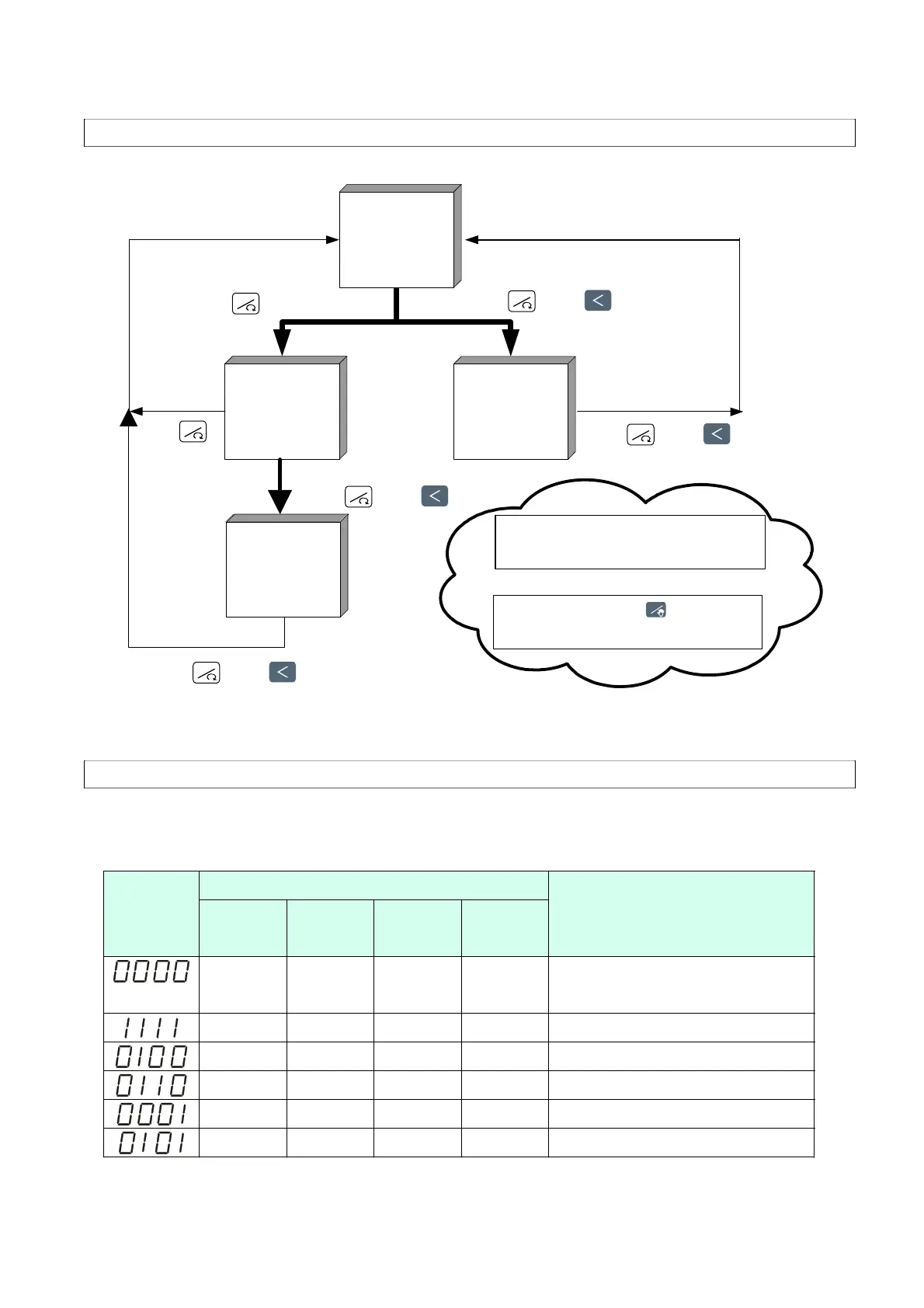
7.1 Levels diagram
LCK = 0000
Level 1
(User
Level)
Press Key 5 seconds
Level 2
(P
ID Level)
Leve
l 3
(Input Level)
Press
Key 5 seconds
Press Key+ 5 seconds
Press Key+ 5 seconds
* The controller returns to Level 1 if there
is no key operation within 60 seconds.
* In any Level, press key
twice will return to Level 1.
Level 4
(SET
Level)
Press Key+ 5 seconds
LCK = 1111
Press Key
+ 5 seconds
7.2 Lock function
To use lock function, please set parameter “LCK” in level 2.
Levels entering available LCK
Level 1
(User)
Level 2
(PID)
Level 3
(Input)
Level 4
(SET)
Parameters which can be
changed
◎ ◎ ◎ ------ All parameters
(Factory set value)
◎ ◎ ------ ◎ All parameters
◎ ◎ ------ ------ All parameters except level 3
◎ ◎ ------ ------ Parameters in level 1
◎ ◎ ------ ------ “SV” and “LCK”
◎ ◎ ------ ------ Only “LCK”
RESET
RESET
AUTO
RESET
RESET
RESET
RESET


 To Next Page
 Loading...