Rollshutter Installation Instructions, 18
©Copyright TALIUS
Section 13: Limit Setting for Motorized Operators
This section shows the limit switch adjustment for motorized Rollshutters. If your unit is manually operated proceed to
the next section.
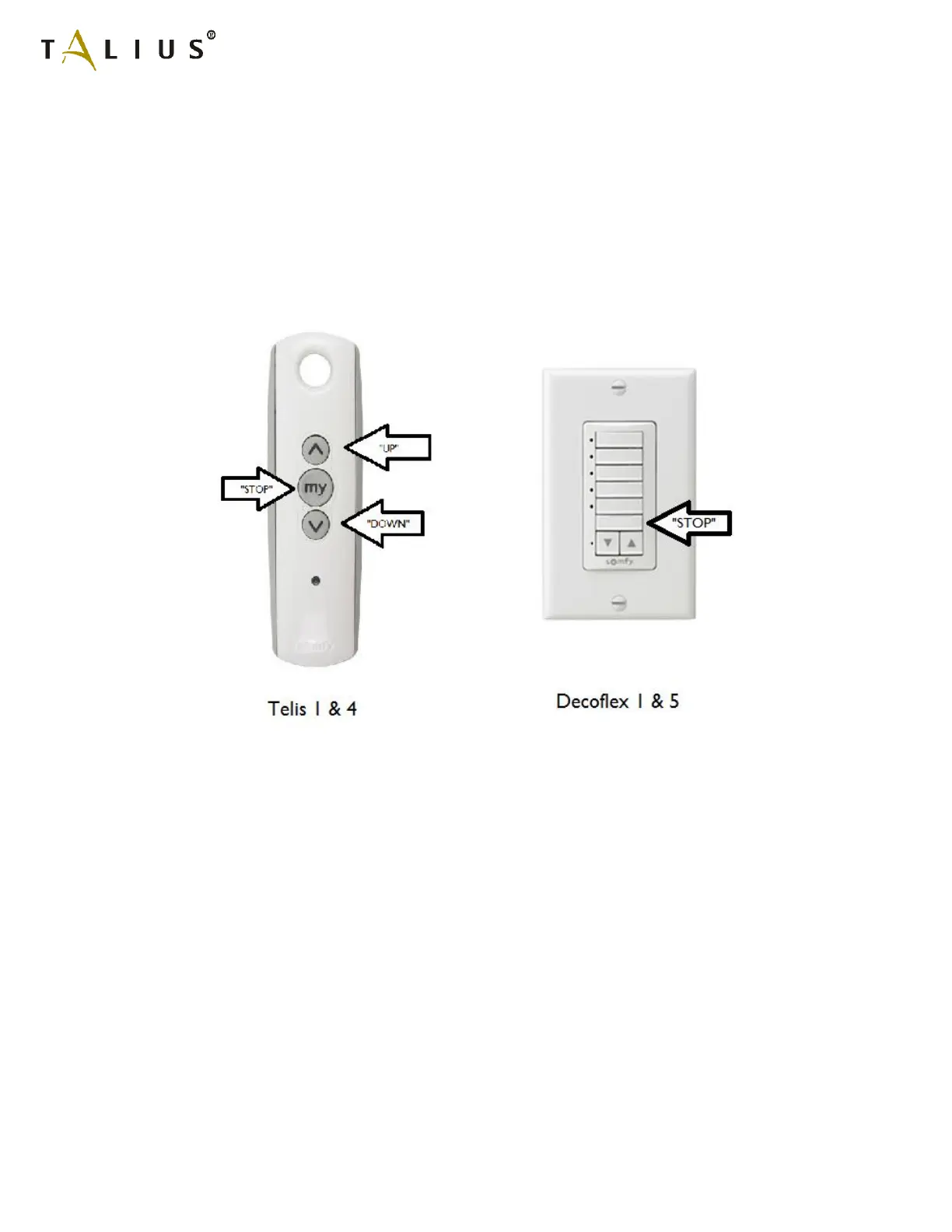
13.1a) Somfy RTS Motors: When you receive your Rollshutter with a Somfy RTS motor the unit will come with a pre-
program transmitter in user mode. To adjust the limits follow the simple steps below. If you have a multi-channel
transmitter, select the channel corresponding to the unit that you are adjusting and follow these steps, which unit
corresponds to which channel is chosen at the time of ordering. If you have more then one unit on a single channel,
power must be disconnected to additional units so that only 1 unit has power. After isolating a single unit, preform the
limit adjustment steps below for each unit.
Step One: Adjusting the Upper Limit
- Move the motor to its current upper limit position and let it stop
- Press the UP and DOWN buttons simultaneously on the transmitter until the motor jogs, then release
- Adjust to a new upper limit position
- Press the STOP button until the motor jogs, then release
- Check that the limit is in the desired position
Step Two: Adjusting the Lower Limit
- Move the motor to its current lower limit position and let it stop
- Press the UP and Down buttons simultaneously on the transmitter until the motor jogs, then release
- Adjust to a new lower limit position
- Press the STOP button until the motor jogs, then release
- Check that the limit is in the desired position



 To Next Page