Rollshutter Installation Instructions, 21
©Copyright TALIUS
13.1c) Somfy Standard Limit Setting Instructions
Steps
1. The Bottom limit (set by Talius) should already be at the correct closed position. Engage the switch/tester cable to
ensure the motor is indeed at the bottom limit.
2. Attach curtain to roller tube.
3. Run unit up until curtain stops at temporary UP limit (set by Talius).
4. Unlock the UP limit switch on the motor by pressing the appropriate button down and releasing it. The button will
stay pressed in.
5. Run curtain up to new desired UP limit and stop.
6. Press down and release the button again so that the button pops up. This will lock in the new UP limit position.
7. Run unit downwards until curtain stops at the DOWN limit (set by Talius), and adjust if necessary using the other
limit adjustment button.
8. Unlock the DOWN limit switch on the motor by pressing the appropriate button down and releasing it. The button
will stay pressed in.
9. Run curtain down to new desired DOWN limit and stop.
10. Press down and release the button again so that the button pops up. This will lock in the new DOWN limit position.
11. Test unit to ensure the unit stops automatically where you wish it to.
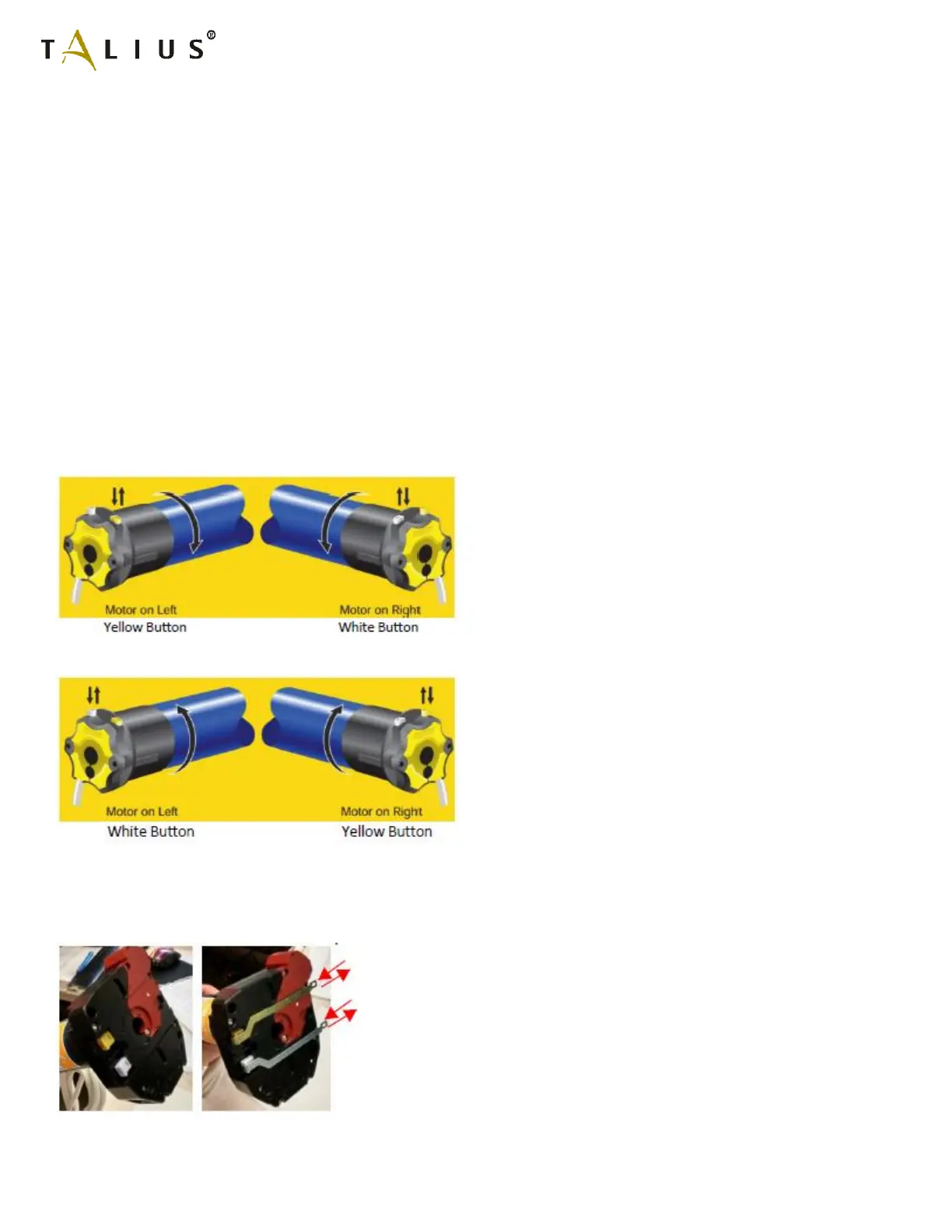
UP Limit
DOWN Limit
Occasionally, the limit adjustment buttons are hidden on the back side of the motor from the installer. This sometimes
must happen in order to locate the Manual override where the customer desires it to be. In these cases, Talius supplies
metal brackets in which tabs are accessible to press and release the limit buttons as necessary. In these cases, you are
pulling and releasing. The tabs are labeled “UP” and “DOWN” on the inside of the endplate for quick identification.
* image of limit brackets.



 To Next Page