- 24 -
15. Setting the Print Method
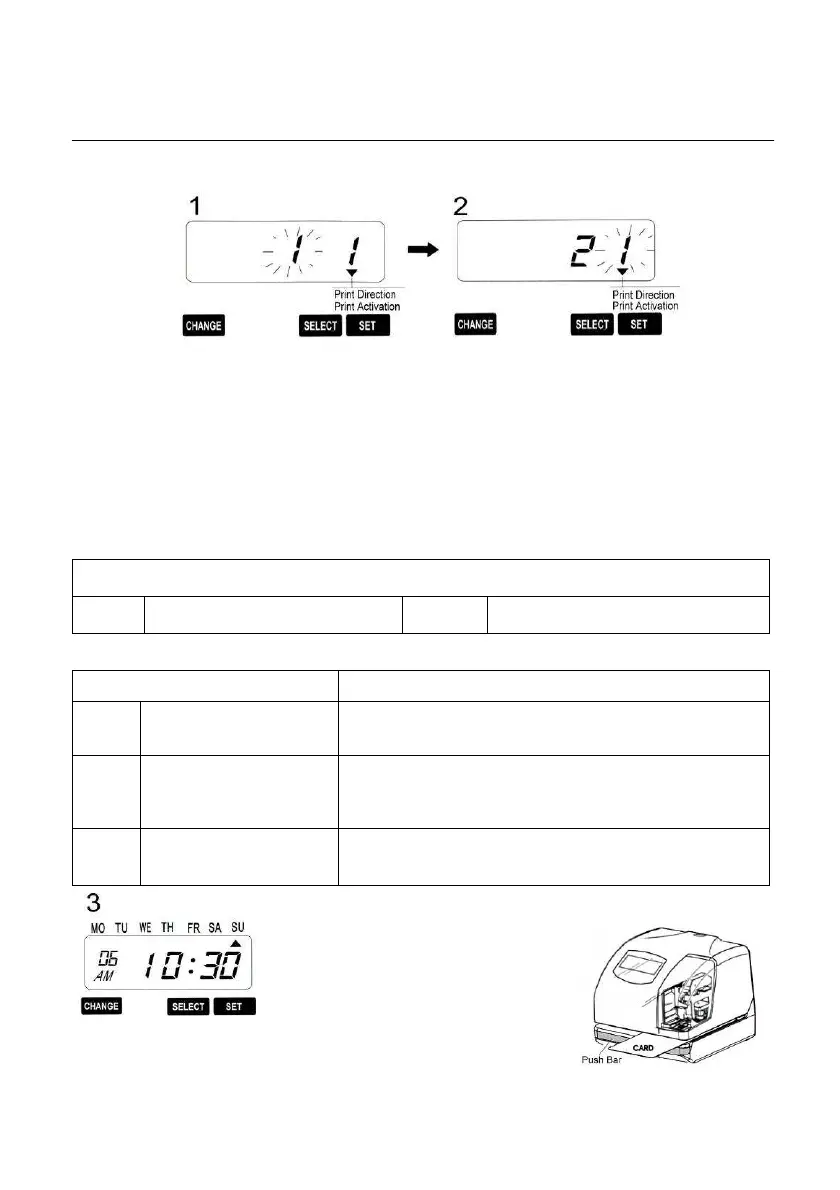
Example: Change the print direction to “Left” and the print activation to “Manual”
Press the {Select} button and position Press the {Change} button to set at
“2”
the
▲
under the “PRINT DIRECTION” And then press the {Set} button.
mark. At that moment, The flashing digit At that moment, the flashing changes
indicates “Print Direction Options” from the “Print Direction” to the
(The flashing means it can be changed) “Print Activation”
Print Direction Options
1 Right 2 Left
Print Activation Options Remarks
1 Automatic
Allow the Time Stamp to print by simply
inserting a card or piece of paper.
2 Semi-automatic
Allow the Time Stamp to print by pressing
the push bar only when a card or piece of
paper is inserted.
3 Manual
Allow the Time Stamp to print by pressing
the push bar.
After you finish setting the Print
direction & Print Activation, press
the {Set} button once again. Now
the setting has been completed.
Replace the cover and lock.
*** Important: If you do not
complete Step 3, the Time Stamp
will not print


 To Next Page