EasyManua.ls Logo

Tascam 122 - 2. Features and Controls; 2-1. Front Panel Features and Controls

Tascam 122
64 pages
Print Icon
To Next Page IconTo Next Page
To Previous Page IconTo Previous Page
Loading...
122
2. FEATURES AND CONTROLS
2-1.
FRONT
PANEL
FEATURES
AND
CONTROLS
GPOWE
R
switch
fj
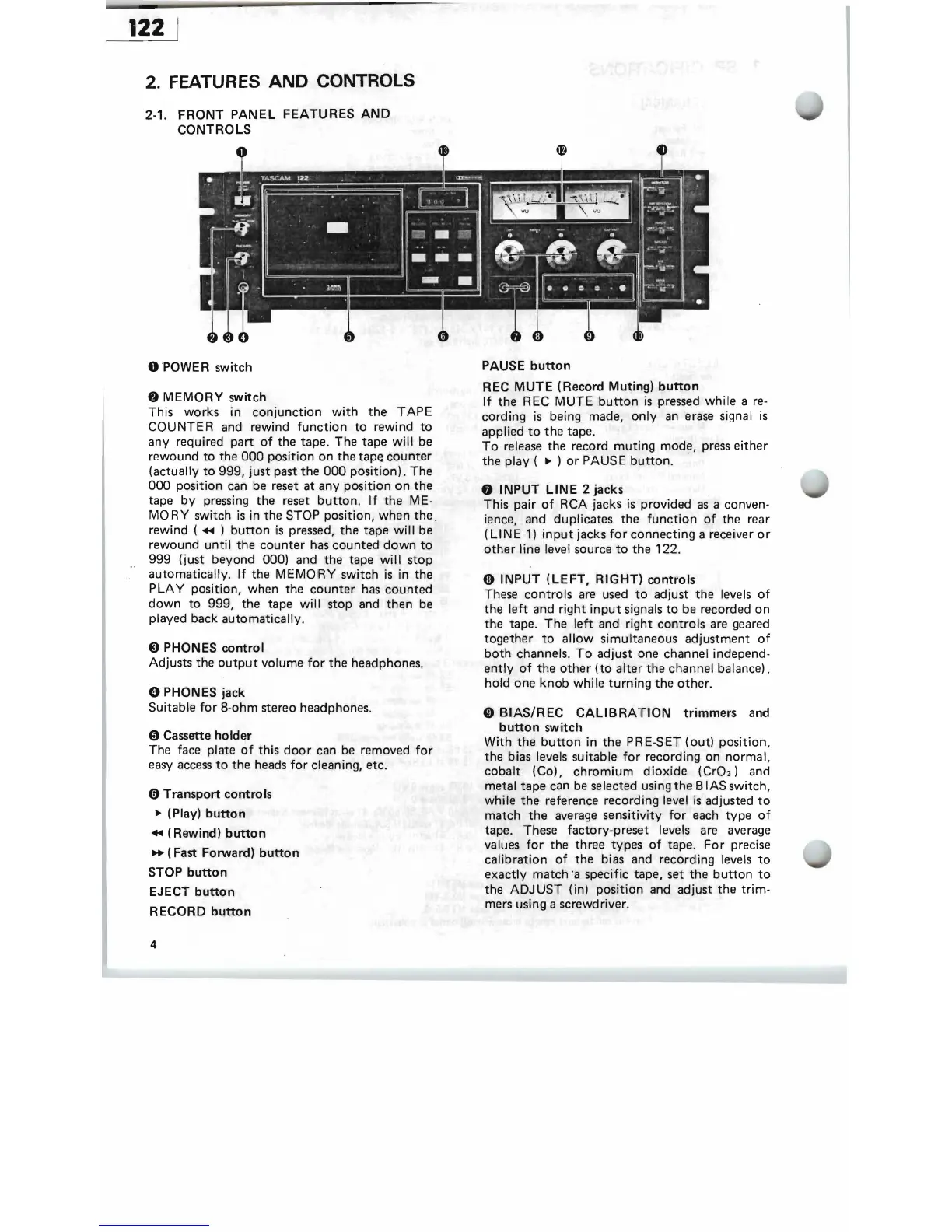
MEMORY
switch
This
works
in
conjunction
with
the
TAPE
COUNTER
and
rewind
function
to
rewind
to
any
required
part
of
the
tape.
The
tape
will be
rewound
to
the
000
position
on
the
tape
counter
(actually
to
999,
just
past
the
000
position).
The
000
position can
be
reset
at
any
position
on
the
tape
by
pressing
the
reset
button.
If
the
ME-
MO
RY
switch
is
in
the
STOP
position,
when
the
,
rewind (
+II
)
button
is pressed,
the
tape
will
be
rewound
until
the
counter
has
counted
down
to
999
(just
beyond
000)
and
the
tape
will
stop
0 '
automatically.
If
the
MEMORY
switch
is
in
the
P
LA
Y position,
when
the
counter
has
counted
down
to
999,
the
tape
will
stop
and
then
be
played
back
automatically
.
8 PHONES
control
Adjusts
the
output
volume
for
the
headphones.
o PHONES jack
Suitable
for
8-ohm
stereo
headphones.
o
Cassette
holder
The
face
plate
of
this
door
can
be removed
for
easy access
to
the
heads
for
cleaning,
etc
.
(!)
Transport
controls
~
(Play)
button
+II
(Rewind)
button
..
(Fast
Forward)
button
STOP
button
EJECT
button
RECORD
button
PAUSE
button
REC MUTE
(Record
Muting)
button
If
the
REC MUTE
button
is
pressed while a re-
cording
is
being made,
only
an erase signal
is
applied
to
the
tape.
To
release
the
record
muting
mode,
press
either
the
play (
~
)
or
PAUS E
button.
INPUT LINE 2
jacks
This
pair
of
RCA
jacks
is
provided
as a conven-
ience,
and
duplicates
the
function
of
the
rear
(LINE
1)
input
jacks
for
connecting
a receil
veror
other
line level
source
to
the
122.
Ci)
INPUT
(LEFT,
RIGHT)
controls
These
controls
are used
to
adjust
the
levels
of
the
left
and
right
input
signals
to
be
recorded
on
the
tape
.
The
'left
and
right
controls
are geared
together
to
allow
simultaneous
adj
ustment
of
both
channels.
To
adjust
one
channel
independ-
ently
of
the
other
(to
alter
the
channel
balance),
hold
one
knob
while
turning
the
other
.
o
BIAS/REC
CALIBRA
f'
ION
trimmers
and
button
switch
With
the
button
in
the
PRE-SET
(out)
position,
the
bias levels
suitable
for
recording
on
normal,
cobalt
(Co),
chromium
dioxide
(Cr02)
and
metal
tape
can be selected using
the
B lAS
switch,
while
the
reference recording level
is
adjusted
to
match
the
average
sensit
ivity
for
each
type
of
tape
.
These
factory-preset
levels are average
values
for
the
three
ty
pes
of
tape.
For
precise
calibration
of
the
bias
and
recording levels
to
exactly
match
°a specific
tape,
set
the
button
to
the
ADJ
US
T (in)
position
and
adjust
the
trim
-
mers using a screwdriver.
4

Related product manuals