EasyManua.ls Logo

Tascam 122 - 7-6. Overall Frequency Response; 7-7. Overall Signal-to-Noise Ratio; 7-8. Overall Distortion; 7-9. Erasure

Tascam 122
64 pages
Print Icon
To Next Page IconTo Next Page
To Previous Page IconTo Previous Page
Loading...
•••
•••
1
122
Co{Cr02)
and
NORMAL
Take
the
same
procedures
as
for
metal
tape.
Refer
to
Table
under
paragraph
7-5
for
the
tapes
to
be used
and
the
switch
settings.
7.7.
OVERALL
SIGNAL-TO-NOISE
RATIO
Obtain
the
standard
setting
according
to
proce-
dures
1)
- 6)
of
7-5.
to
check
record/reproduce
level.
1)
Recording
input
signal
of
-14
dBV/400
Hz
on
a
blank
tape
for
a
short
time.
Then
mute
the
signal
and
record
with
no
input
signal.
2) Rewind
the
tape
to
the
start
of
the
recorded
section.
3) Play
back
the
recorded
section
and
measure
the
output
level
of
the
section
with
the
signal,
then,
at
the
point
where
the
signal
stops,
increase
the
sensitivity
of
the
VTVM
and
measure
the
output
level
of
the
no-signal
section.
The
output
level
measurement
should
be
weighted.
4)
Calculate
the
level
ratio
of
noise
with
respect
to
the
recorded
signal
and
confirm
that
they
are identical
to
the
values
shown
in
the
table
below.
For
the
tapes
to
be
used
and
the
switch
settings,
refer
to
Table
under
paragraph
7-5.
If
the
values are
unsatisfactory,
proceed
as
follows:
*
Demagnetize
and
clean
the
erase
and
record/
reproduce
heads.
*
Check
that
erasi ng is being
done
effectively.
*
Check
and
adjust
reproduce
and
record/repro-
duce
frequency
response.
*
Check
and
adjust
the
bias
trap.
* Replace
the
tape.
SPEED
STANDARD
HIGH
METAL
Co(CrOl)
More
than
48
dB
More
than
49
dB
NORMAL
More
than
45
dB
More
than
46
dB
7-8.
OVERALL
DISTORTION
1)
Connect
the
measuring
instruments
as
shown
in
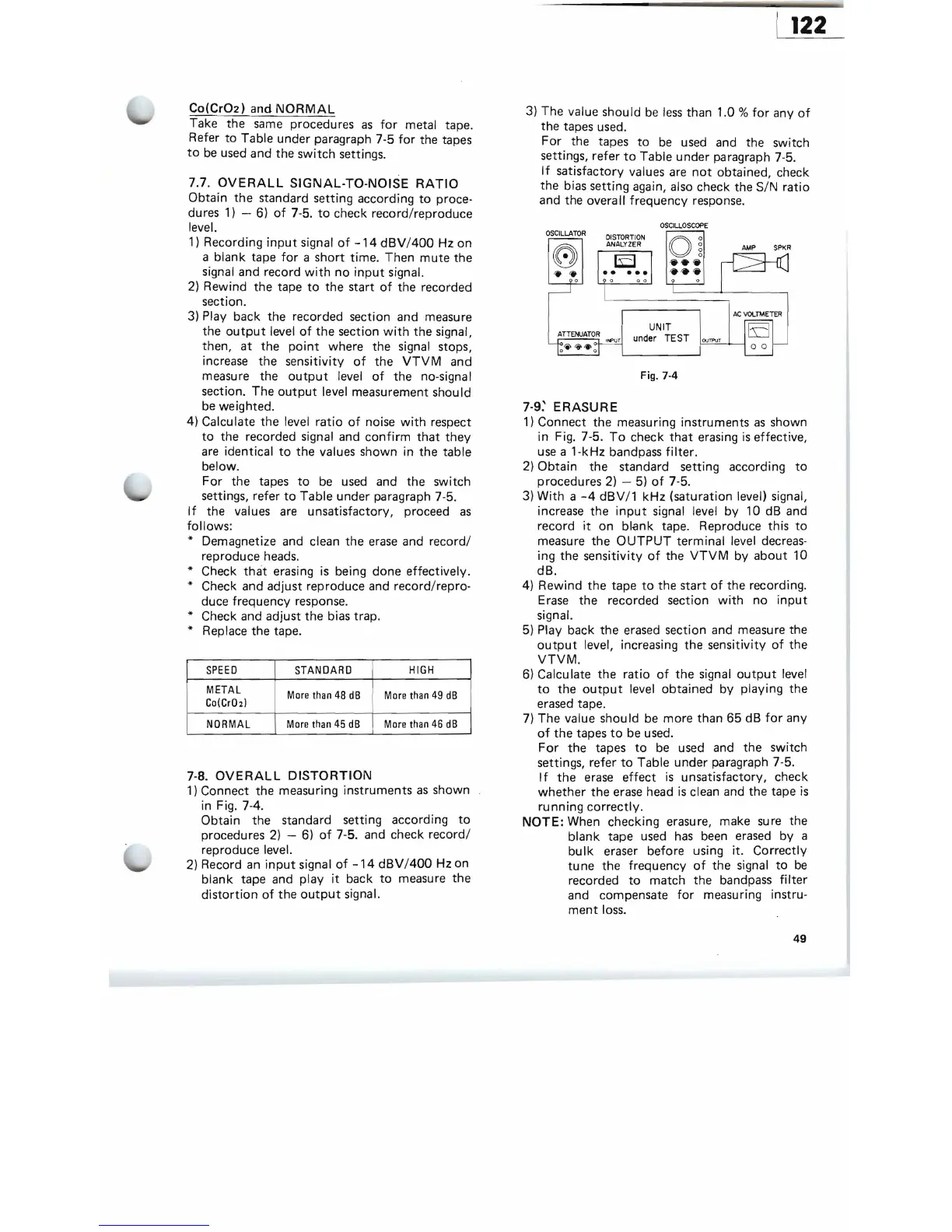
Fig. 7-4.
Obtain
the
standard
setting
according
to
procedures
2)
- 6)
of
7-5.
and
check
record/
reproduce
level.
2)
Record
an
input
signal
of
-14
dBV
/400
Hz
on
blank
tape
and
play it
back
to
measure
the
distortion
of
the
output
signal.
3)
The
value
should
be less
than
1.0
%
for
any
of
the
tapes
used.
For
the
tapes
to
be used
and
the
switch
settings,
refer
to
Table
under
paragraph
7-5.
If
satisfactory
values are
not
obtained,
check
the
bias
setting
again, also
check
the
SIN
ratio
and
the
overa
II
frequency
response.
OSCILLOSCOPE
OSCILLATOR
0
DISTORTION
ANALYZER
AMP
SPKR
O~
.. ..
0
AC
VOLTMETER
UNIT
under TEST
OVTP\JT
o 0
Fig. 7-4
7-9:
ERASURE
1)
Connect
the
measuring
instruments
as
shown
in Fig. 7-5.
To
check
that
erasing
is
effective,
use a 1-kHz
bandpass
filter.
2)
Obtain
the
standard
setting
according
to
procedures
2) - 5)
of
7-5.
3) With a
-4
dBV/1 kHz
(saturation
level) signal,
increase
the
input
signal level
by
10
dB
and
record
it
on
blank
tape.
Reproduce
this
to
measure
the
OUTPUT
terminal
level decreas-
ing
the
sensitivity
of
the
VTVM
by
about
10
dB.
4)
Rewind
the
tape
to
the
start
of
the
recording.
Erase
the
recorded
section
with
no
input
signal.
5) Play
back
the
erased
section
and
measure
the
output
level, increasing
the
sensitivity
of
the
VTVM.
6)
Calculate
the
ratio
of
the
signal
output
level
to
the
output
level
obtained
by
playing
the
erased
tape.
7)
The
value
should
be
more
than
65
dB
for
any
of
the
tapes
to
be
used.
For
the
tapes
to
be
used
and
the
switch
settings,
refer
to
Table
under
paragraph
7-5.
If
the
erase
effect
is
unsatisfactory,
check
whether
the
erase
head
is
clean
and
the
tape
is
running
correctly.
NOTE:
When
checking
erasure,
make
sure
the
blank
tape
used has
been
erased
by
a
bulk
eraser
before
using it.
Correctly
tu
ne
the
frequency
of
the
signal
to
be
recorded
to
match
the
bandpass
filter
and
compensate
for
measuring
instru-
ment
loss.
49

Related product manuals