EasyManua.ls Logo

Tascam 122 - 6. Electro-Mechanical Checks and Adjustments; 6-1. Head Base Plate Positioning; 6-2. Microswitch (A) Assembly Clearance; 6-3. Microswitch (B) Assembly Clearance

Tascam 122
64 pages
Print Icon
To Next Page IconTo Next Page
To Previous Page IconTo Previous Page
Loading...
122
6. ELECTRO-MECHANICAL CHECKS
AND
ADJUSTMENTS
6-1.
HEAD
BASE
PLATE
POSITIONING
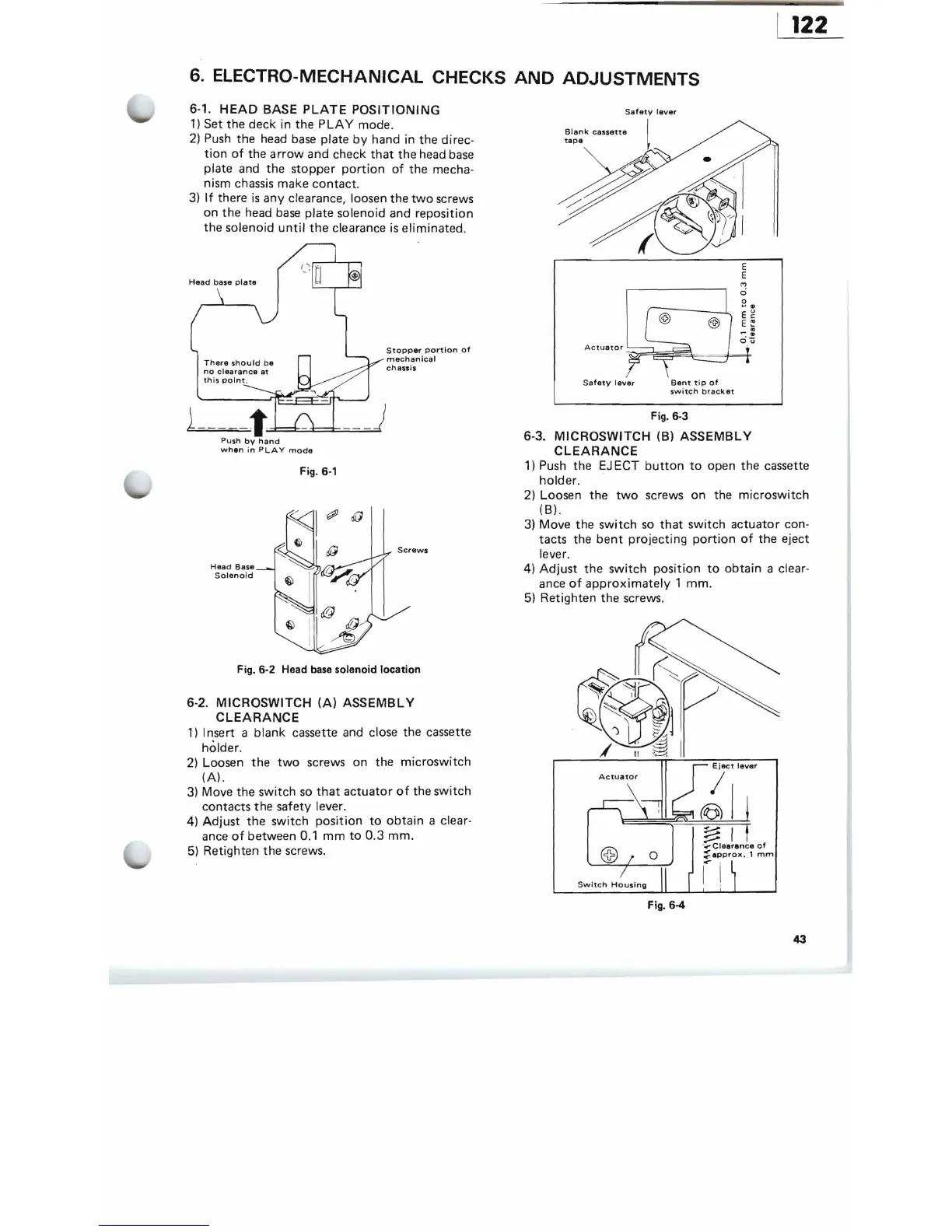
1)
Set the deck in the
PLAY
mode.
2)
Push
the head
base
plate
by
hand in
the
direc-
tion
of
the a
rrow
and check
that
the
head
base
plate and the stopper
portion
of
the
mecha-
nism chassis make contact.
3)
If
there
is
any clearance, loosen
the
two
screws
on
the
head
base
plate solenoid and reposition
the solenoid
until
the
clearance
is
eliminated.
There
should
be
no
clearance
at
this
point
.
1-
--
--t~:::::C:..=.=.::
Stopper
portion
of
mechanical
chassis
Push
by
hand
when
in
PLAY
mode
Fig.
6-1
Head
Base
Solenoid
Fig.6-2
Head base solenoid location
6-2.
MICROSWITCH
(A)
ASSEMBLY
CLEARANCE
1)
I nsert a blank cassette and close the cassette
holder.
2)
Loosen
the
two
screws on the
microswitch
(A).
3)
Move
the
switch
so
that
actuator
of
the
switch
contacts
the
safety lever.
4)
Adjust
the
switch
position
to
obtain
a clear-
ance
of
between 0.1
mm
to
0.3
mm.
5) Retighten the screws.
Safety
lever
Blank
cassette
@ @
Safety
I
ever
Bent
tip
of
switch
bracket
Fig. 6-3
6-3.
MICROSWITCH
(B)
ASSEMBLY
CLEARANCE
1)
Push
the
EJ
ECT
button
to
open the cassette
holder.
2) Loosen
the
two
screws on the
microswitch
(8).
3)
Move
the
switch
so
that
switch
actuator
con-
tacts the
bent
projecting
portion
of
the
eject
lever.
4)
Adjust
the
switch
position
to
obtain
a clear-
ance
of
approximately
1
mm.
5) Retighten the screws.
Eject
lever
I
(6)
Ii
~
I t
-
....
Clearance
of
::
appro)(.
1
mm
rl
Fig. 6-4
43

Related product manuals