11 – Menu and parameter reference–Menu groups
TASCAM DA-98HR 77
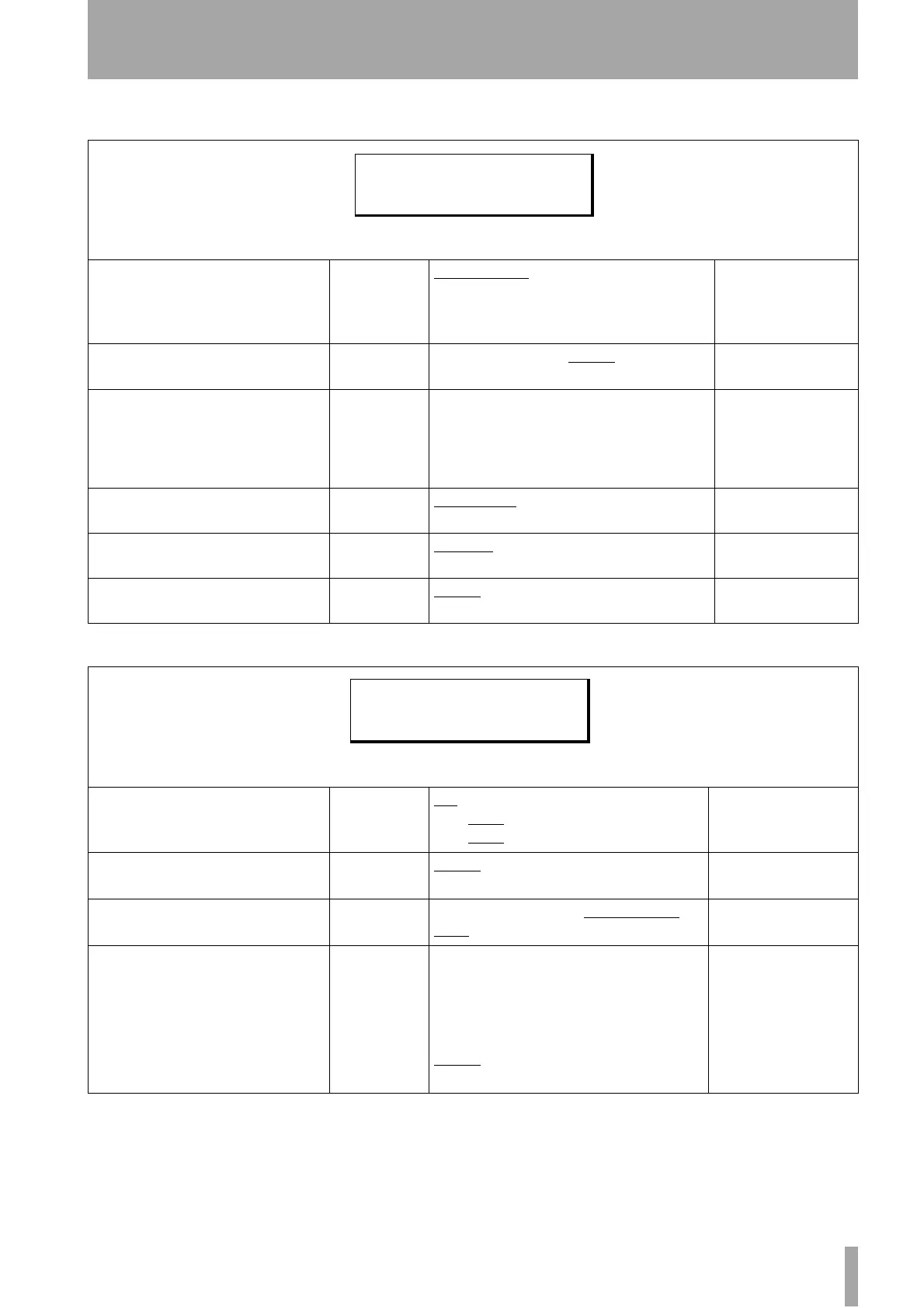
11.1.7 Menu group 6
11.1.8 Menu group 7
Menu item Parameter(s) Values Reference
Emulation Device
Device name
PCM-7050
,
BVH-3000
,
BVU-
950
,
BVW-75
,
PCM-800
,
BVH-2000
,
DVR-10
,
TASCAM
10.3.2, “Emulation”
Record Delay
Time in frames
0
through
9
frames or
Auto
(the number of
frames depends on the selected emulation)
10.3.3, “Record delay”
Track Mapping
Track maps Various mappings of DA-98 tracks to analog/digi-
tal. Default is DA-98 tracks 1 through 4 corre-
spond to analog tracks 1 through 4 and DA-98
tracks 5 through 8 correspond to digital tracks 1
through 4.
10.3.6, “Track mapping”
TC Record Enable
Enabled
disable
,
enable
10.3.7, “Timecode track
mapping”
Fast Wind Speed
Referenced to
play speed
x 100
,
x 8
10.3.5, “Fast wind
speed”
Cueup Tally
Message to
remote
Stop
,
Still
10.3.4, “Cue-up tally”
Menu item Parameter(s) Values Reference
MTC Output
Output
Fast wind mode
Stop
on
,
off
on
,
off
on
,
off
10.5.1, “MMC and the
DA-98HR”
Function Key
Mode
Mode for func-
tion keys
Menu
,
Locate Position
4.2.1, “Function key
modes”
MIDI/Bus ID
MIDI ID for
MMC
001
through
127
,
Receive
All
Locate Position
(Function Key)
Enabled
off
(if function key mode is
“
Locate Position
”, location
point is displayed. If the function key mode is not
“
Locate Position
”,
off
is displayed)
7.2, “Function key loca-
tion memories”
Function key
Time value
F. 1
through
F.10
Defaults to
00:00:00:00
E m l D e v T C R e c E N
R e c D l y F a s t S p d
T r k M a p C u e u p T l y
M T C O u t M I D I I D
F u n c t M o d e L o c ( F u n c )


 To Next Page