11 – Menu and parameter reference–Menu groups
TASCAM DA-98HR 79
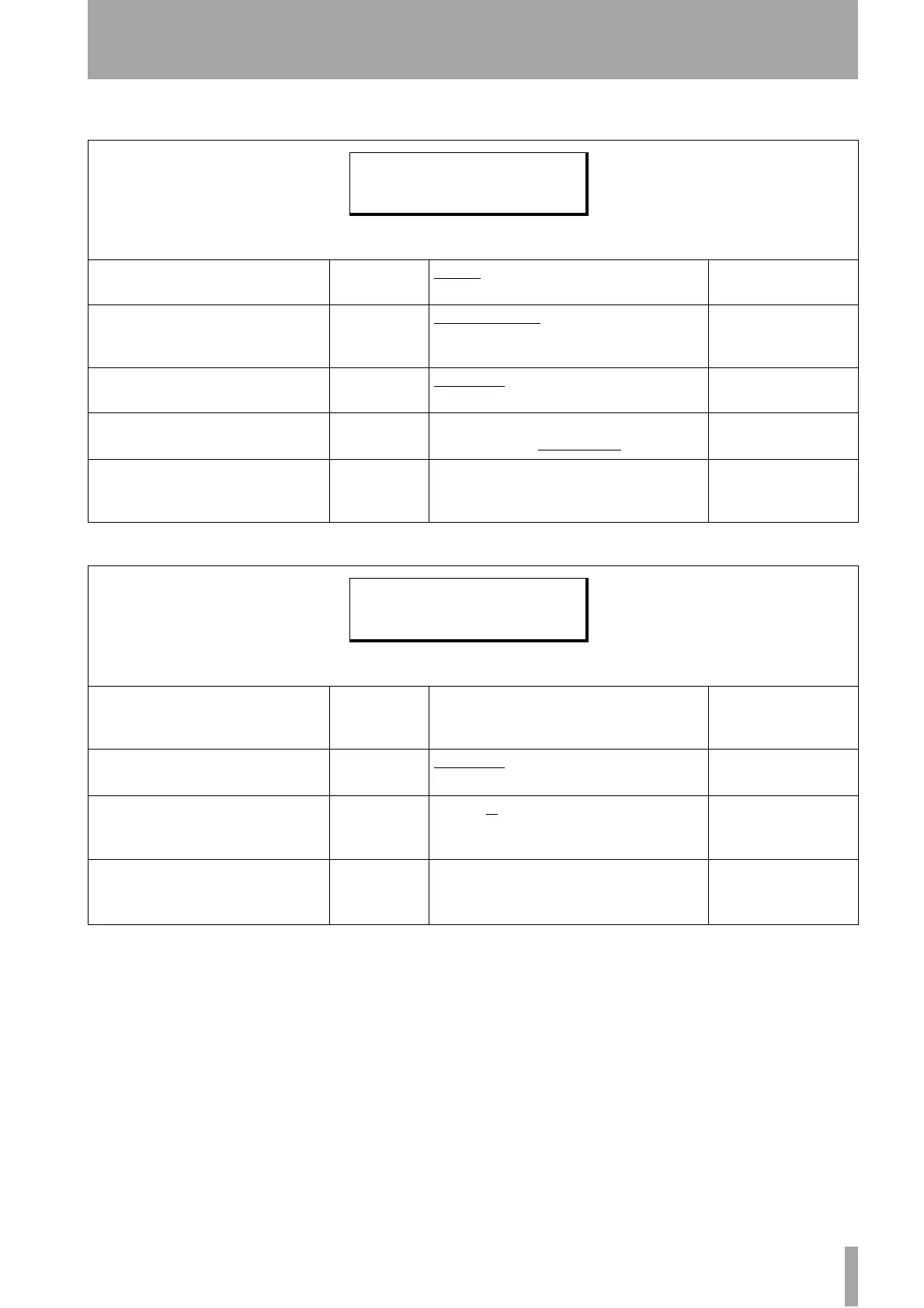
11.1.11 Menu group A
11.1.12 Menu group B
Menu item Parameter(s) Values Reference
Clock Mode
automatic or
individual
Auto
,
Individual
8.4.5, “Clock mode”
AES x2 I/O Mode
High-resolution
transmission
dual line
,
high speed
7.10.3, “Setting the high-
frequency AES/EBU I/O
transfer mode”
Cbit Mode
Display or
ignore
Normal
,
No Warning
7.10.4, “Cbit mode”
Device Type
Select
Device type
DA-38
,
DA-88
,
DA-98
,
DA-78HR
,
DA-98HR
8.3, “DTRS emulation”
AES/EBU Clock
AES/EBU chan-
nels to be used
as clock source
Usually paired (1-2, etc.), but for dual- and quad-
frequency tracks, these are grouped together.
6.1.2, “Setting the AES/
EBU channel for the
word sync source”
Menu item Parameter(s) Values Reference
Output Patch
source, and
channel-track
assignment
Normalled (one-to-one correspondence between
tracks and channels)
5.2, “Patching the out-
puts”
Output Word
Length
Word length of
the outputs
16 bit
,
24 bit
7.13, “Output word
length”
Mix Input Select
Source and
assignment of
mixdown
S
(slot),
T
(tape),
D
(digital input)
Destination track (1 through 8) — default is
normalled
5.4.2, “Selecting the mix-
down sources”
Mix Down
channel, level
and pan + mas-
ter level
Channel
1
through
8
, Level
0
through
127
, Pan
L63
through
R63
, master
level
0
through
127
5.4.3, “Setting mixdown
levels”
C l k M o d e D e v i c e T y p
A E S x 2 I o A e s E b u C l k
C b i t M o d e
O u t P a t c h M i x I n S e l
O u t W d L e n M i x D o w n


 To Next Page