28
DECELERATION
RALLENTAMENTO
START
tE
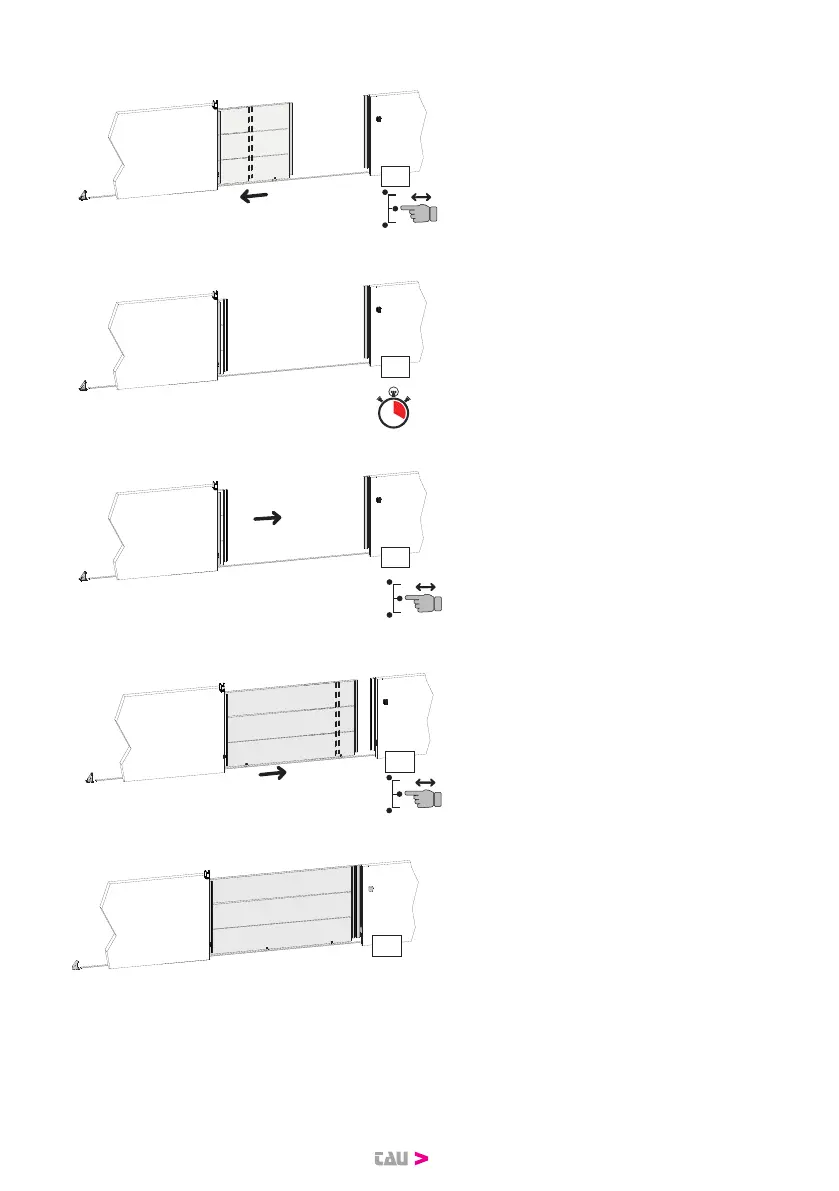
5. Press and release the START key.
The gate memorizes the decelera-
tion start point during opening.
OPEN
TCA
OP
6. When the opening limit switch
intervenes, the gate stops, the
message OP appears on the
display and the countdown for the
automatic closing time starts from
here.
CL
START
CLOSE
7. After the desired time for the
automatic closing has passed,
press and release the START key.
The message CL appears on the
display and the gate begins to
close at cycle speed.
START
DECELERATION
RALLENTAMENTO
CL
8. Press and release the START key.
The gate memorizes the decelera-
tion start point in closing.
CLOSE
CH
9. When the closing limit switch in-
tervenes, the gate stops, the mes-
sage CH appears on the display
and the programming procedure
ends.
If one or more settings are changed after the memorization, the procedure
shouldberepeated.


 To Next Page