13
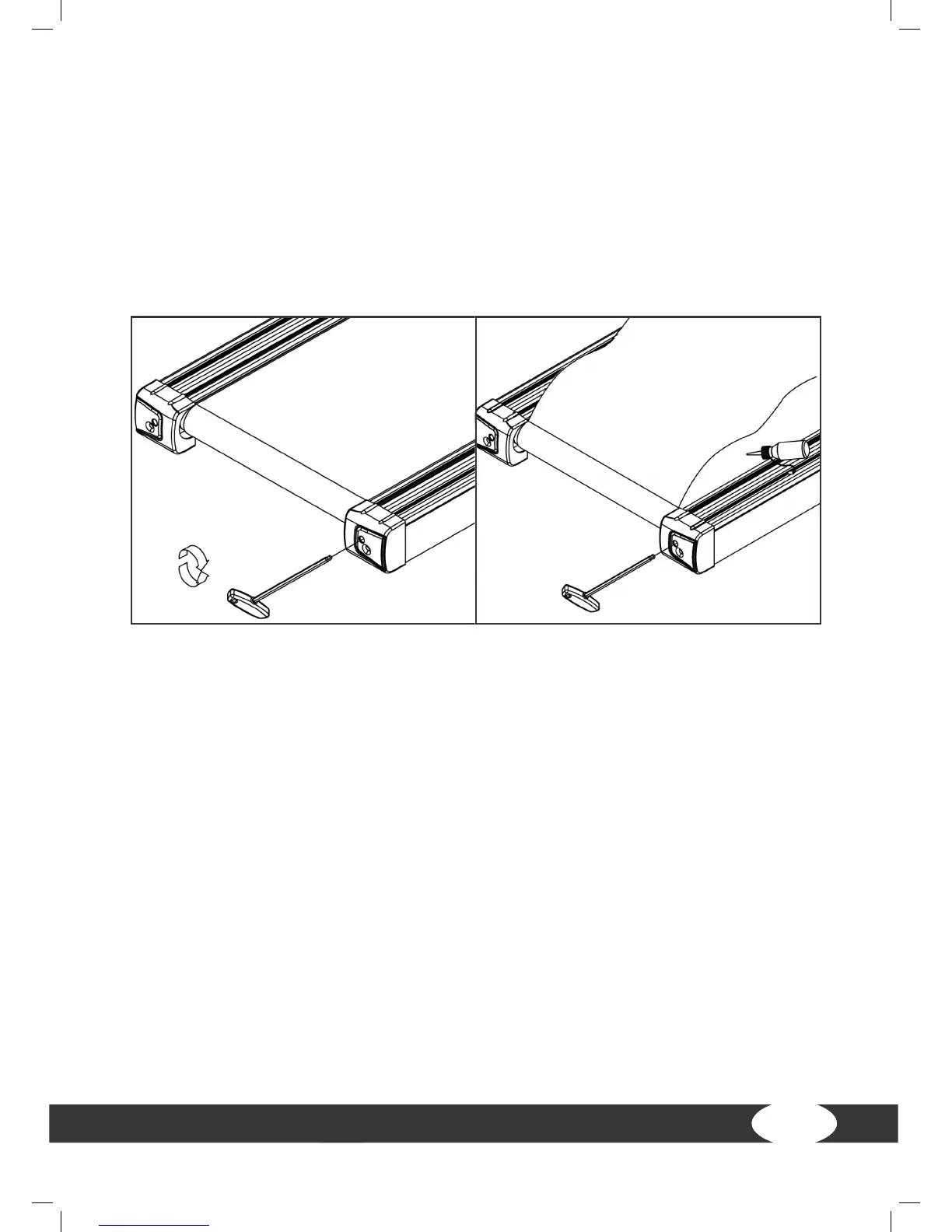
+ If the running belt is oset to the right, turn the right setting screw on the rear end
of the equipment at most 1/4 rotation clockwise and the left setting screw at most
1/4 rotation counterclockwise (g. D).
+ Then watch how the belt runs for approximately 30 seconds, because the change
will not be visible immediately.
+ Repeat the process until the running belt runs straight again. If the running belt
cannot be adjusted, please contact your contract partner.
Tensioning the belt
+ If the running belt slips over the rollers during operation (if this is the case, a
noticeable jerking will be noticed while running), the running belt must be
tightened again. In most cases, the cause for the slipping is a straining of the belt
through usage. This is completely normal.
+ It can be tightened through the same setting screws that were used during
alignment.
+ While tensioning the belt, let the equipment run with a speed of 5km/h.
+ Turn the left and right setting screws directly after each other a max. of 1/4 rotation
clockwise.
+ Then check if the running belt is still slipping. If this is still the case, the described
process needs to be repeated.


 To Next Page