MAVLink APM
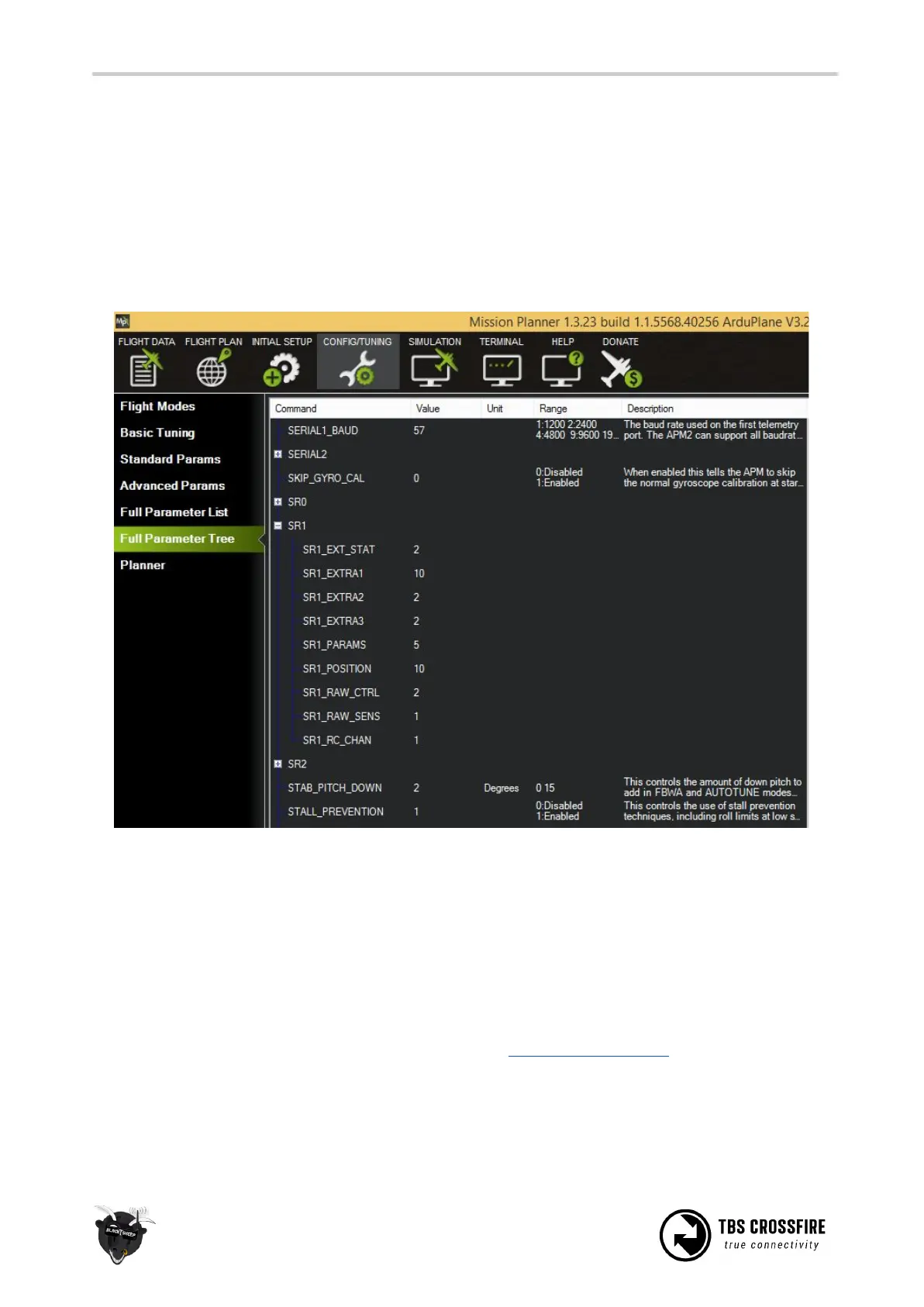
For APM (ArduPilot) the telemetry port also need to be configured on the FC side. Otherwise you only will
get telemetry if you connect by Tower app or similar first.
Please use mission planner for configuration. Settings can be found under “CONFIG/TUNING”-tab → “Full
Parameter Tree” ‘→ “SR1-SR2”. SR1 stands for telemetry port 1 and SR2 for telemetry port 2. Configure the
telemetry port you are using according to the sample below.
Disable telemetry
Telemetry can be disabled under RX Settings. If the telemetry is turned off the transmitter will not get any
feedback. This will affect the dynamic power and the status information on the transmitter side. Dynamic
power will be automatically switched off and remain on the max. power setting. Links statistics will not be
updated anymore and the RF mode will be set to 50Hz.
Note: None of this will affect the the link. It just changes the link from a bidirectional one to a
unidirectional one. Refer this paper for further information: FPV Racing Whitepaper
CRSF
Our CRSF protocol provides bidirectional end-to-end communication, fault detection and very-low latency.



 To Next Page