EasyManua.ls Logo

TDK-Lambda G10-500 - 3.3 Alarms and Protective Functions

TDK-Lambda G10-500
56 pages
Print Icon
To Next Page IconTo Next Page
To Previous Page IconTo Previous Page
Loading...
35
3.6.2
AC Input Wire Connection
1. Strip the outside insulation of the AC cable approx. 10cm. Trim the wires so that the ground wire
is 10mm longer than the other wires. Strip 10mm at the end of each of the wires.
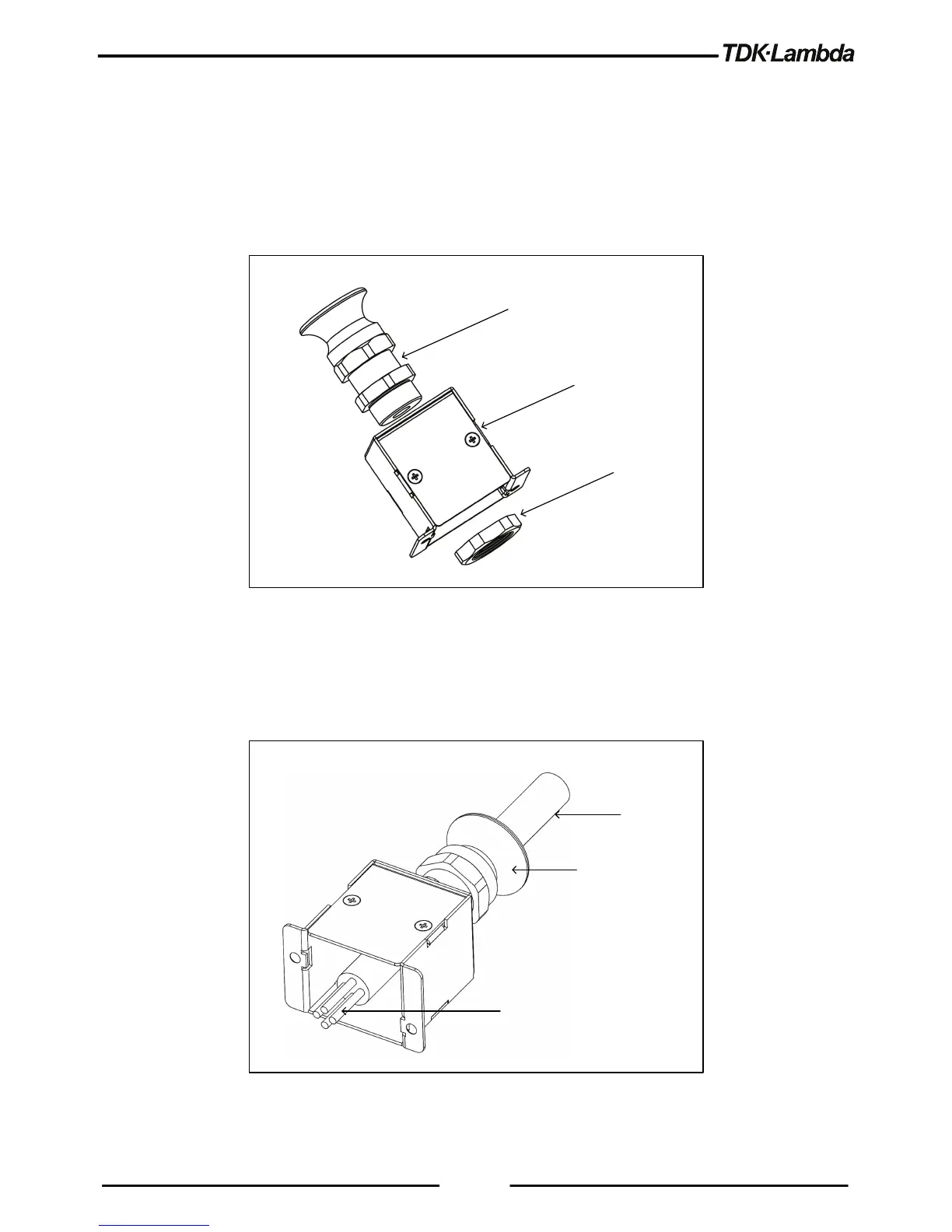
2. Insert the Cable gland into the Strain relief bracket Assembly as shown in Figure 3-2.
3. Tighten the plastic nut (supplied in the accessories box), from the inside part of the bracket by
using manual force only.
Cable gland
Strain relief
brack et
Nut
Figure 3-2: Insertion of the Plastic Nut into Strain Relief Bracket
4. Unscrew the conical cable entry part, until it will not apply any stress to the AC cable.
5. Insert the AC cable through the conic cable gland entry and the strain relief bracket as shown in
Figure 3-3.
AC Cable
Conical cable
gland entry
AC wires to
connect
Figure 3-3: Stripped Wires Inserted Through
6. Insert the AC wires into the AC input connector (as shown in Figure 3-4).

Table of Contents

Other manuals for TDK-Lambda G10-500

Related product manuals