11/49
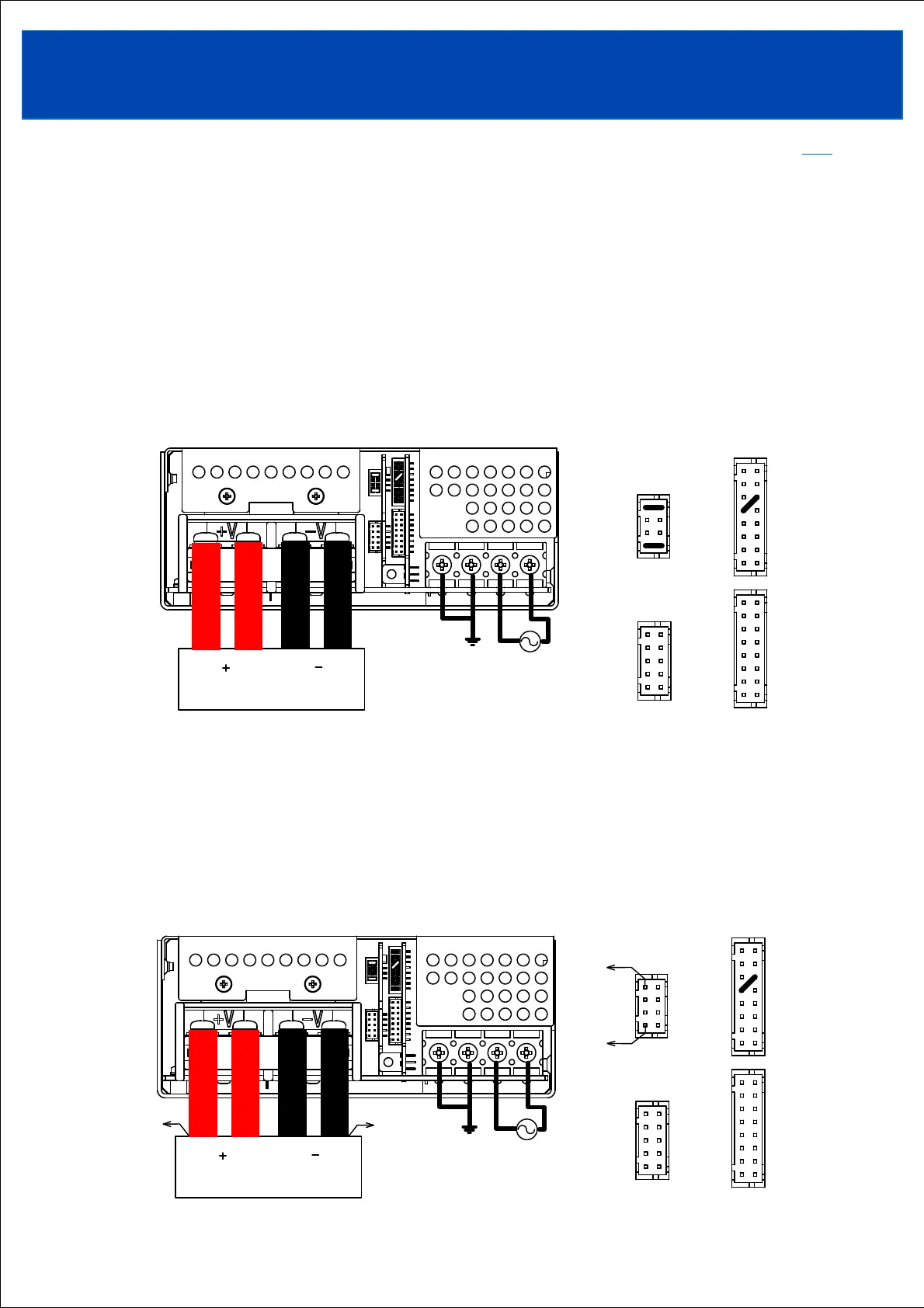
Pay attention to the input wiring. If it is connected to wrong terminal, the power supply will be damaged.
• Input must be off when making connections.
• Connect terminal to earth (frame ground of the equipment etc.) by thick wire for safety and improvement
of Noise sensitivity.
3-1-2. Remote sensing connection
Connect the sensing wire from the +S terminal (pin No. 7) of CN61 to the + side of the load terminal,
and from the -S terminal (pin No. 1) of CN61 to the - side of the load terminal.
Use twisted or shielded sensing wires.
Be careful not to remove the load wire screws. Load current may flow through the sensing wires, causing power
supply failure.
3-1. Basic connection(Common connection when using analog function/communication function)
3-1-1. At time of shipment
TOPTOP
3. Connecting method
Short pieces ① and ② are connected at the time of shipment from the factory.
① When not using the remote sensing function (local sensing), short-connect the -S terminal (Pin No.1)
and -L terminal (Pin No.2), and short-connect the +S terminal (Pin No.7) and +L terminal (Pin No.8)
of CN61.
② When not using the remote ON/OFF control function, short-connect the -R terminal (Pin No.9) and
AG terminal (Pin No.12) of CN41 or CN42.












 To Next Page