EasyManua.ls Logo

Teac A-5500 - Page 10

Teac A-5500
109 pages
Print Icon
To Next Page IconTo Next Page
To Previous Page IconTo Previous Page
Loading...
{ees
CAPSTAN
MOTOR
ASSEMBLY
REMOVAL
a)
Head
wiring
cables
from
Amplifier
(1
cable,
2
pin-jack
cords)
b)
12P
connector
from
CAPSTAN
MOTOR
ASSY.
d)
Sub
Control
PC
Board.
(1
X-head
screw)
d)
Voltage
Stabilizer
unit
(1
X-head
screw)
2.
Remove
the
Sub
Control
PC
Board
stand-off
post.
3,
Remove
the
Left
hand
screw
on
the
capacitor
PC
Board,
let
that
corner
slip
down.
>
4.
Remove
the
Head
Housing
(2
Allen-head
screws)
and
the
Pinch
Roller.
5.
Remove
the
Head
Assembly
(6
screws),
leaving
wires
fastened.
6.
Remove
the
"0''
ring
grommet
from
the
capstan
motor
shaft.
U
7.
Hold
the
CAPSTAN
MOTOR
ASSY
firmly
while
TA
you
remove
the
3
remaining
screws.
Then
carefully
slide
out
the
Assy
while
observ-
ing
the
capstan
shaft.
CAUTION:
Do
not
bend
the
leaf
switches
by
the
capstan
shaft.
1.
Disconnect
the
following:
9
=)
SUB
CONTROL
5
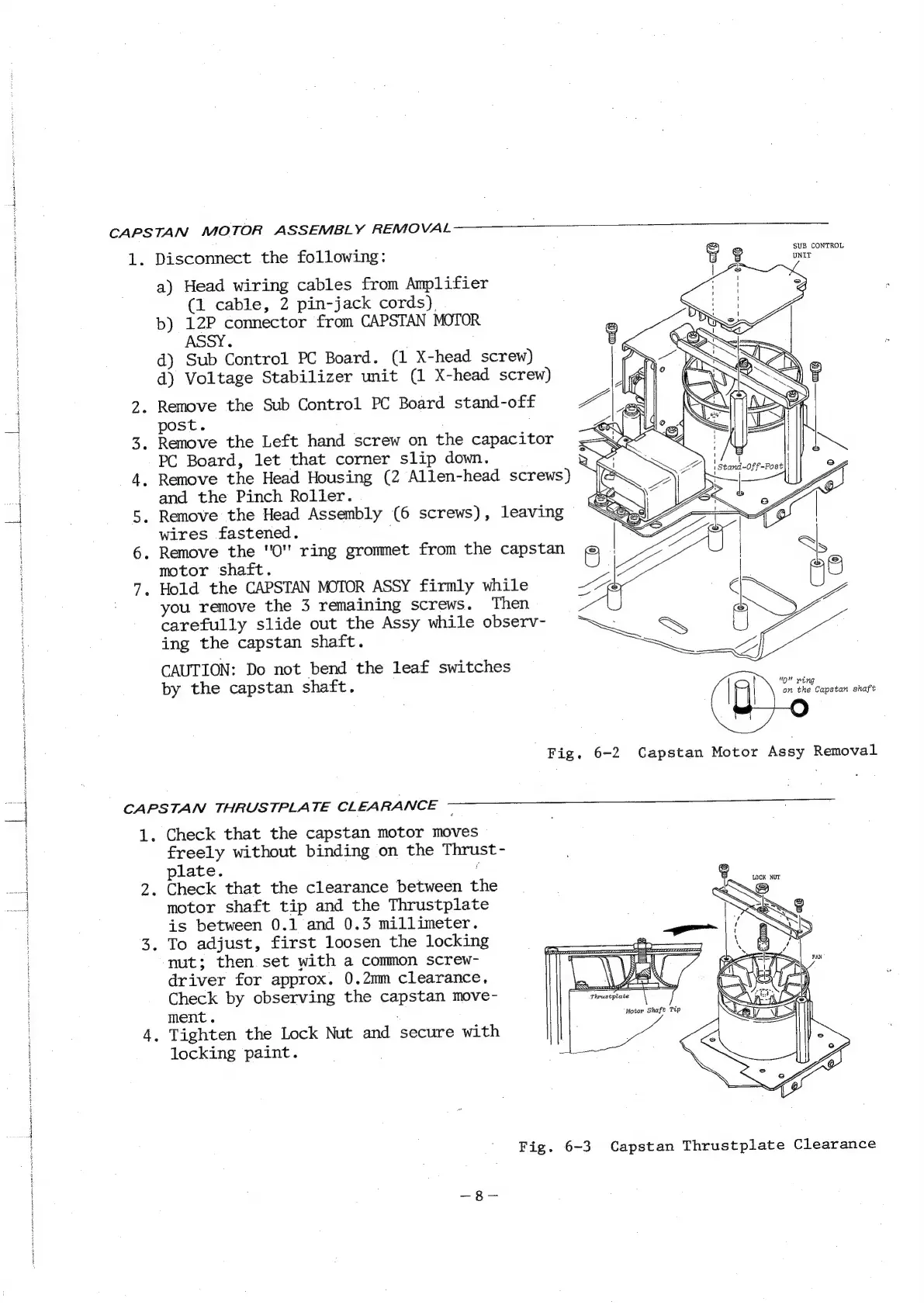
Fig.
6-2
Capstan
Motor
Assy
Removal
CAPSTAN
THRUSTPLATE
CLEARANCE
1.
Check
that
the
capstan
motor
moves
freely
without
binding
on
the
Thrust-
plate.
@
2.
Check
that
the
clearance
between
the
motor
shaft
tip
and
the
Thrustplate
is
between
0.1
and
0.3
millimeter.
3.
To
adjust,
first
loosen
the
locking
nut;
then.
set
with
a
common
screw-
driver
for
approx.
0.2mm
clearance,
Check
by
observing
the
capstan
move-
ment.
4,
Tighten
the
Lock
Nut
and
secure
with
locking
paint.
Fig.
6-3
Capstan
Thrustplate
Clearance

Related product manuals