EasyManua.ls Logo

Teac A-5500 - Page 11

Teac A-5500
109 pages
Print Icon
To Next Page IconTo Next Page
To Previous Page IconTo Previous Page
Loading...
REEL
DRIVE
(L/RJ
ASSEMBLY
REMOVAL
1.
Remove
Rear
Panel
by
6
screws.
2-a.Disconnect
the
Wire
Socket
(6P)
on
the
PC
Board.
For
Brake
Solenoid
Replacement
NOTE:
"O''
ring
spacer
must
be
between
the
brake
arms
and
the
solenoid
coil.
Refer
to
Mark
(A).
2-b.EX
Model
RIGHT
Reel
table
only,
remove
the
VOLTAGE
CONVERSION
panel
(2
screws).
3.
Remove
the
3
mounting
screws
holding
the
Reel
Drive
Assy.
4.
Gently
slide
Reel
Drive
Assy
OUT
from
the
Rear.
NOTE
RIGHT
Reel
Drive
Assy
includes
2
transistors,
and the
voltage
conversion
panel
(EX
only).
e
Reel
Drive
Assemblies
are
mirror
a
QO"
images
of
each
other,
these
assemblies
are
not
interchange-
able.
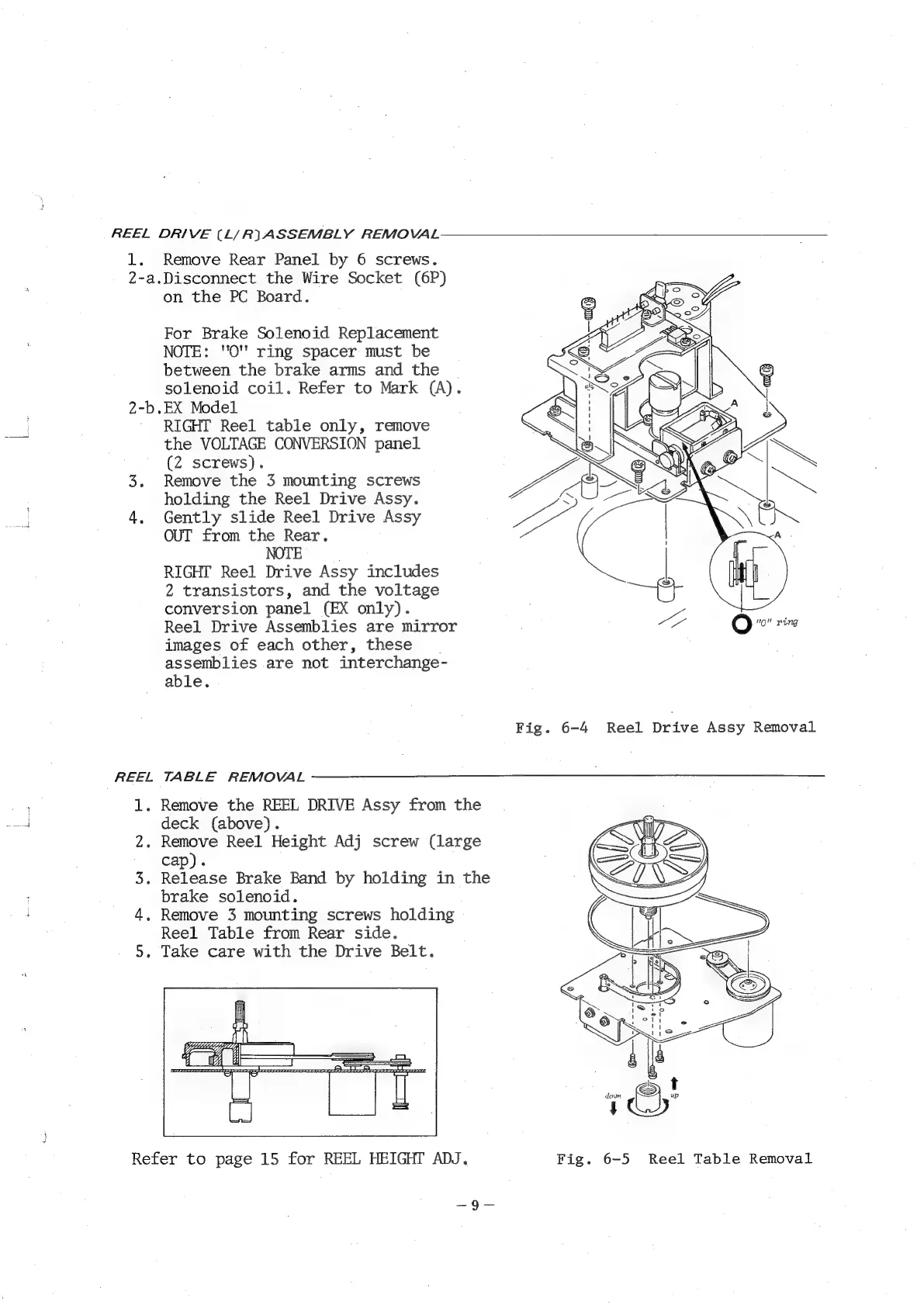
Fig.
6-4
Reel
Drive
Assy
Removal
REEL
TABLE
REMOVAL
1.
Remove
the
REEL
DRIVE
Assy
from
the
deck
(above).
2.
Remove
Reel
Height
Adj
screw
(large
cap).
3.
Release
Brake
Band
by
holding
in
the
brake
solenoid.
4,
Remove
3
mounting
screws
holding
Reel
Table
from
Rear
side.
5.
Take
care
with
the
Drive
Belt.
Refer
to
page
15
for
REEL
HEIGHT
ADJ.
Fig.
6-5
Reel
Table
Removal
—9—

Related product manuals