EasyManua.ls Logo

Teac A-5500 - Page 24

Teac A-5500
109 pages
Print Icon
To Next Page IconTo Next Page
To Previous Page IconTo Previous Page
Loading...
11.MEASUREMENT
AND
ADJUSTMENT
-ELECTRICAL-
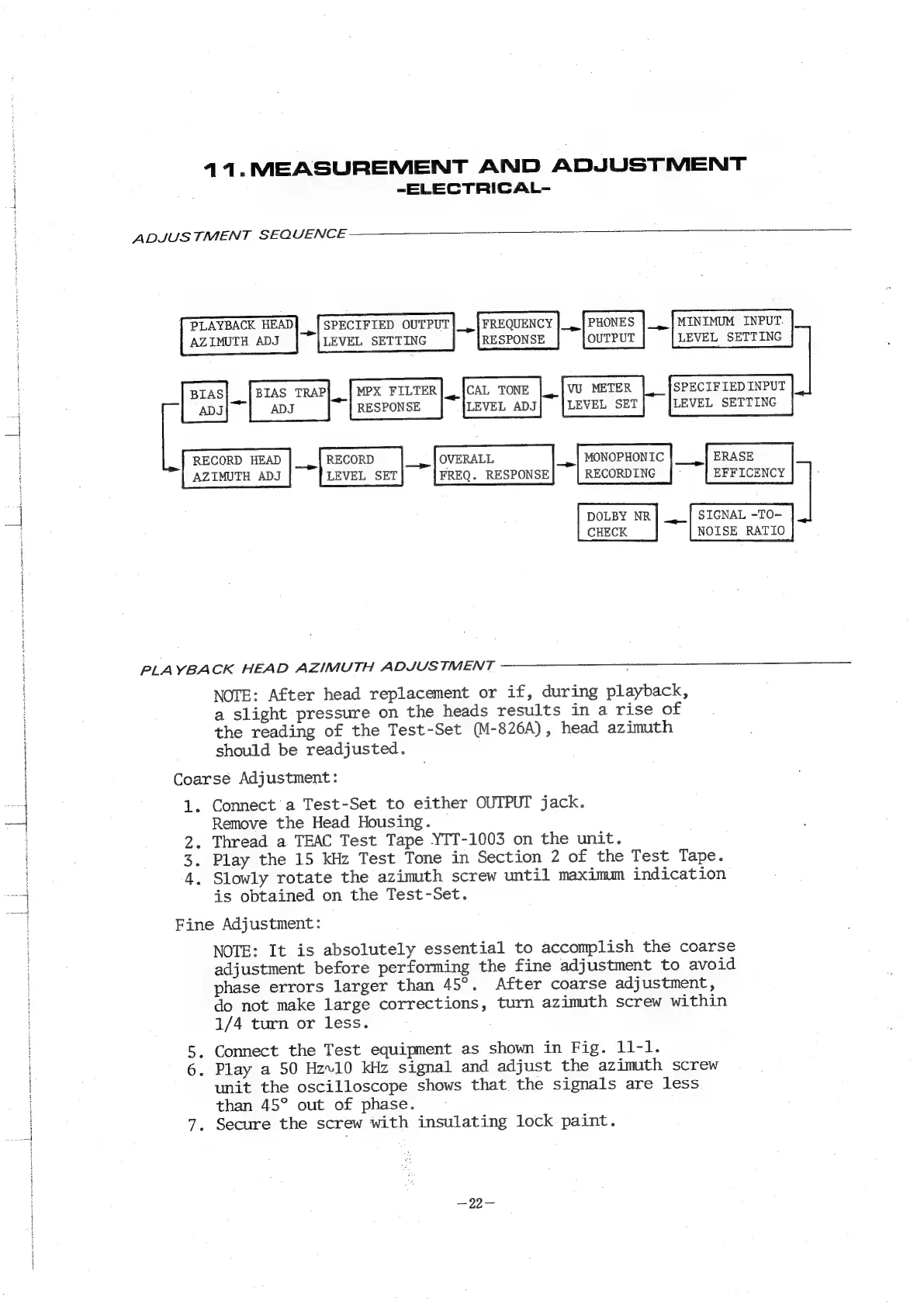
ADJUSTMENT
SEQUENCE
PLAYBACK
HEAD
at
SPECIFIED
OUTPUT]_,
|
FREQUENCY
|_.
PHONES
|_.|MINIMUM
INPUT.
AZIMUTH
ADJ
LEVEL
SETTING
RESPONSE
OUTPUT
LEVEL
SETTING
BIAS
BIAS
TRAP]
MPX
FILTER]
CAL
TONE
|
VU
METER
SPECIFIED
INPUT
i
ADJ
an
ADJ
RESPONSE
LEVEL
ADJ
LEVEL
SET
LEVEL
SETTING
RECORD
HEAD
|__|
RECORD
OVERALL
_,|
MONOPHONTC
ERASE
AZIMUTH
ADJ
LEVEL
SET
FREQ.
RESPONSE
RECORDING
|
EFF
ICENCY
]
DOLBY
NR|
|
SIGNAL
-TO-
CHECK NOISE
RATIO
PLAYBACK
HEAD
AZIMUTH
ADJUSTMENT
NOTE:
After
head
replacement
or
if,
during
playback,
a
slight
pressure
on
the
heads
results
in
a
rise
of
the
reading
of
the
Test-Set
(M-826A),
head
azimuth
should
be
readjusted.
Coarse
Adjustment:
1.
Connect
a
Test-Set
to
either
OUTPUT
jack.
Remove
the
Head
Housing.
2.
Thread
a
TEAC
Test
Tape
YIT-1003
on
the
unit.
3.
Play
the
15
kHz
Test
Tone
in
Section
2
of
the
Test
Tape.
4.
Slowly
rotate
the
azimuth
screw
until
maximum
indication
is
obtained
on
the
Test-Set.
Fine
Adjustment:
NOTE:
It
is
absolutely
essential
to
accomplish
the
coarse
adjustment
before
performing
the
fine
adjustment
to
avoid
phase
errors
larger
than
45°.
After
coarse
adjustment,
do
not
make
large
corrections,
turn
azimuth
screw
within
1/4
turn
or
less.
5,
Connect
the
Test
equipment
as
shown
in
Fig.
11-1.
6.
Play
a
50
Hzv10
kHz
signal
and
adjust
the
azimuth
screw
unit
the
oscilloscope
shows
that
the
signals
are
less
than
45°
out
of
phase.
7.
Secure
the
screw
with
insulating
lock
paint.

Related product manuals