EasyManua.ls Logo

Teac A-5500 - Page 41

Teac A-5500
109 pages
Print Icon
To Next Page IconTo Next Page
To Previous Page IconTo Previous Page
Loading...
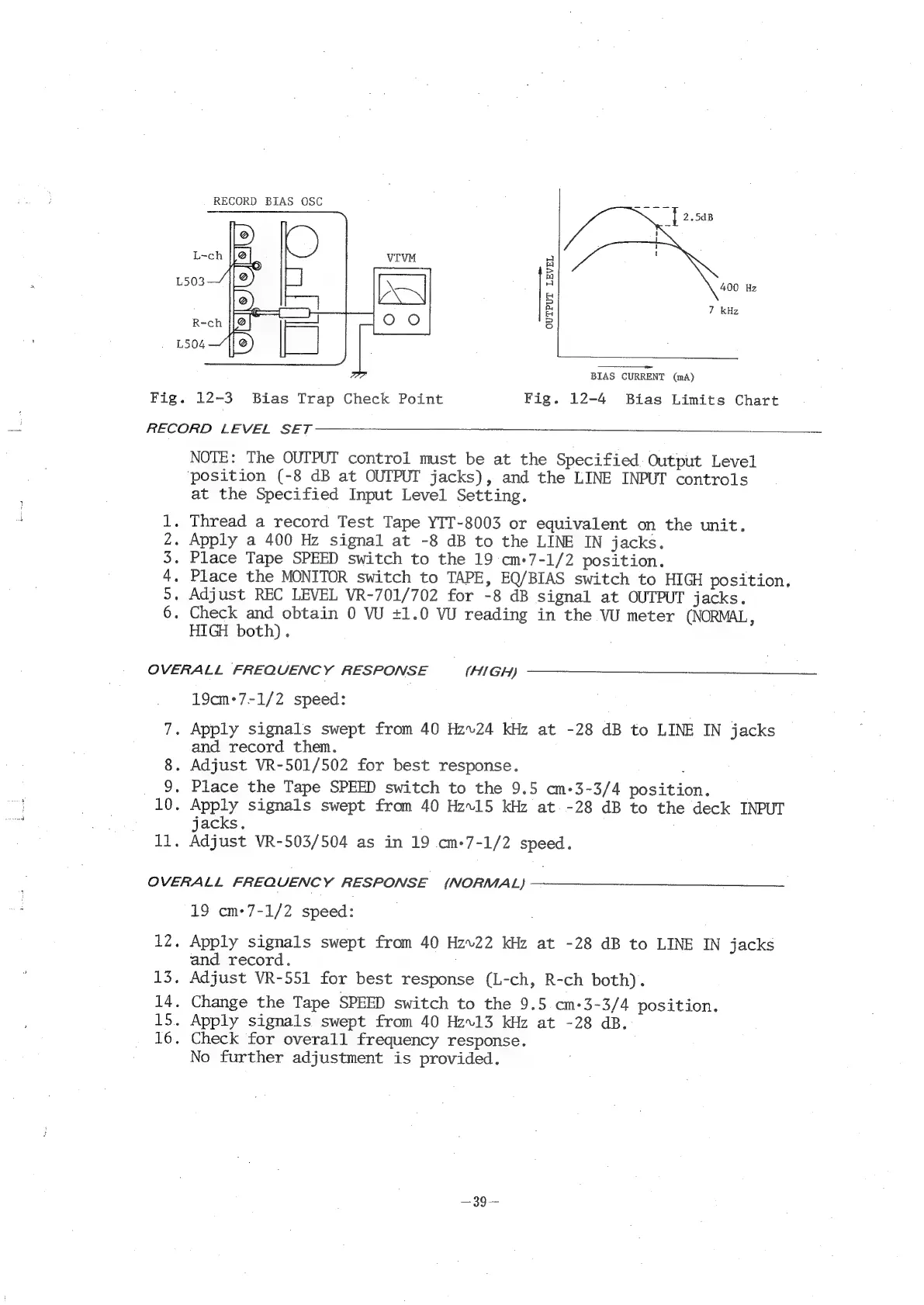
RECORD
BIAS
OSC
400
Hz
7
kHz
OUTPUT
LEVEL
BIAS
CURRENT
(mA)
Fig.
12-3
Bias
Trap
Check
Point
Fig.
12-4
Bias
Limits
Chart
RECORD
LEVEL
SET
NOTE:
The
OUTPUT
control
must
be
at
the
Specified
Output
Level
‘position
(-8
dB
at
OUTPUT
jacks),
and
the
LINE
INPUT
controls
at
the
Specified
Input
Level
Setting.
.
Thread
a
record
Test
Tape
YIT-8003
or
equivalent
on
the
unit.
-
Apply
a
400
Hz
signal
at
-8
dB
to
the
LINE
IN
jacks.
-
Place
Tape
SPEED
switch
to
the
19
cm+7-1/2
position.
.
Place
the
MONITOR
switch
to
TAPE,
EQ/BIAS
switch
to
HIGH
position.
.
Adjust
REC
LEVEL
VR-701/702
for
-8
dB
signal
at
OUTPUT
jacks.
.
Check
and
obtain
0
VU
+1.0
VU
reading
in
the
VU
meter
(NORMAL,
HIGH
both).
DNunPWNHF
OVERALL
FREQUENCY
RESPONSE
(HIGH)
19cm-7-1/2
speed:
7.
Apply
signals
swept
from
40
Hz~24
kHz
at
-28
dB
to
LINE
IN
jacks
and
record
them.
8.
Adjust
VR-501/502
for
best
response.
.
9.
Place
the
Tape
SPEED
switch
to
the
9.5
cm-3-3/4
position.
10.
Apply
signals
swept
from
40
Hzv15
kHz
at
-28
dB
to
the
deck
INPUT
jacks.
as
Adjust
VR-503/504
as
in
19
cm-7-1/2
speed.
OVERALL
FREQUENCY
RESPONSE
(NORMAL)
19
cm+7-1/2
speed:
12.
Apply
signals
swept
from
40
Hzv22
kHz
at
-28
dB
to
LINE
IN
jacks
and
record.
13.
Adjust
VR-551
for
best
response
(L-ch,
R-ch
both).
14.
Change
the
Tape
SPEED
switch
to
the
9.5
cm-3-3/4
position.
15.
Apply
signals
swept
from
40
Hz.13
kHz
at
-28
dB.
16.
Check
for
overall
frequency
response.
No
further
adjustment
is
provided.

Related product manuals