EasyManua.ls Logo

Teac AG-360 - OPERATIONS; Basic Operations Guide; Audio Adjustments Guide

Teac AG-360
22 pages
Print Icon
To Next Page IconTo Next Page
To Previous Page IconTo Previous Page
Loading...
OPERATIONS
Basic
Operations
Audio
Adjustments
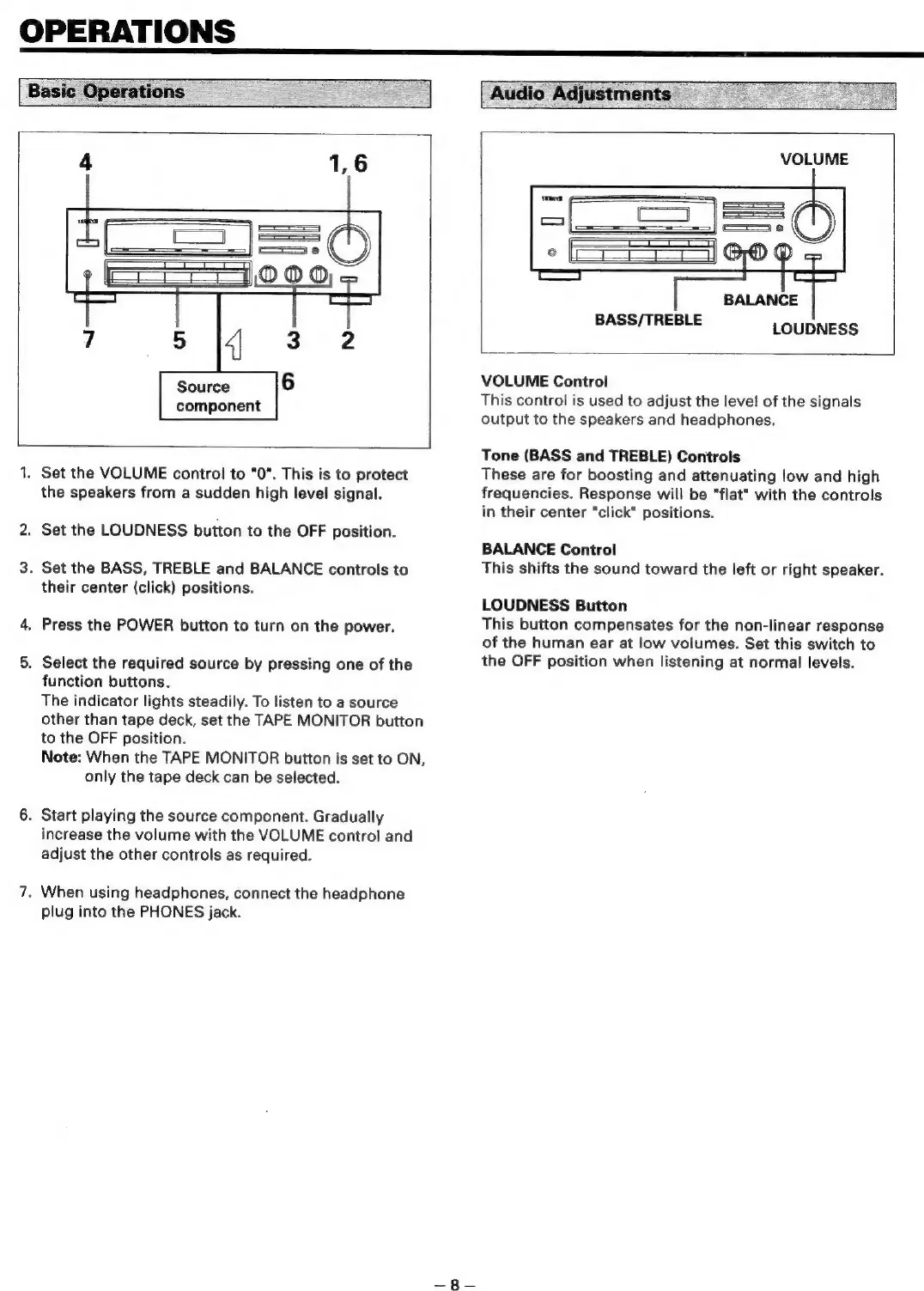
4
1,6
=
OOO
7
5
4
3
2
Source
6
component
1.
Set the
VOLUME
control
to
"0".
This
is
to
protect
the
speakers
from
a
sudden
high
level
signal.
2.
Set
the
LOUDNESS
button
to
the
OFF
position.
3.
Set
the
BASS,
TREBLE
and
BALANCE
controls
to
their
center
(click)
positions.
4,
Press
the
POWER
button
to
turn
on
the
power.
5.
Select
the
required
source
by
pressing
one
of
the
function
buttons.
The
indicator
lights
steadily.
To
listen
to
a
source
other
than
tape
deck,
set
the
TAPE
MONITOR
button
to
the
OFF
position.
Note:
When
the
TAPE
MONITOR
button
is
set
to
ON,
only
the
tape
deck
can
be
selected.
6.
Start
playing
the
source
component.
Gradually
increase
the
volume
with
the
VOLUME
control
and
adjust
the
other
controls
as
required.
7.
When
using
headphones,
connect
the
headphone
plug
into
the
PHONES
jack.
VOLUME
BALANCE
BASS/TREBLE
LOUDNESS
VOLUME
Control
This
control
is
used
to
adjust
the
level
of
the
signals
output
to
the
speakers
and
headphones.
Tone
(BASS
and
TREBLE)
Controls
These
are
for
boosting
and
attenuating
low
and
high
frequencies.
Response
will
be
"flat"
with
the
controls
in
their
center
"click"
positions.
BALANCE
Control
This
shifts
the
sound
toward
the
left
or
right
speaker.
LOUDNESS
Button
This
button
compensates
for
the
non-linear
response
of
the
human
ear
at
low
volumes.
Set
this
switch
to
the
OFF
position
when
listening
at
normal
levels.

Related product manuals