11
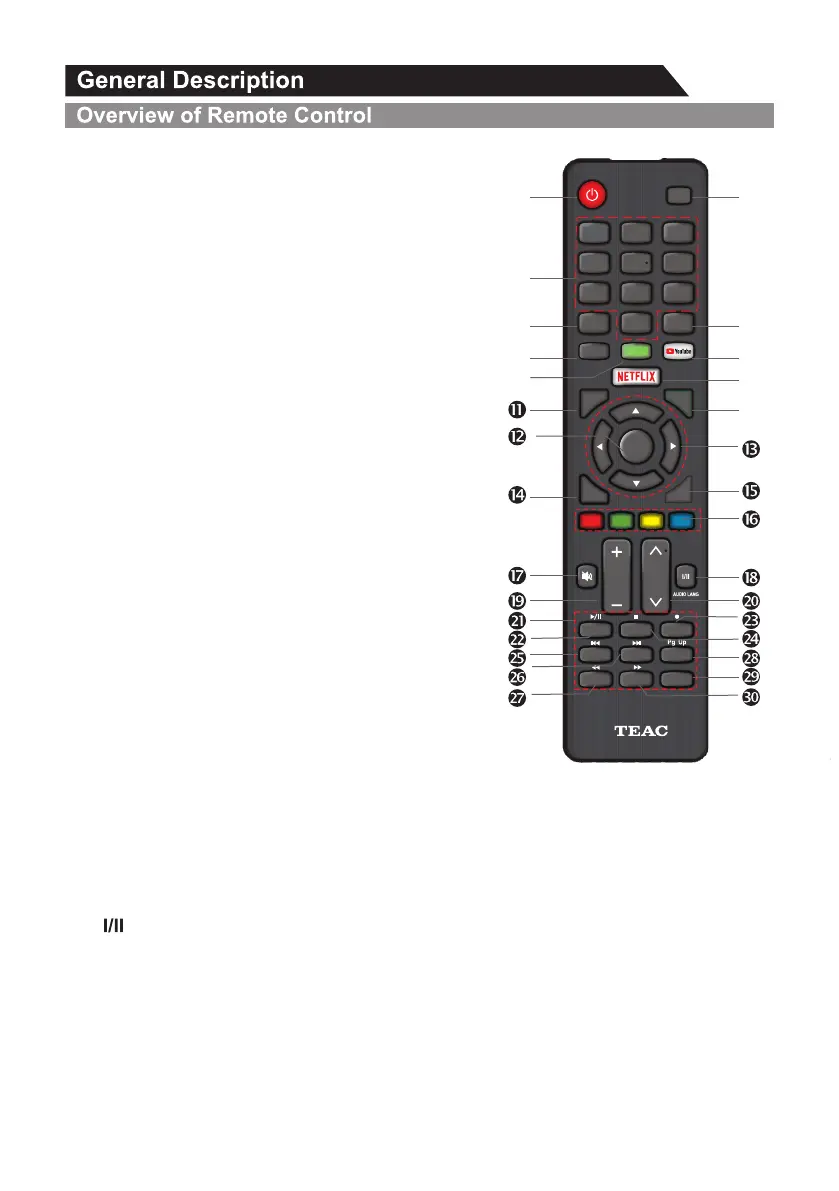
1. POWER: Turn the TV on and off.
2. SOURCE: This button is used to switch among different
sources, Select a source and press ENTER button to
confirm.
3. Digital Buttons(0-9): Directly select channel with digital
buttons.
4. RECALL: Switch to the previous program.
5. YouTube: If network connects, press this key to view
YouTube directly.
6. INFO: Display the program information.
7. SUBTITLE: In DTV source, the button is used for subtitle
language.
In USB source, the button is used to change subtitle.
8. HOME: Press it to go to App home page.
9. NETFLIX: If network connects, press this key to view
NETFLIX directly.
10. MENU: Display the main menu or exit the current menu.
11. Q.MENU: Press this key to go to quick menu.
12. ENTER/LIST: Press to show channel list and favorite list
on screen.
13. Arrow buttons pqtu: Use to select on-screen menu
items and change menu values.
14. BACK/GUIDE: Display menu GUIDE in DTV mode. Return function in app.
15. EXIT: Exit the menu.
16. COLOR BUTTONS: It's used in Apps.
17. MUTE: Press this button to cut off the sound of the TV set temporarily, press again to resume.
18. button/AUDIO LANG :
In ATV source, the button is used to set NICAM sound system.
In DTV source, the button is used to set the audio language.
19. VOL+/-: Press these buttons to adjust the volume.
20. CHp/q: Press these buttons to change channel upward or downward.
HOME
0
7
8 9
4
5
6
1 2
3
Q.MENU
MENU
EXIT
VOL
RECALL
BACK/
GUIDE
CH
TEXT
SUBT ITLE
INFO
INDEX HOLD MIX
SIZE
TIME
REVEAL
CANCEL
SUBCODE
Pg Dn
ENTER
/LIST
INPUT
Ž
’
“
”
•
Œ
‘


 To Next Page