12
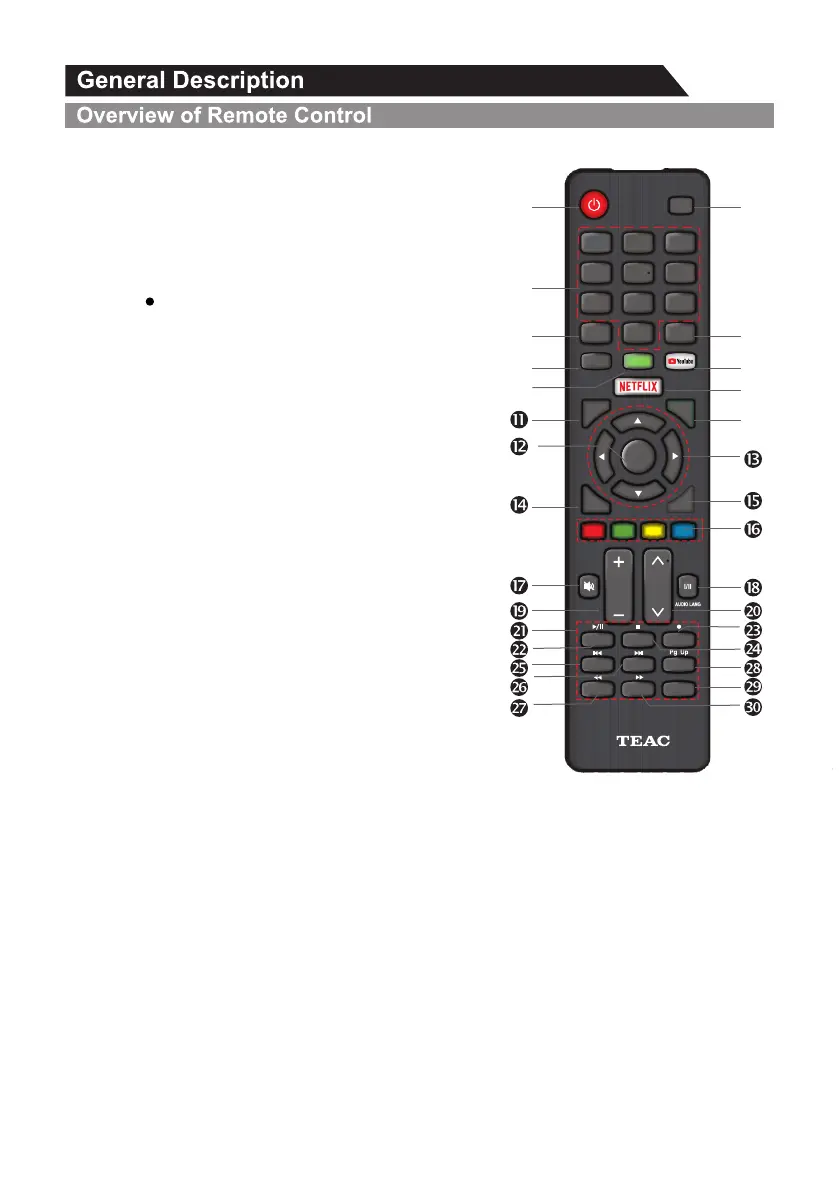
21. DIGITAL MEDIA PLAYER CONTROL BUTTON:
Include play/pause, stop, previous, next, backward,
forward is used in USB mode .
Please refer to relevant instructions in the section of
multimedia player.
22.INDEX: Press INDEX button, then index page displays.
23.MIX ( ): Teletext buttons for mix function, please refer
to TTX description page. It is also used for recording
function when TV is on DTV mode, please refer to PVR
page.
24. HOLD:Press HOLD button to toggle Hold function on
or off. When Hold is switched on, the page acquisition
is stopped. When Hold is switched off, the page
acquisition is started.
25. TEXT: Press TEXT button to enter or exit teletext mode.
26. SIZE: Press SIZE button one time to display the upper
half of the screen in double height, press the SIZE button
two times to display the lower half of the screen in double
height, press three times to display the full screen in
normal size.
27. Pressing this button will reveal any hidden REVEAL:
data (answers to quizzes for example). Press the
REVEAL button again to return to normal screen.
28. TIME: This button is used to show the time of the teletext.
29. SUBCODE: Subcode mode gives the possibility to select
certain subcode pages of a Teletext page. Entry of digits
within the range 0...9 for current subcode entry. If the
digit completes the entry, a page request is started.
Press CH p and CH q buttons to change the subcode pages.
CANCEL: 30. The CANCEL button will exit from any Teletext on the display. Press CANCEL button
again to exit Teletext and return to live TV broadcast .
HOME
0
7 8 9
4
5
6
1 2
3
Q.MENU
MENU
EXIT
VOL
RECALL
BACK/
GUIDE
CH
TEXT
SUBT ITLE
INFO
INDEX HOLD MIX
SIZE
TIME
REVEAL
CANCEL
SUBCODE
Pg Dn
ENTER
/LIST
INPUT
Ž
’
“
”
•
Œ
‘


 To Next Page