5 - Installation
Incubator Installation
MIO2 Operating Manual, 394934, en, V3.0 5 - 7
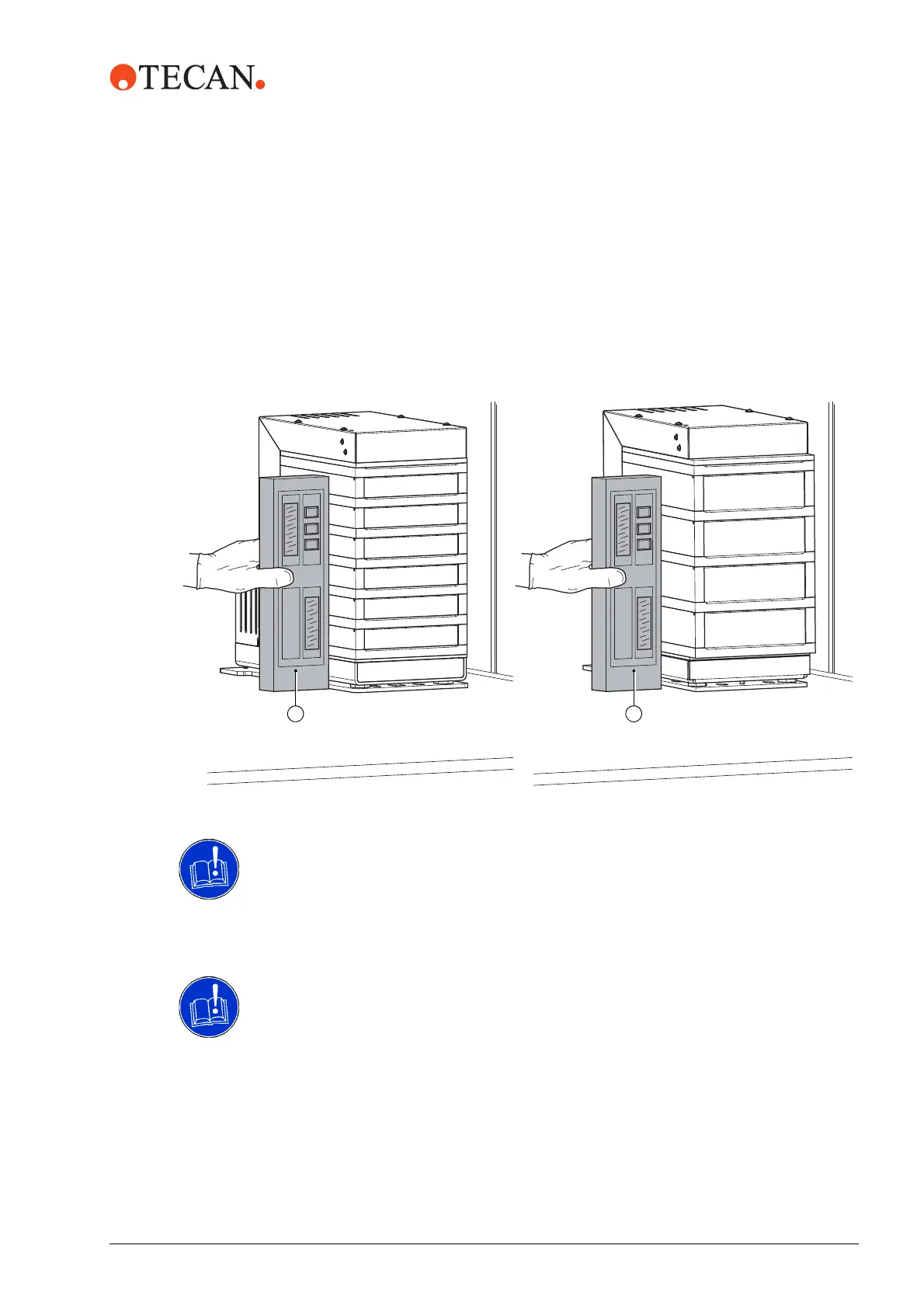
Verify Leveling 3 Using the special tool (D), adjust the left feet until the incubator is
perpendicular to the worktable Fig. 5-4,
5-6. Use a precision level (F) to
check Fig. 5-5,
5-7.
4 Repeat the procedure substeps for the Y-direction (use a precision level and
adjust the front feet).
Alternatively, use a square instead of a precision level to check the position of
the incubator. The maximum deviation from the perpendicular line must not
exceed 0.3 mm.
ATTENTION
Risk of foreign object damage. Foreign objects brought in between the support
plate and instrument worktable may lead to damage to equipment.
Make sure the mounting surfaces are clean.
ATTENTION
Malfunction of the system occurs if two monitored incubator options run on the
same CAN bus address.
If more than one MIO option connect to the instrument, it is required to select
individual CAN bus addresses for each MIO device.
5 Connect the CAN cable of the instrument platform to the MIO2.
6 Put the incubator in the designated position on the worktable.
Fig. 5-5 Levelling the heated incubator
6 Positions 4 Positions
F F


 To Next Page