22
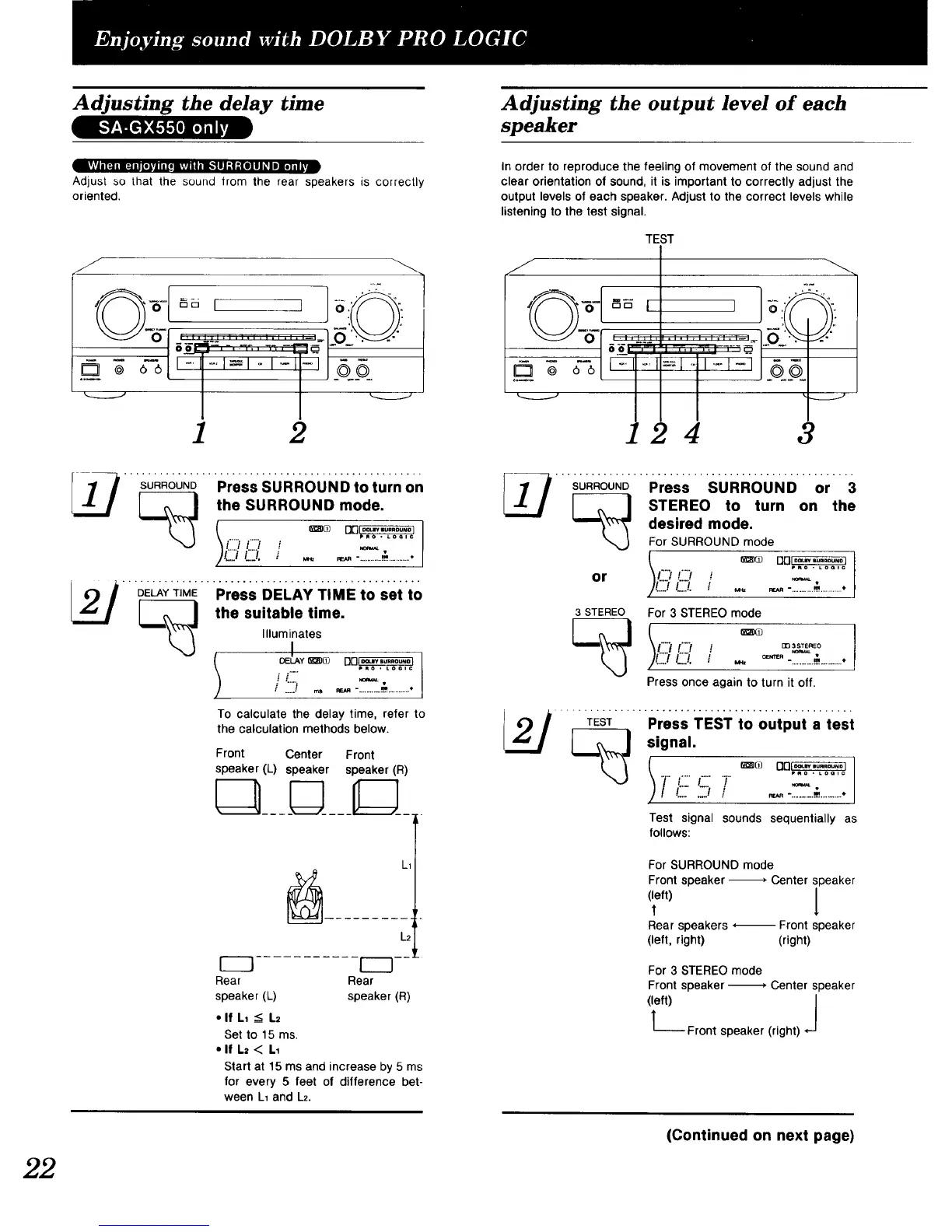
Adjusting the delay time
lVlVh [q imqll ,_,l,_l_ -,v,vnI i'lk1.ll "! :[O]U _I iii]n _
Adjust so that the sound trom the rear speakers is correctly
oriented.
J
1 2
SURROUNDPress SURROUND to turn on
J the SURROUND mode.
_J \ L...i /...../ ,_ .
)C_¢:_. ._ .__-............._.............
__./ DELAYT,ME""Press DELAYTiMEtO sei t0
,,o.,=,o,,oo.
OELAY _)O [][]_
p_o • Loolc
ii
, .....I ._ _._ -............,].............
To calculate the delay time, refer to
the calculation methods below•
Front Center Front
speaker (L) speaker speaker (R)
Rear
speaker (L)
• If LI __ L2
L1
L2
1---_ --!
Rear
speaker (R)
Set to15ms.
• If L= < L1
Start at 15 ms and increase by 5 ms
for every 5 feet of difference bet-
ween L1 and L2.
Adjusting the output level of each
speaker
In order to reproduce the feeling of movement of the sound and
clear orientation of sound, it is important to correctly adjust the
output levels of each speaker. Adjust to the correct levels while
listening to the test signal•
TEST
J
_r m
i.... =_ ..i,-I-i .q_o
@ 66
4 3
SURROUNDPress SURROUND or 3
to turn on the
STEREO
"_'_" desired mode.
For SURROUND mode
C?or
J _v
3 STEREO
For 3 STEREO mode
I"'_ !"'? mp%_TEr,EO
C_Q. ... ='"-. ..........._.............
Press once again to turn it off.
_L__J_Pro" Ti_STi0oot,,i,t,si
_J signal.
_ ---__
-,., 1,!:_;/ ..-_.,............
Test signal sounds sequentially as
follows:
For SURROUND mode
Front speaker -_ Center speaker
(left)1' l
Rear speakers *_ Front speaker
(left, right) (right)
For 3 STEREO mode
Front speaker-m" Center speaker
(left) J
--Front speaker (right)
(Continued on next page)


 To Next Page
 Loading...