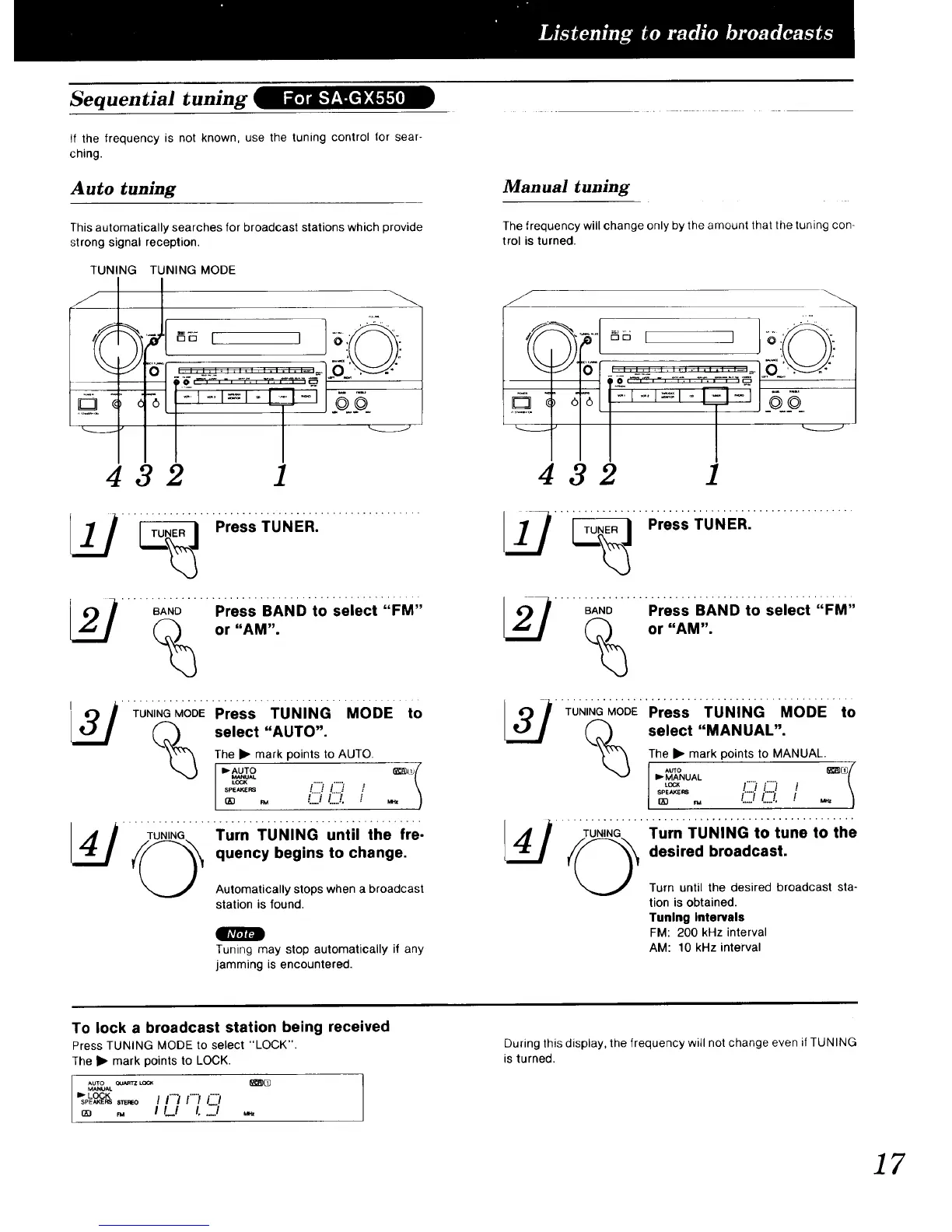
Sequential tuning
If the frequency is not known, use the tuning control for sear-
ching.
Auto tuning
This automatically searches for broadcast stations which provide
strong signal reception.
TUNING TUNING MODE
432 1
_._ "_' Press TUN ER: .................
_ BAND Press BAND to select "FM"or "AM".
TUNINGMODEPress TUNING MODE to
Q_ select "AUTO".
The • mark points to AUTO.
L_'"AUTO :LU t
_._.s !') 1'"" ,-'
m .., (::) L::J.
_ Turn TUNING until the fre-
quency begins to change.
Automatically stops when a broadcast
station is found.
41_11J
Tuning may stop automatically if any
jamming is encountered.
Manual tuning
The frequency will change only by the amount that the tuning con-
trol is turned.
Q
) 6
)
432 1
_ '_" 'Press TUNERI .................
..... BAND...... Press BANDto Select "FM'
or "AM".
'" TUNING"MOIRE''Press TuNiNG "MODE "to
Q_ select "MANUAL".
}_"'_ The • mark points to MANUAL.
v I_ MANUAL /
A_,,, (::j _:::) i \
/.....//...../. / ,,, )QD FM
..... -ILo";_G..... Turn ;ruNING t; tone tO ihe
:::'::t: t:r::e:_::tb;oadc ast st a-
tion is obtained.
Tuning Intervals
FM: 200 kHz interval
AM: 10 kHz interval
To lock a broadcast station being received
Press TUNING MODE to select "LOCK".
The • mark points to LOCK.
Auxo QUARTZ_ _%
MANUAL
lb. LOCK
SPE,KE,S,_.._O I I"'_ /"';' i"'/
,. t #_/ t...-.)
During this display, the frequency will not change even if TUNING
is turned.
17


 To Next Page
 Loading...