4.2.4 .1System
4.2.4.1.1 General
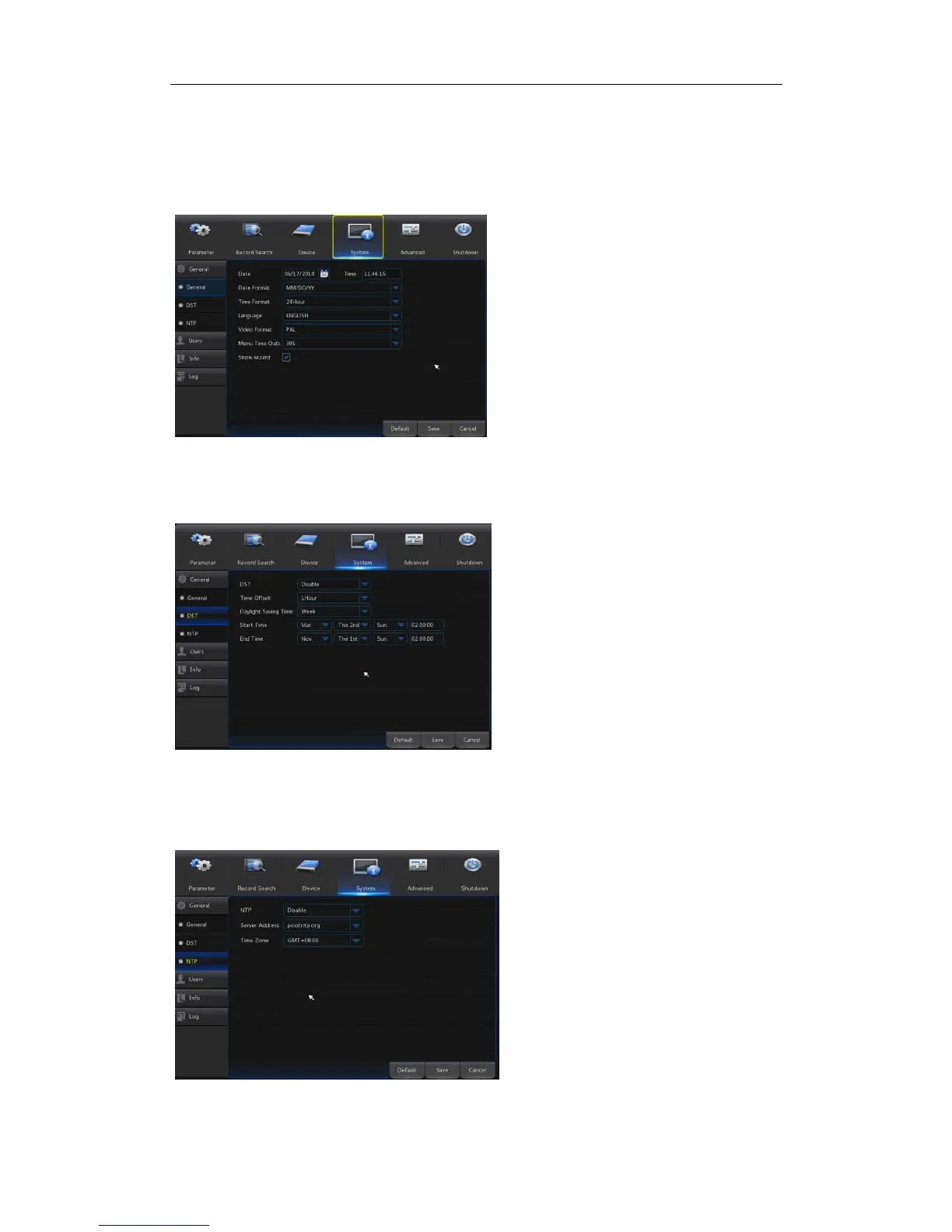
Go to“Main Menu”→“System”→“General” to enter into the interface shown as
Picture 4-31.
Picture 4-31
4.2.4.1.2DST
Go to“Main Menu”→“System”→“General”→“DST”to enter into the interface shown as
Picture 4-32.
Picture 4-32
4.2.4.1.3NTP
Go to“Main Menu”→“System”→“General”→“NTP”to enter into the interface shown
as Picture 4-33.
Picture 4-33
Enter into the interface shown
as Picture 4-32 to set DST, Time
Offset, Start Time and End Time.
NTP service: Enable/Disable NTP
function.
Server Address: Select NTP server
( time.windows.com, time.nist.gov,
pool.ntp.org).
Time Zone: Corresponding time
zones for various nations or regions.
Update Time: Enable NTP function
and save parameters and click
Update Time to calibrate the system
time.
Note: When NTP function is set to
“Enable”, system will calibrate the
system time at every 00:07:50 and
every start-up.
User maysetDate, Time, Date
Format, Time Format, Language,
Video Format, Menu Timeouts and
Show Wizard in this page.



 To Next Page