Challenger Series Installation and Quick Programming Manual 17
Description
. LED 1 flashes slowly to indicate panel operation, and flashes quickly during firmware
update or panel default.
. Transmit and receive LEDs to indicate activity on LAN 1.
Tx1 transmit LED flashes to indicate the Challenger panel is polling remote units (RASs
and DGPs) on LAN 1. The Tx1 LED should always be active.
Rx1 receive LED flashes to indicate remote units on LAN 1 are replying to polling.
. TERM link for LAN 1. See “RS-485 LAN” on page 22.
. Transmit and receive LEDs to indicate activity on LAN 2.
Tx2 transmit LED flashes to indicate the Challenger panel is polling remote units (RASs
and DGPs) on LAN 2. Tx2 flashes quickly for 1 second each minute when nothing is
polled on LAN 2.
Rx2 receive LED flashes to indicate remote units on LAN 2 are replying to polling.
. TERM link for LAN 2. See “RS-485 LAN” on page 22.
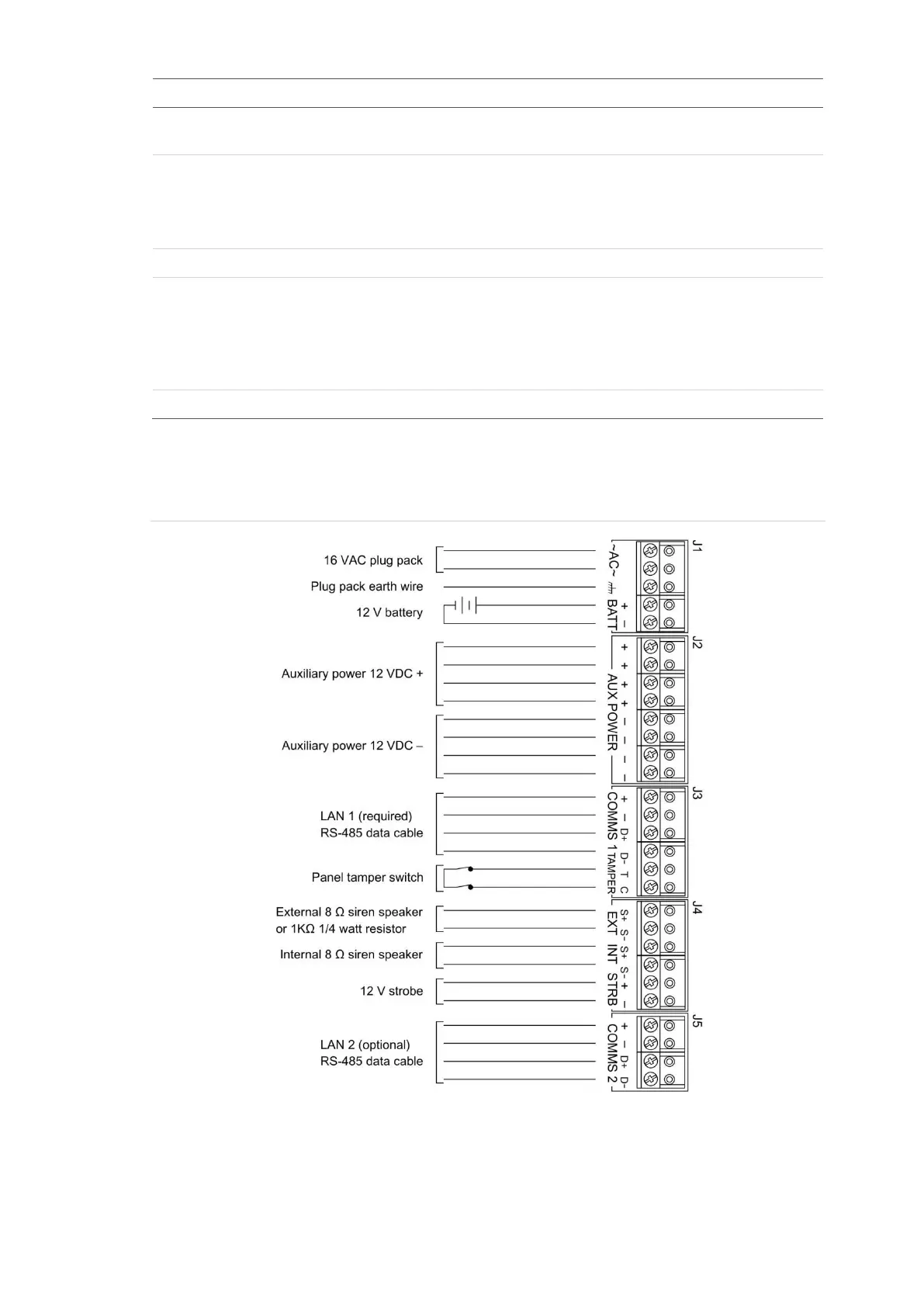
See Figure 8 below for connection details for terminal blocks J1 to J5.
Figure 8: Connection details for terminal blocks J1 to J5



 To Next Page