2. Click the DGPs button on the Panel programming ribbon tab to open
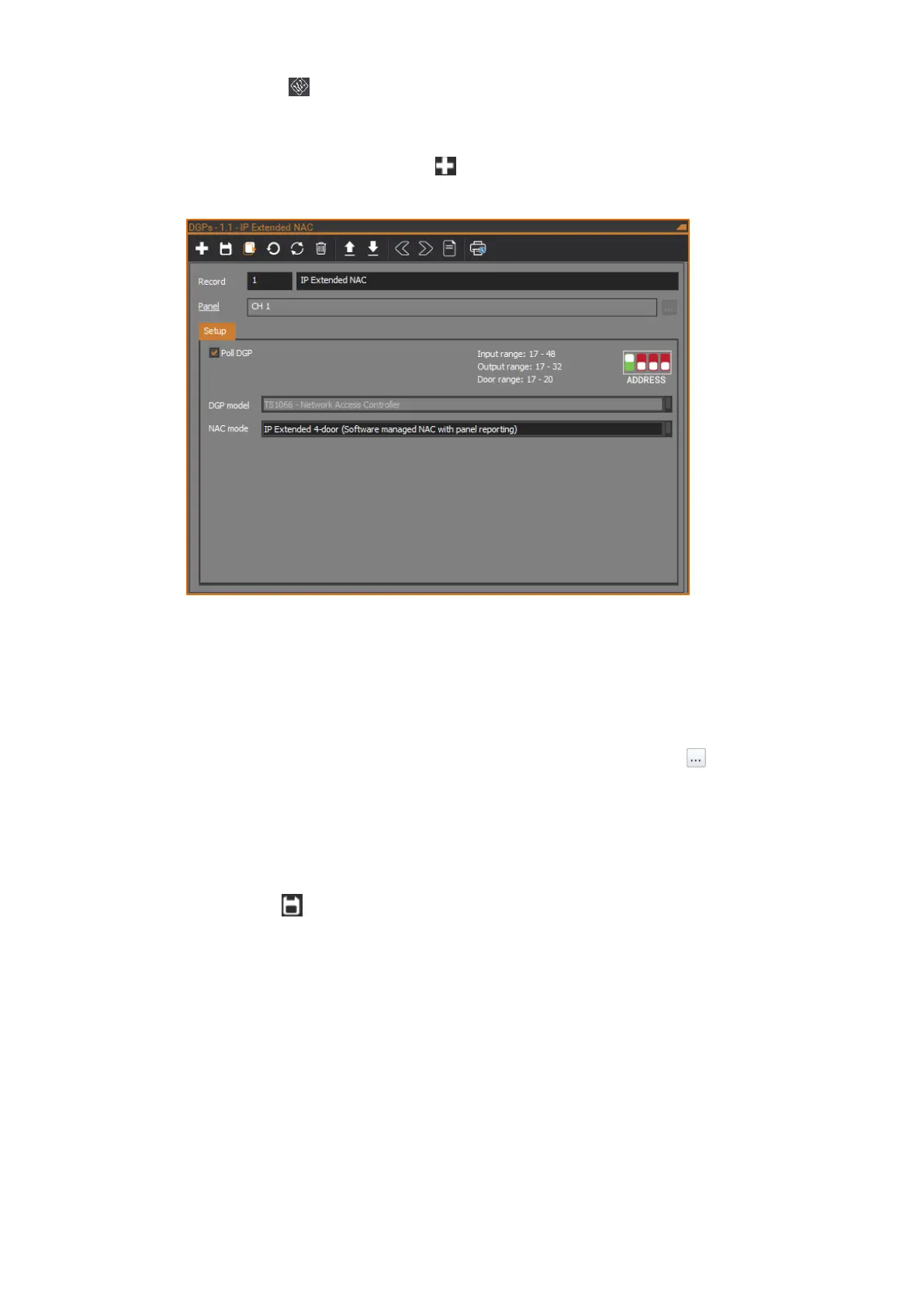
the DGPs form. Note that there is an existing DGP record for the NAC
itself (DGP 16 on the NAC).
3. On the DGPs form, click the New button in the toolbar to add a new
DGP record.
4. Enter the number the NAC will be polled as in the Record number field (1
to 12 if the NAC is connected to the ChallengerPlus system LAN 1, or 17
to 28 if the NAC is connected to LAN 2).
5. Enter a description for the NAC in the Record description field.
6. Ensure the Panel field is set to the ChallengerPlus panel that the NAC is
connected to via its system LAN. If necessary, click the Browse button
next to the Panel field to select the ChallengerPlus panel.
7. On the Setup tab, tick the Poll DGP check box.
8. Set the DGP model to be TS1066 - Network Access Controller.
9. Set the NAC mode to be IP Extended 4-door.
10. Click the Save button in the toolbar to save the DGP record.
The NAC is now connected to the ChallengerPlus panel as well as CTPlus.
See Status and control section for more details depending on the operating mode
of NAC.
If desired, you can set up IP communications on the NAC and reconnect CTPlus
to the NAC using IP instead of USB. See the Programming IP communications
section on page 38.



 To Next Page