© 2020 521_D - 12/20
20 of 28
A Watts Water Technologies Company
Setup Menu (1 of 2)
Setting Display
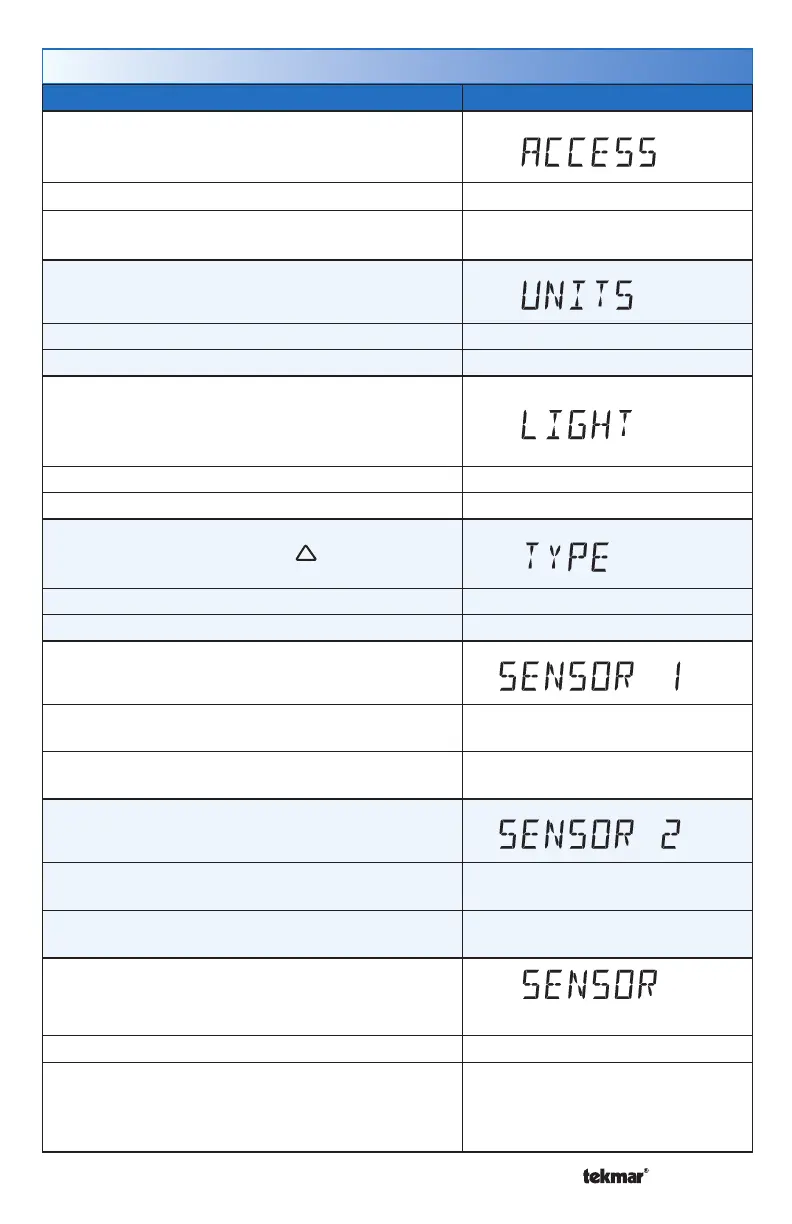
ACCESS
Selects the access level of the thermostat, which
determines which menus and items are available.
Access Level: Installer, User Range: Installer or User
Conditions: Only available when switch setting 1 is
set to Unlocked.
Default: Installer
UNITS
Select the temperature units.
Access Level: Installer, User Range: °F or °C
Conditions: Always available. Default: °F
LIGHT
Select when the display back light should operate.
Auto operates the back light for 30 seconds after a
keystroke.
Access Level: Installer, User Range: OFF, AUTO, ON
Conditions: Always available. Default: AUTO
TYPE
Device Type number. Hold the button to view
the software version.
Access Level: Installer, User Range: 521
Conditions: Always available. Default: 521
SENSOR 1
Select the type of auxiliary sensor 1.
Access Level: Installer
Range: NONE, ROOM, FLOR
(floor), OUT (Outdoor)
Conditions: Available when a sensor is automatically
detected on auxiliary sensor 1 input.
Default: FLOR
SENSOR 2
Select the type of auxiliary sensor 2.
Access Level: Installer
Range: NONE, ROOM, FLOR
(floor)
Conditions: Available when a sensor is automatically
detected on auxiliary sensor 2 input.
Default: ROOM
ROOM SENSOR
Select if the built-in room temperature sensor is on
or off.
Room
Access Level: Installer Range: OFF or ON
Conditions: When switch setting 2 is set to 1H or 2H,
an auxiliary sensor must be set to Room or Floor.
When switch setting 2 is set to H/C/F, an auxiliary
sensor must be set to Room.
Default: ON



 To Next Page