Settings Screen
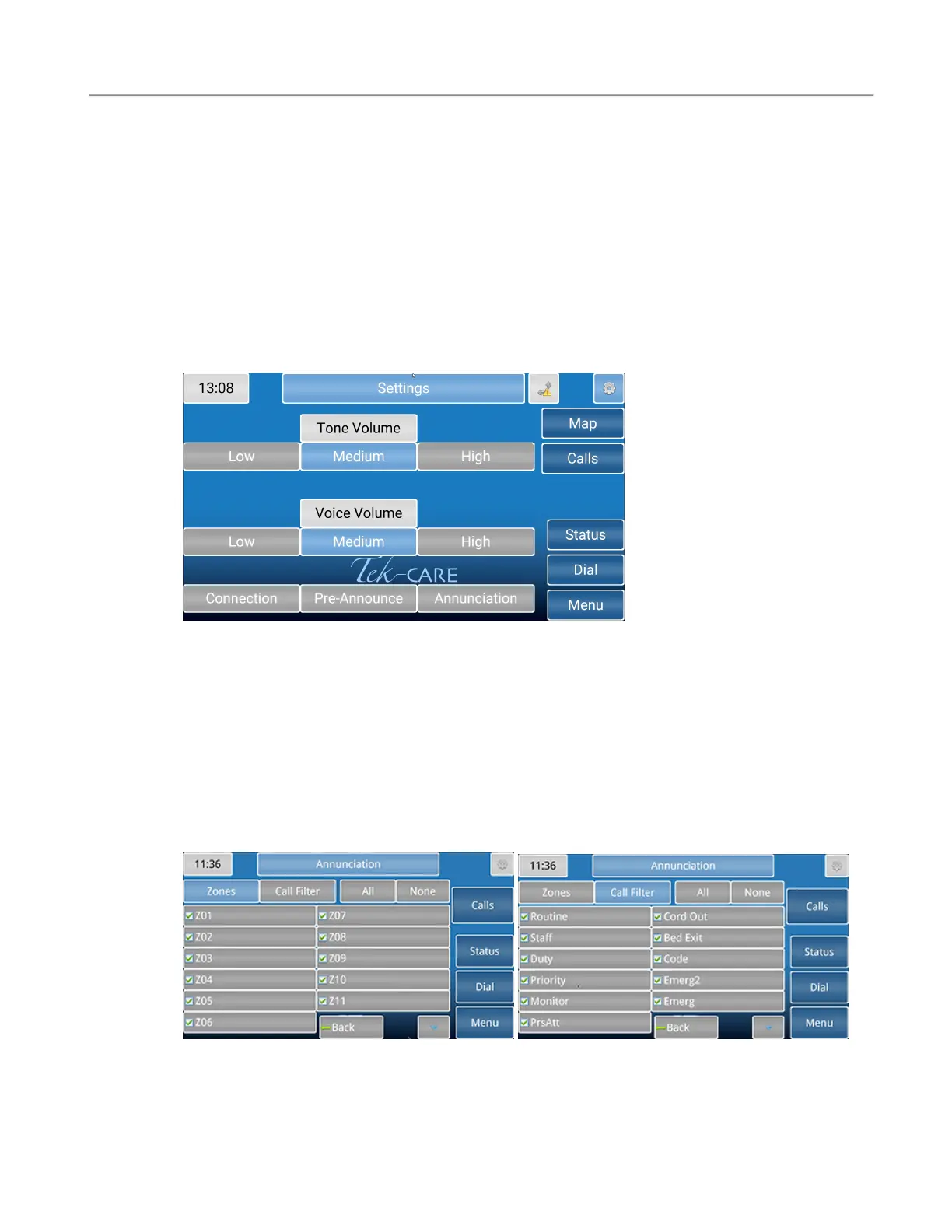
The Settings screen offers several options for volume control, connection, and annunciations.
Changing the Volume
To change the Tone Volume or Voice Volume for the handset, select Low, Medium, or High. The
NC403TS Monitor will only display the Tone Volume. Tone Volume and Voice Volume are both set
to Medium in the example below.
Connection will show the IP address and Device ID that was originally entered when the master station
was turned on for the first time.
Play Tones will allow the option for notification sounds to play when there is a fault or an incoming
nurse call. This feature is only available on the NC403TSMonitor.
If desired, select Pre-Announce which will indicate to the staff and personnel in the room of the station
that an audio session is about to start.
The Annunciation button allows for configuration of which calls can be annunciated from all selected
zones and call types on these screens. A Zone comprises of a number of stations grouped together. Use
the check boxes and the All or None buttons to select the desired zones and call types to annunciate.
NOTE: Changing the annunciations will only change the annunciation settings on that
master or monitor. This is not a global change.
Copyright
©
TekTone Sound and Signal Mfg., Inc. All Rights Reserved
IL1052 NC403TS and NC404TS Installation Manual | 15
Settings Screen


 To Next Page