Using the NC404L Sidecar Master
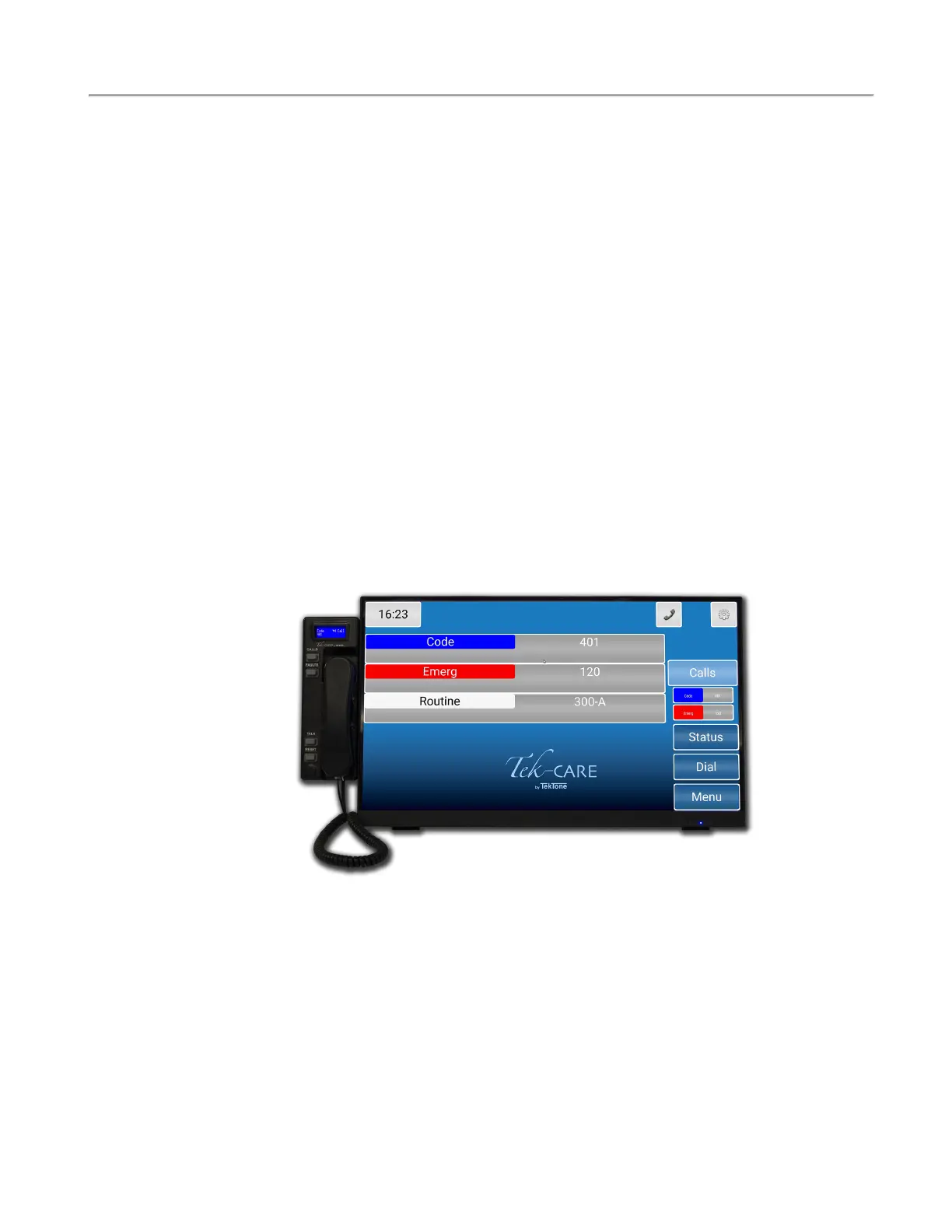
The NC404L audio-visual sidecar master pairs with the touchscreen monitor to comprise of the
NC404TS Master Station console.
NOTE:If something were to happen to the monitor, the NC404L is considered a master
station and can handle all of the functions of the monitor with the buttons on the sidecar.
The highest priority alarm is always shown at the top of the list of the NC404L.
Select any active call on the main screen and go to the Call Details screen. Picking up the handset or
pressing the TALK button will connect to that station placing a call. Press the TALK button to speak
and release the button to listen.
If more than one call is active on the system, a scroll arrow will appear to the right of the list. Scroll
through the list with the CALLSbutton to choose the call you wish to answer. Calls are sorted based
on priority and time.
Once the call is complete, either hang up the handset or press the RESET button.
NOTE: Only calls with Call Types with Attended unchecked in the Config Tool will
reset when the handset hangs up. Other call types have to be reset at the station where the
call is placed.
Select Faults to view any faults present on the system.
Copyright
©
TekTone Sound and Signal Mfg., Inc. All Rights Reserved
IL1052 NC403TS and NC404TS Installation Manual | 21
Using the NC404L Sidecar Master


 To Previous Page