Menu Screen
Menu Screen
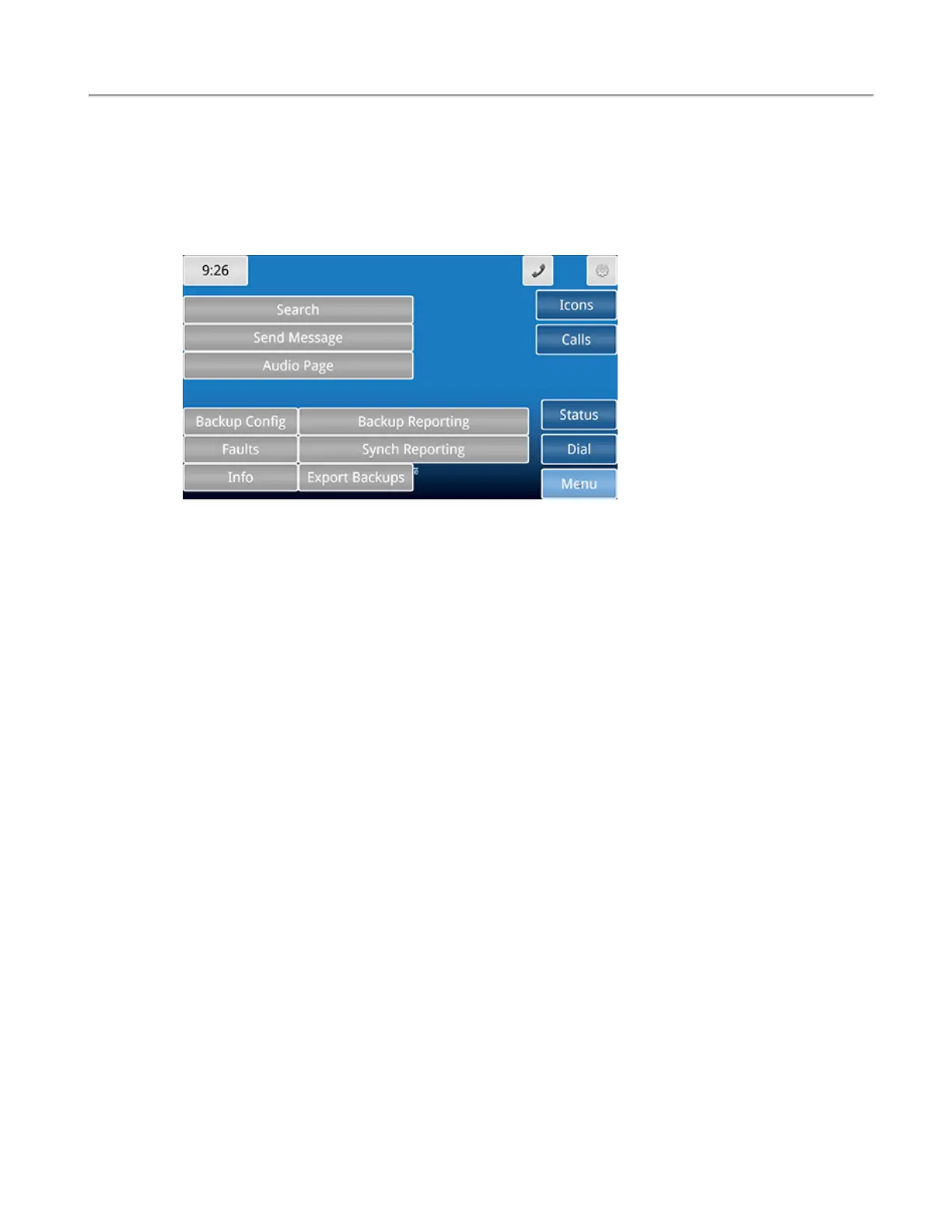
The Menu screen is used to view system information, sync reporting, and create backups.
The Search button enables you to search for Patients or Staff that have been added into the system.
The Send Message button allows you to send either a preprogrammed or custom message to individuals
or a staff group.
The Audio Page button will allow you to talk to all masters, stations, or zones the master station is
assigned to watch. Touch Master Page, Zone Page, or System Page to page all audio capable masters,
zones, and devices on the system that the master station is watching. Either pick up the handset, or hold
down the TALK button next to the handset to communicate with the selected group.
The Backup Config button creates a backup file of the current configuration. Touching the Backup Con-
fig button or selecting the option display plays two tones, one low beep to indicate the process has been
started, and a higher beep to indicate the process has been successful.
The Backup Reporting button creates a backup file of the reporting database. Touching the Backup
Reporting button or selecting the option display plays two tones, one low beep to indicate the process
has been started, and a higher beep to indicate the process has been successful.
The Faults button displays all current faults that are present on the Tek-CARE system. The Repair and
Redetect options are also available from the Faults screen.
20|IL1052 NC403TS and NC404TS Installation Manual
Copyright
©
TekTone Sound and Signal Mfg., Inc. All Rights Reserved


 To Next Page