TS4000 Radio Modem User’s Manual Serial Port 16
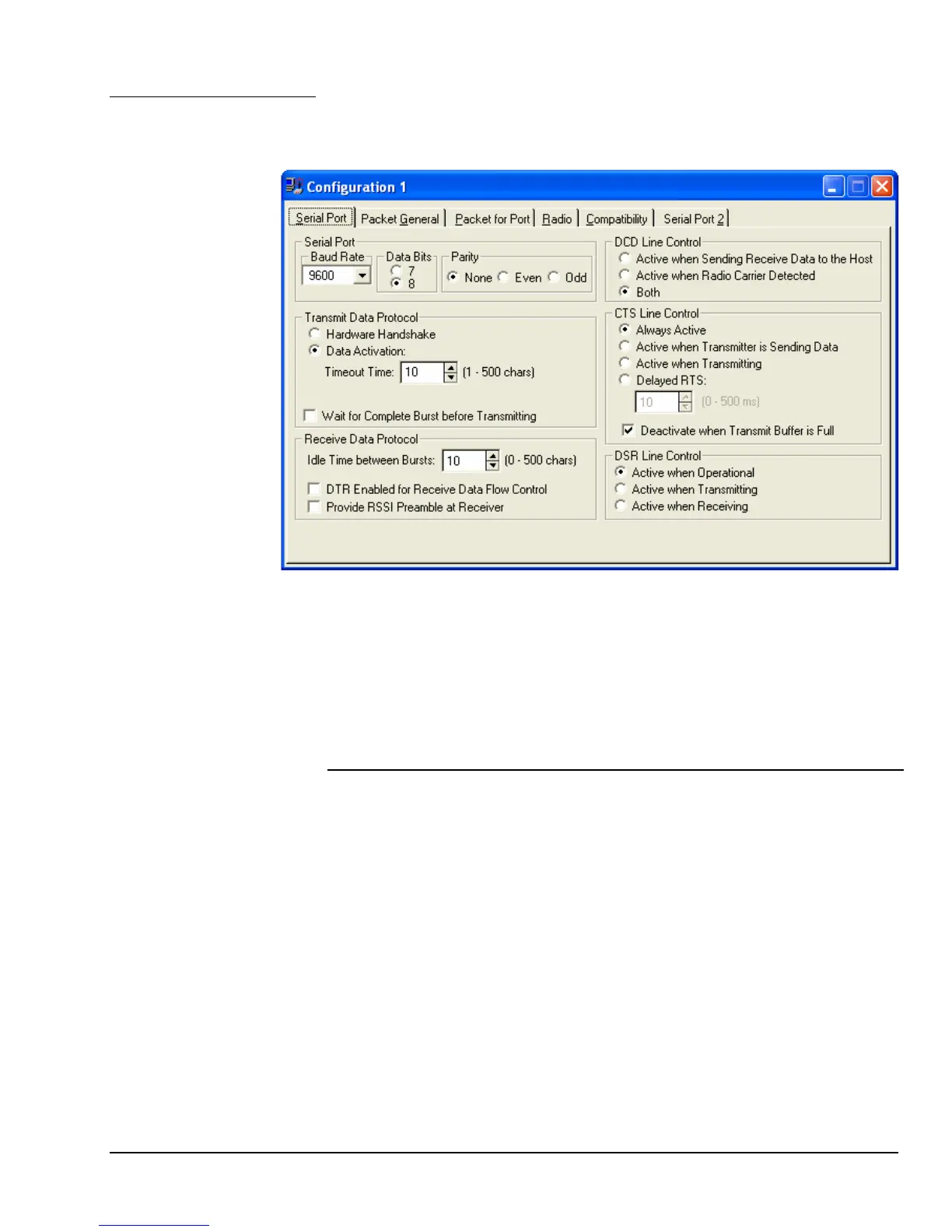
The serial port provides a number of configuration options that allows it to be
connected to virtually any asynchronous host equipment. These configuration
options are set using the Serial Port tab of the Modem Configuration.
Configuration
Options
The baud rate list provides selection of the serial port asynchronous baud rate.
The available selections are 300, 1200, 2400, 4800, 9600, 19200 and 38400
baud.
Baud Rate List
These options set the number of data bits in each asynchronous character.
Data Bits
These options set the parity of the asynchronous characters.
Parity
Selection Description
Hardware Handshake In this mode the RTS handshake line is used to
frame transmit data into bursts. The TS4000 begins
transmission when RTS is activated and at least
one character (non-control string) is received.
Transmission ends when RTS goes inactive and
the burst has been completely transmitted.
Data Activation This mode uses a character timer to frame the
transmit data into bursts. The TS4000 begins
transmission when one character (non-control
string) is received. The transmit burst is completed
when the transmit data line is idle (no data) for the
number of character periods defined by the data
activation timeout control.
Protocol Options



 To Next Page