TSA-1000
© 2008 – 2012 Telefire Fire & Gas Detectors Ltd Revision 1.12 האיגש !אצמנ אל הינפהה רוקמ. 2
– Page 57 of 57 –
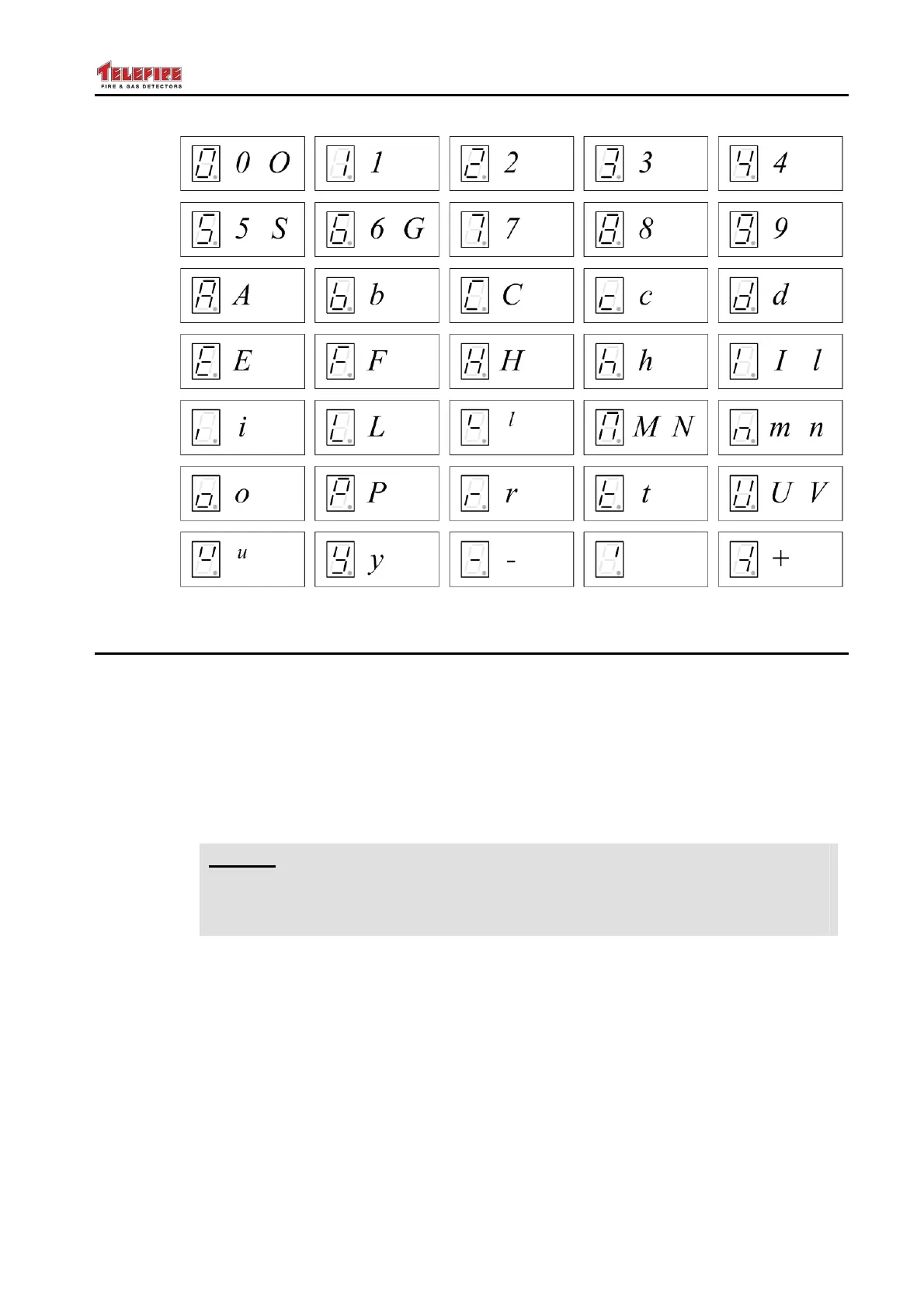
Figure 24 The seven-segment display and representation of digits and letters
14.5 Programming Sequence
14.5.1 Programming Steps
There are five steps to programming the control panel:
• Enter programming mode
• Program the control panel's general parameters
• Program inputs
• Program output modes and matrices
• Save to non-volatile memory
i
Note
When in programming mode, the buzzer sound after 30 minutes without use
of the keyboard to remind you not to leave the control panel in programming
mode.
14.5.2 Programming Sequence for Each Parameter
For each control parameter the programming sequence is as follows:
• Select the device type (left digit)
• Press the Menu key to move the cursor to the middle digit and select the device
number
• Press the Menu key to move the cursor to the right digit and select the device mode
• Press the Menu key to move the cursor to select the event type with the LEDs to the
right of the digital display
• Press the Menu key to move the cursor to select the delay. Each LED in this field
represents a delay of 5 seconds



 To Next Page