TSA-1000
© 2008 – 2012 Telefire Fire & Gas Detectors Ltd Revision 1.12 האיגש !אצמנ אל הינפהה רוקמ. 2
– Page 26 of 26 –
9 User Interface-Display and Keyboard
The front door of the TSA-1000 also serves as the user interface, and contains a display
and a keyboard.
The display has three distinct areas:
A General Display area (distinct, separate LEDs)
Zones indications area (distinct, separate LEDs)
Digital Display area (3 7 segments numeric digits display)
Digital Display indications area (distinct, separate LEDs)
9.1 General Display Area
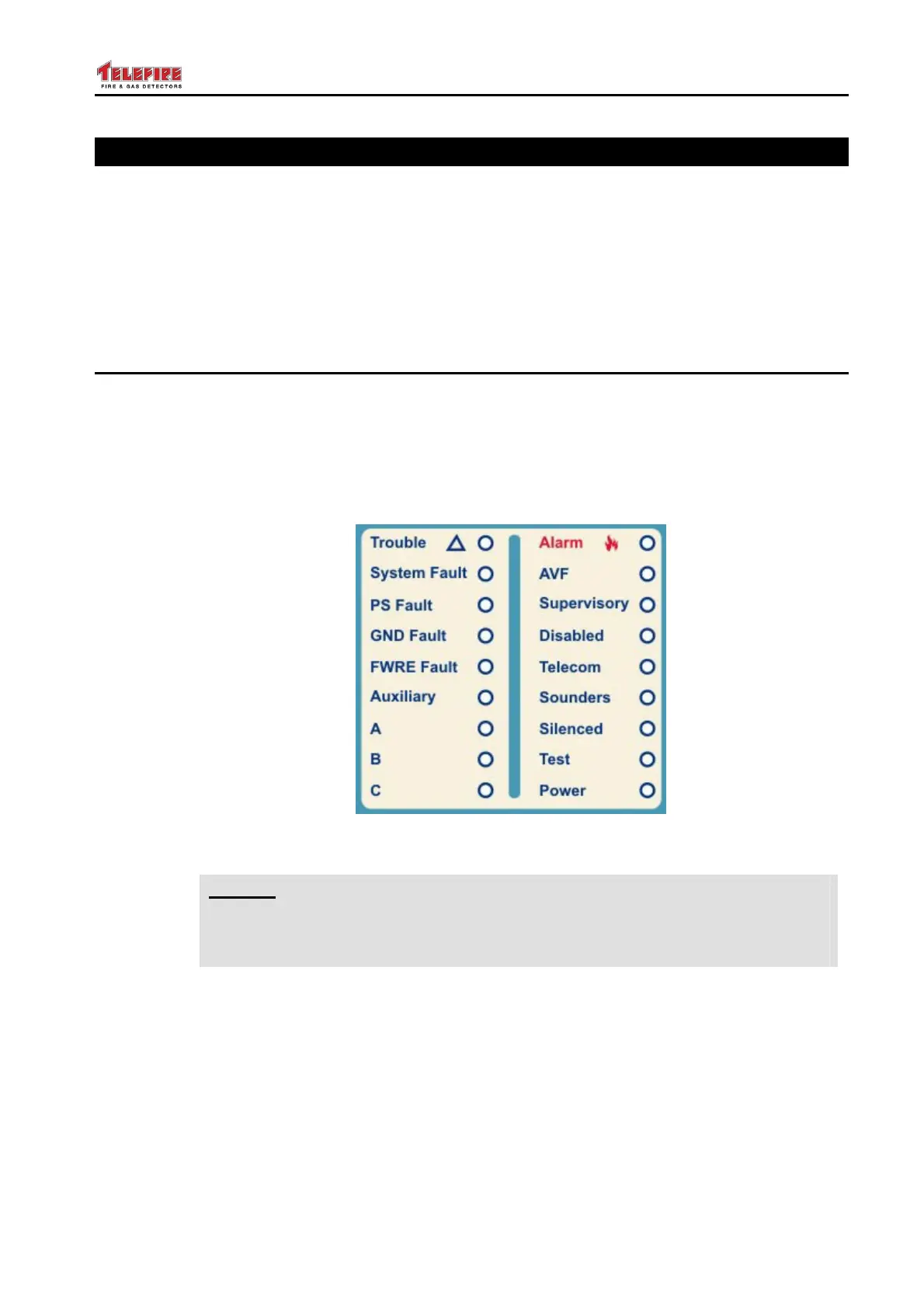
The general display area is the main display of the TSA-1000.
It is made up of two rows, where each row has 9 LEDs.
The right column provides status information such as Alarm, Power On, Test State, etc.
The left column displays faults of the control panel, A, B, C indicators are reserved for
future use. The General Display Area is shown below, and the function of each LED is
explained.
Figure 4 General Display Area
i
Note
The term "outputs" in the following table refers to any or all outputs, including
Horn output, Fire Dialer output, FWRE output, programmable outputs, or
relays.



 To Next Page