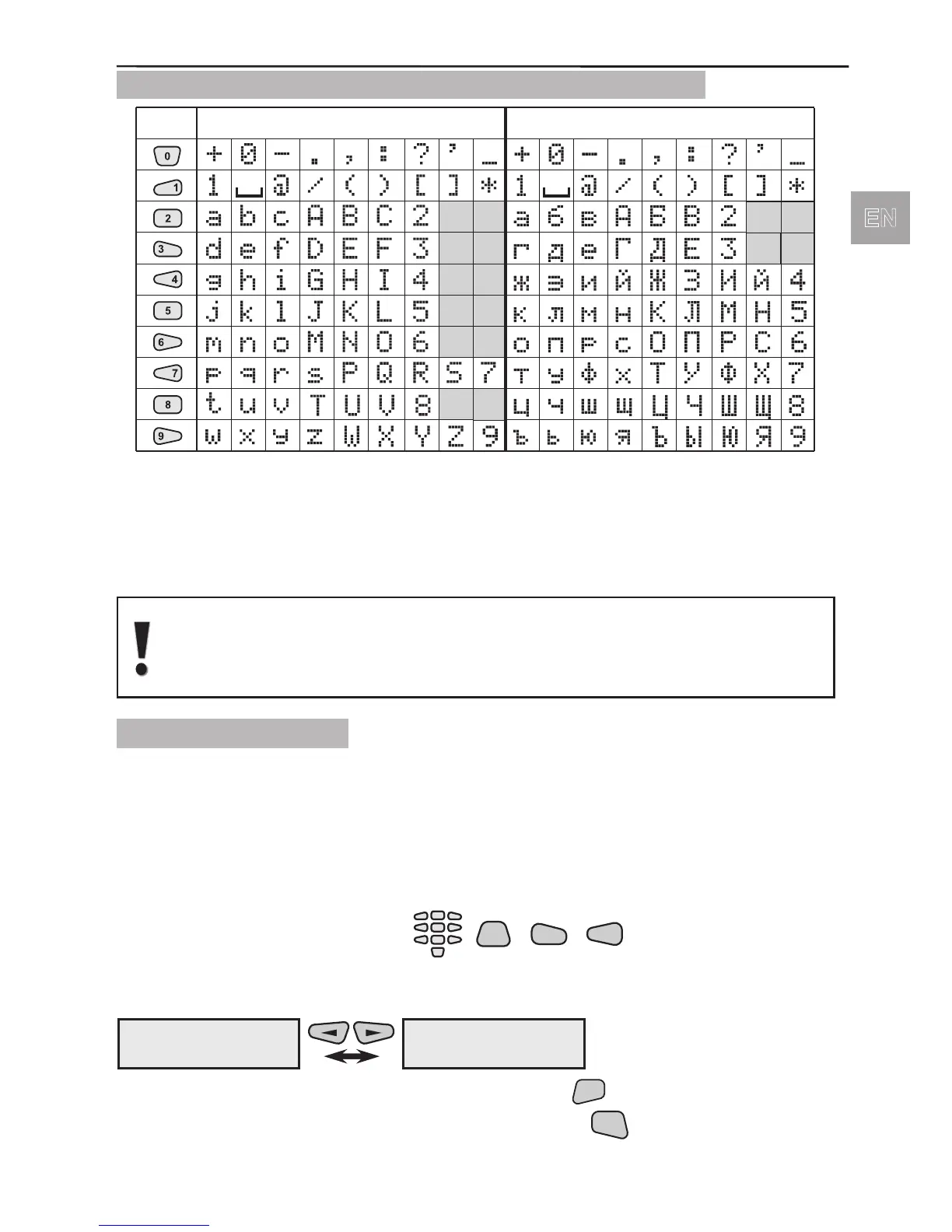
1.2.5. Symbols Used for Text Introducing from the Keypad
Use the keypad buttons numbered from 1 to 9 to introduce the symbols for entering
group and detector names, for adjusting the time and date, etc. In text editing and
entering mode the button is repeatedly pressed until the required letter, digit or symbol
is obtained. The available symbols of the pressed button are displayed in the top right-
hand corner when introduced.
Letters in Latin are displayed if the English version of the software is
selected, and in Cyrillic in the Bulgarian version.
Switching over between the different languages is described in §1.3.
1.2.6 Built-in Siren
The AVA Wireless Security System has a built-in siren 90dB which could be freely
programmed to become active in case of specic system events and continuity of siren
alarm.
1.3 Language Change
During initial start-up the menus by default are in English. In order to change the menus
over to other language select in succession:
That gives you the opportunity to choose the language of the system menus. After
selecting the indicated buttons the screen has the following view:
You can choose the selected language by pressing the



 To Next Page