EasyManua.ls Logo

Teletek electronics AVA - User Code Management; Programming User Code Names; Changing User Code Numbers; Setting User Arming Rights

Teletek electronics AVA
40 pages
Print Icon
To Next Page IconTo Next Page
To Previous Page IconTo Previous Page
Loading...
16 AVA Wireless Security System - User’s Manual
EN
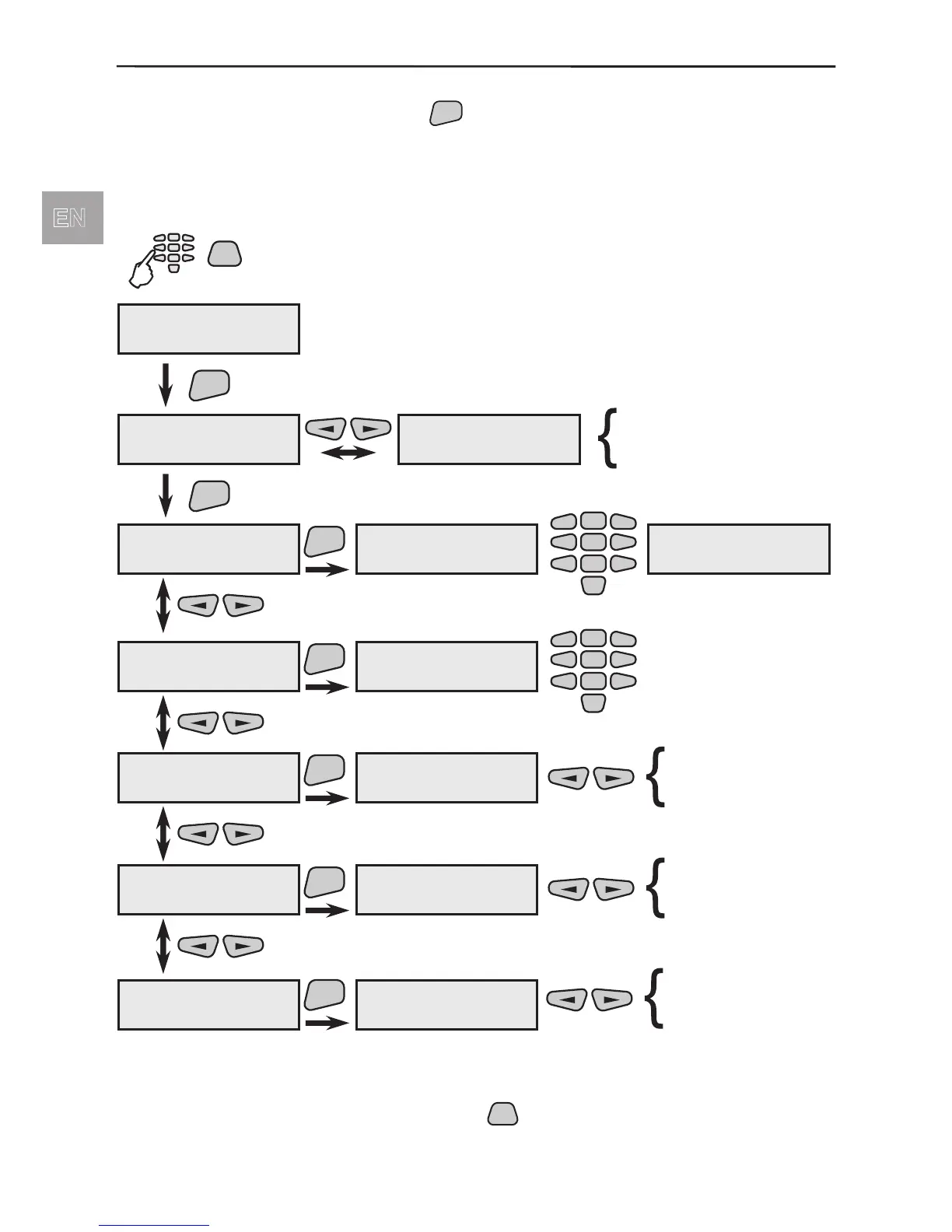
6.1 User Codes Programming
From menu 1)User Codes press
ENT
button to enter the user code programming
submenus.
For each code you can program 5 separate submenus: for changing the digits and code
name, arming and disarming rights and the code attributes.
Quick access to the user code programming submenus:
* All active parameters in the system are marked with the * symbol and the
inactive - with the -symbol. Press the
PRG
button of the keypad to change the
parameter status of the respective submenu.
PRG
code
PROGramming
1)User Codes
ENT
Code 01 ****
Code 01 name
Code 16 xxxx
Code 16 name
ENT
****
õõõõ
programmed code
free position for
new code
Code 01 name
1)Change Code
ENT
Code 01 name
new code:[ ]
2
5
8
0
1
3
4
6
79
Code 01 name
5)CodeAttributes
ENT
5)CodeAttributes
* Manager
* Manager
* Bypass
* Log view
* Time/Date set
* Remote Access
Code 01 name
confirm:[ ]
Code 01 name
2)Change name
ENT
2)Change name
Code 01 name
2
5
8
0
1
3
4
6
79
-
Code 01 name
3)Arming Rights
ENT
3)Arming Rights
* ARM f-n N1
Code 01 name
4)Disarm.Rights
ENT
4)Disarm.Rights
* DARM f-n N1
* ARM f-n N1
* ARM f-n N2
* ARM f-n N3
* ARM f-n N4
* ARM f-n N5
* ARM f-n N6
* DARM f-n N1
* DARM f-n N2
* DARM f-n N3
* DARM f-n N4
* DARM f-n N5
* DARM f-n N6
*
*
*

Table of Contents

Other manuals for Teletek electronics AVA

Related product manuals