24 en | Maintenance AIRMAN 8+
2024-11 | 07 | F.01U.387.060
Customer Maintenance Manual
Bosch Security Systems, LLC
5.10 Replacing the windscreen
The foam windscreen, once removed from the microphone, can be cleaned using low
pressure air to blow contaminates off from the exterior. If low-pressure air does not provide
effective results, the windscreen should be replaced.
Notice!
Do not use any liquid on the foam windscreen.
To remove the windscreen, do the following:
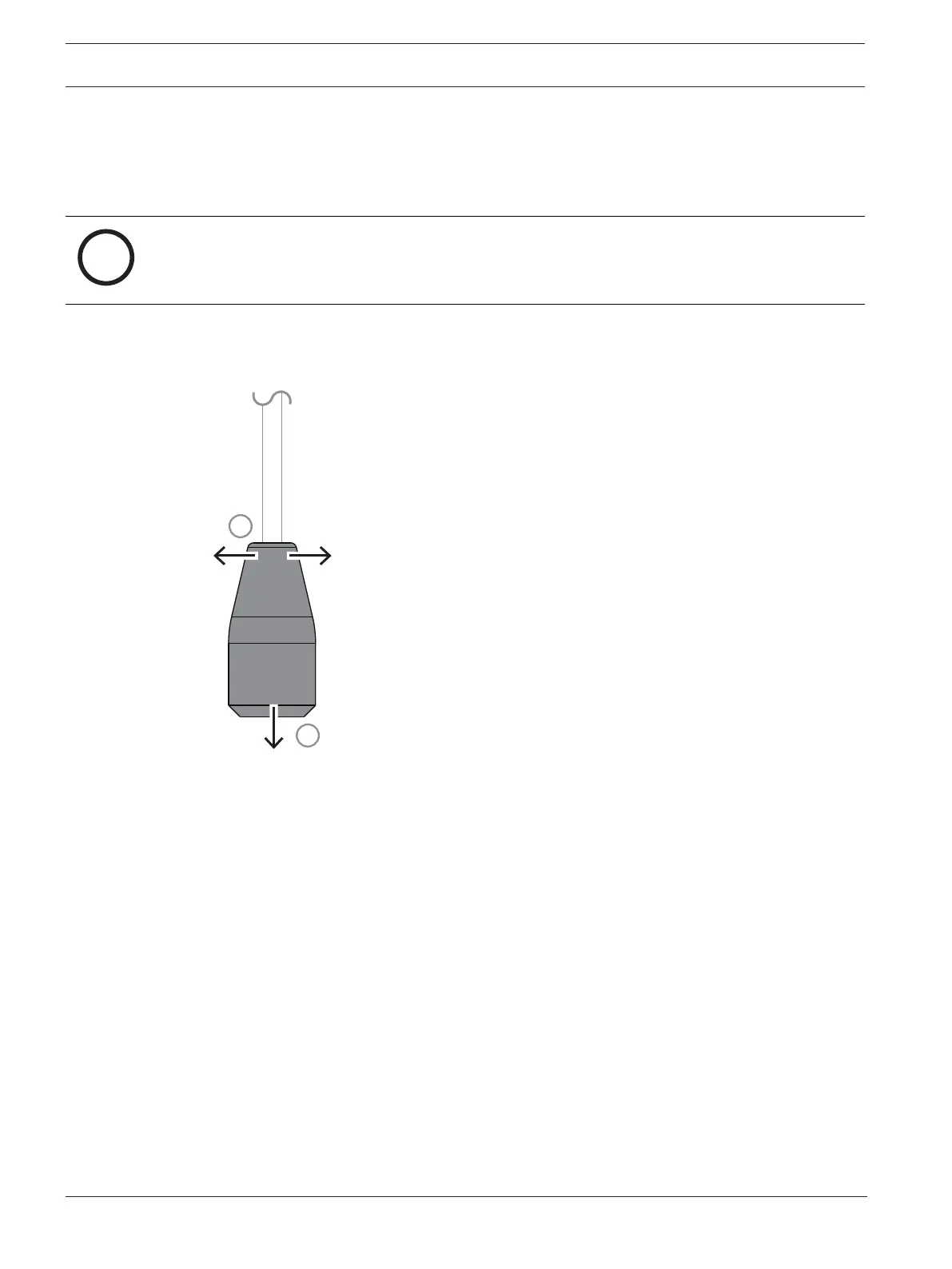
1. Take care to pull the sides of the windscreen away from the mic pre-filter wings before
removing the windscreen to avoid damaging the windscreen or microphone.
Figure5.6: Mic Windscreen Removal and Replacement
2. Grasp the microphone windscreen and gently pull away from the microphone.
To replace the windscreen, do the following:
4 Slide the new windscreen over the microphone.
5.11 Headset storage
To store the headset, do the following:
1. Move the boom mic above the headband.
2. Coil the cord into a loop.
3. Place the coiled cord and headset in the carrying case.


 To Next Page