AIRMAN 8+ Disassembly | en 25
Bosch Security Systems, LLC
Customer Maintenance Manual
2024-11 | 07 | F.01U.387.060
6 Disassembly
The following procedure describes the complete disassembly of the Airman 8+ headset.
Notice!
The removal process requires the following steps to be followed in the order described.
Assembly is the reversal of the disassembly procedure. Please take care when
disassembling to note details that may be required in the reassembly process, such as the
locations of disconnected wires.
When soldering, be careful not to touch the plastic housing of the headset/headphone with
the soldering iron.
Notice!
Only disassemble parts that are necessary for the repair.
6.1 Ear cushion replacement
To ensure optimal product performance, replace cushions and pads periodically.
For the recommended maintenance schedule, please refer to Recommended maintenance
schedule, page 15.
To remove the ear cushions, do the following:
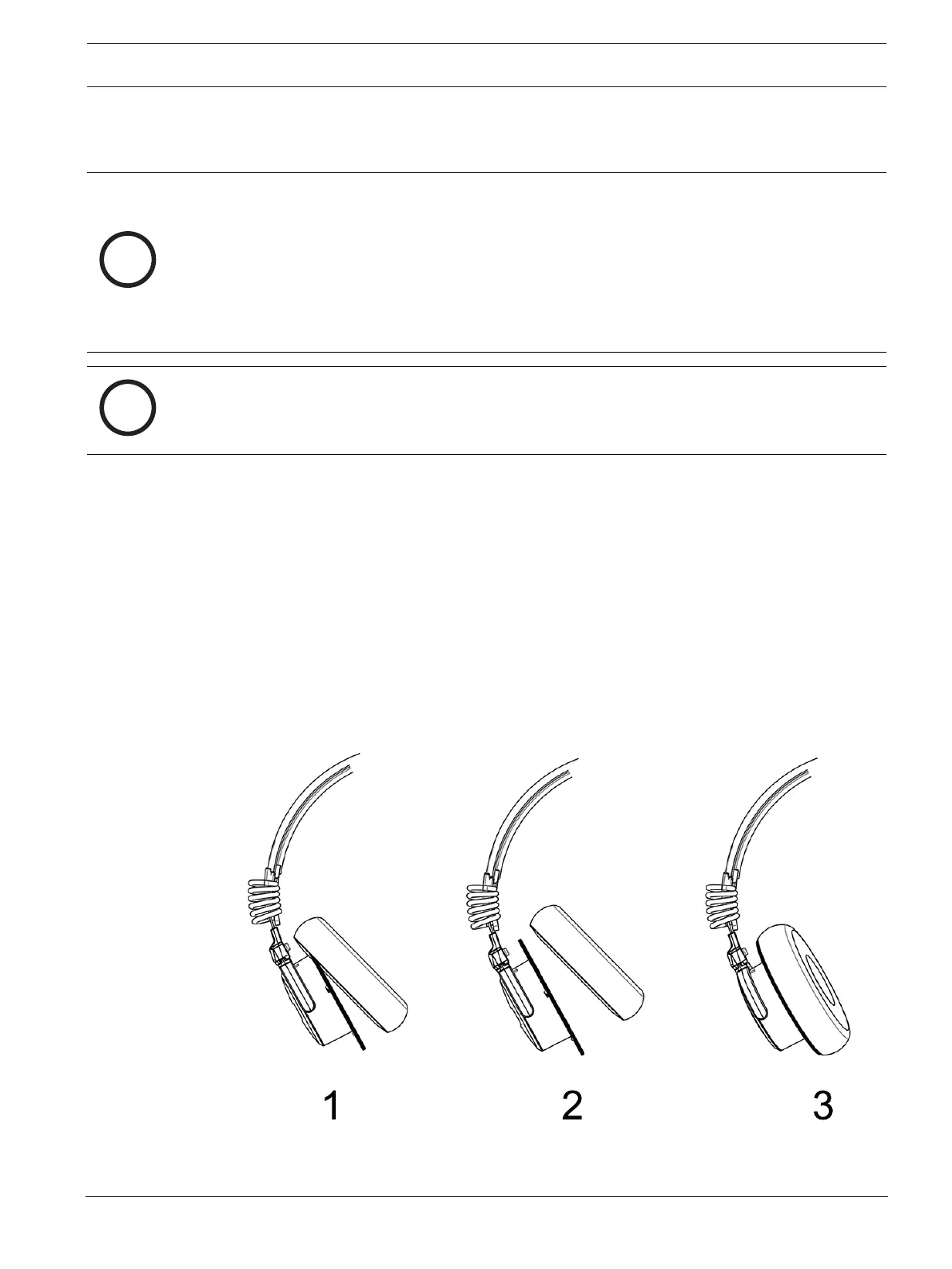
1. Grasp the edge of the ear cushion where it folds into the slot on the ear cup.
2. Gently pull the ear cushion up and away from the ear cup.
To replace the ear cushions, do the following:
1. Starting at the top of the ear cup (1), carefully work the cushion around the cup (2)
until it is in place (3).
Figure6.1: Ear Cushion Removal and Replacement


 To Next Page