27
SKIP
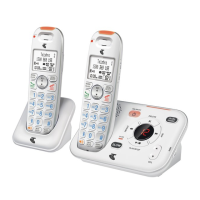
Skip to the next message during message playback.
REPEAT
Press once to repeat the playing message.
Press twice to play the previous message.
PLAY/STOP
Start or stop message playback.
/VOL AND /VOL
Adjust the listening volume message playback.
Adjust the base ringer volume while idle.
PAGE
Page all handsets and pendants when idle.
MESSAGE WINDOW
Show the number of messages, and the other information of the
answering system or telephone base.
SLOW
Slow down the message playback.
IN USE LIGHT
On when the phone is in use or the answering machine is answering an
incoming call.
On when a device is being registered.
Flashes when devices are being deregistered.
Flashes when another telephone on the same line is in use.
Press to skip to the next message during message playback.
5.
•
6.
•
•
7.
•
8.
•
•
9.
•
10.
•
11.
•
12.
•
•
•
•
•


 To Next Page