21
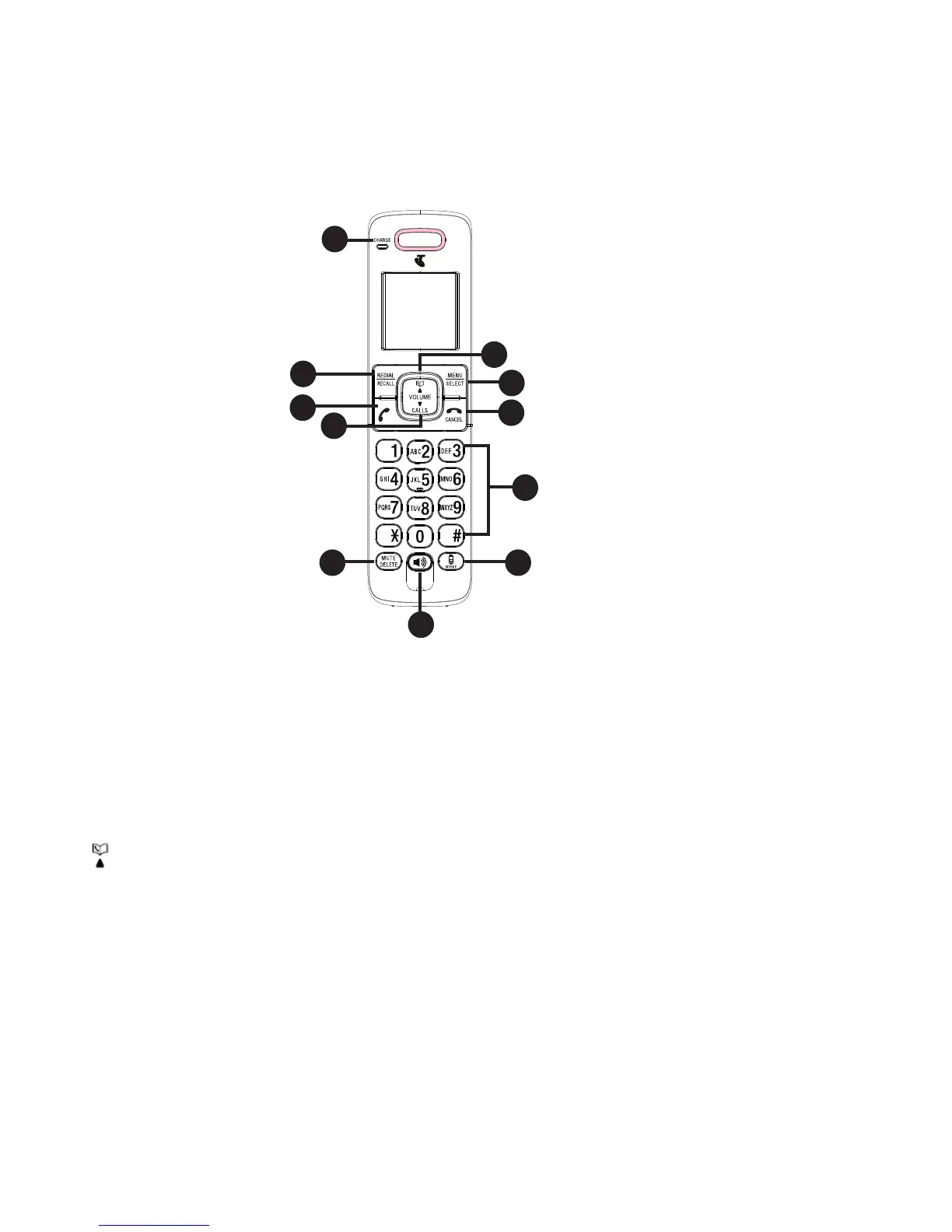
HANDSET BUTTONS
CHARGE light
On when the handset is charging in the telephone base or charger..
REDIAL/RECALL
Press to review the last 5 numbers dialed.
/ VOLUME
Press to review the phonebook when the phone is not in use.
Press to increase the listening volume during a call or message playback.
Press to scroll up while in a menu, or reviewing the phonebook, call list or
redial list.
Press to move the cursor to the left while entering numbers or names in the
phonebook.
1.
•
2.
•
3.
•
•
•
•
Molded Color - Pantone Black C
Silkscreen - Vtech Silver 04 (refer to the sample) ( )
Silkscreen - Pantone 347 C ( )
Silkscreen - Pantone 200 C ( )
Part Descripition Color Texture/Finishing
1-a. Top Cabinet
SPIA-1
Molded Color - Pantone Black C
Silkscreen Color - Vtech Silver 04
(refer to the sample)
( )
1-d. Top Cabinet
SPIB-1
Spray Color - Vtech Silver 04
(refer to the sample)
2-a. Back Cabinet
MT11520
Molded Color - Pantone Black C
Engraved : 0.15mm
( ), 0.1mm ( )
3. LCD Lens
SPIA-1
Transparency - Backlit Color Green
4. Chrome ring
SPIA-1
Chrome
5. Crystal Key (2 Pos)
SPIA-1
Transparency
Silkscreen Rear - Vtech Silver 04
(refer to the sample)
Silkscreen Rear - Pantone 433 C ( )
(LED)
2013 Value Handset
Color specification
Version
01
HENRY 2013_06_19
Scale 100 %
7. Crystal Key (15 Pos)
SPIA-1
Transparency
Silkscreen Rear - Vtech Silver 04
(refer to the sample)
Silkscreen Rear - Pantone 433 C - Backlit Color Green
Silkscreen Rear - Pantone 433 C - Backlit Color Orange ( )
6. Hard Key (4 Pos)
SPIA-1
1-b. Top Cabinet
MT11510
Molded Color - Pantone Black C
1-c. Top Cabinet
SPIA-1
SPIA-1
2-b. Back Cabinet
SPIA-1
Molded Color - Pantone Black C
Translucent - Backlit Color Red
2-a
2-b



 To Next Page