43
RESET OPTIONS
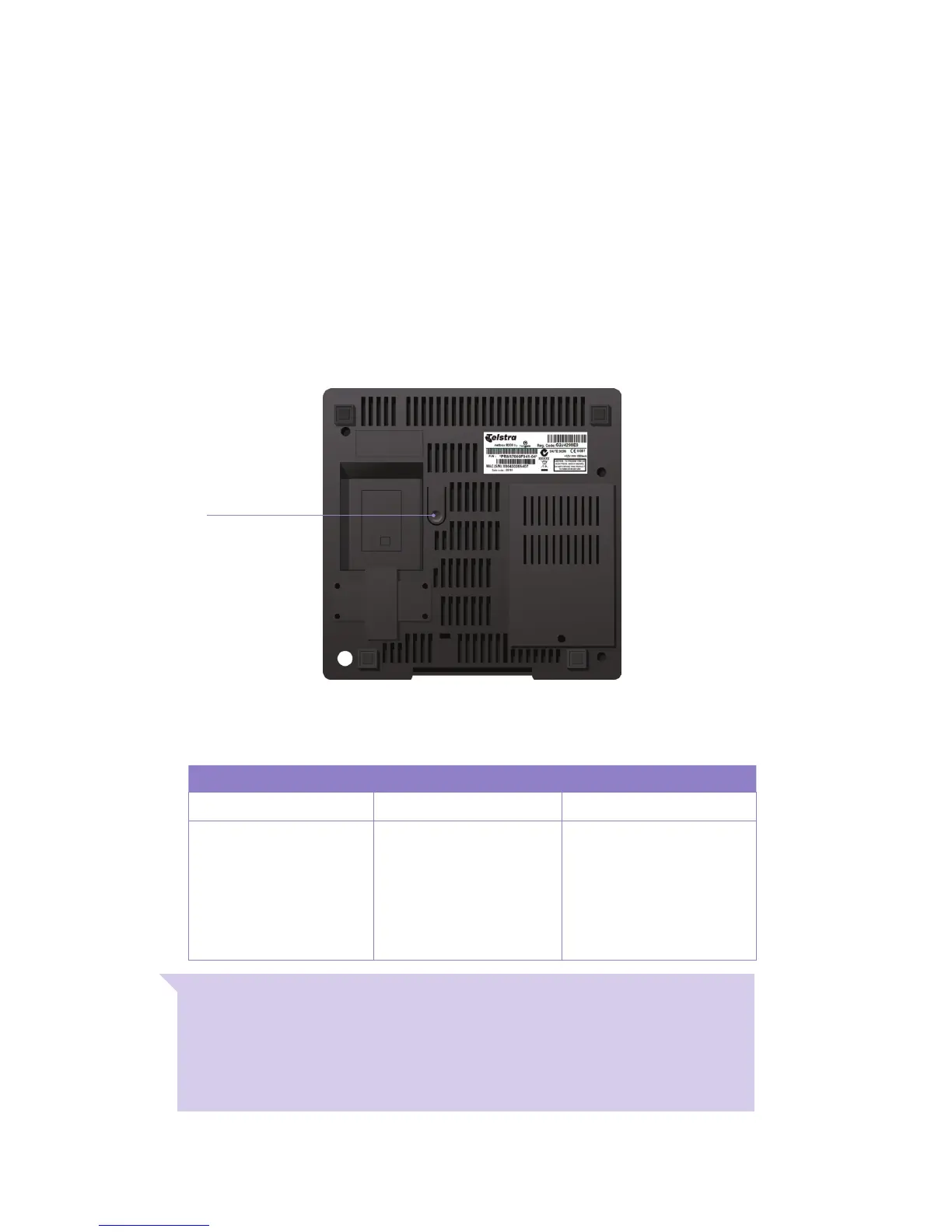
You’llndtheResetbuttononthebottomofyourT-Box
®
. If you run into
problems with your T-Box, pressing this button will reset it.
If you press and hold the Reset button while watching the light on the front
of your T-Box, you can activate a couple of other Reset options:
WARNING: Before disconnecting the power supply, rst turn your T-Box off
by putting it in deep sleep mode. Press the power button on the remote for 3
seconds until you see the on screen message ‘Entering sleep mode; please wait'.
Only when the T-Box powers down is it safe to switch off from the power point.
Never pull the cord out of the T-Box directly as it could cause issues with the hard
drive of your T-Box.
Re-Start Remote Pairing Reset
Press Reset Once. Press Reset Two Times. Press Reset Five Times.
RestartsyourT-Box.Your
T-Box will power off as soon
as you release the reset
button. Press the 'power'
button on the remote control
to turn it back on.
Resets the remote control
pairing, so that you can
re-pair your existing remote
control or pair a new remote
control to your T-Box.
Erases all settings so you can
re-run the entire
set-up process.
No recordings or movies are
deleted.
Recordings currently in
progress are stopped.
Reset button



 To Next Page