28
CHARGING THE BATTERY
• When the battery indicator, in the top right
hand corner of the display is less than 5%
of full capacity, the meter should be
immediately charged, otherwise it will affect
the measurement accuracy.
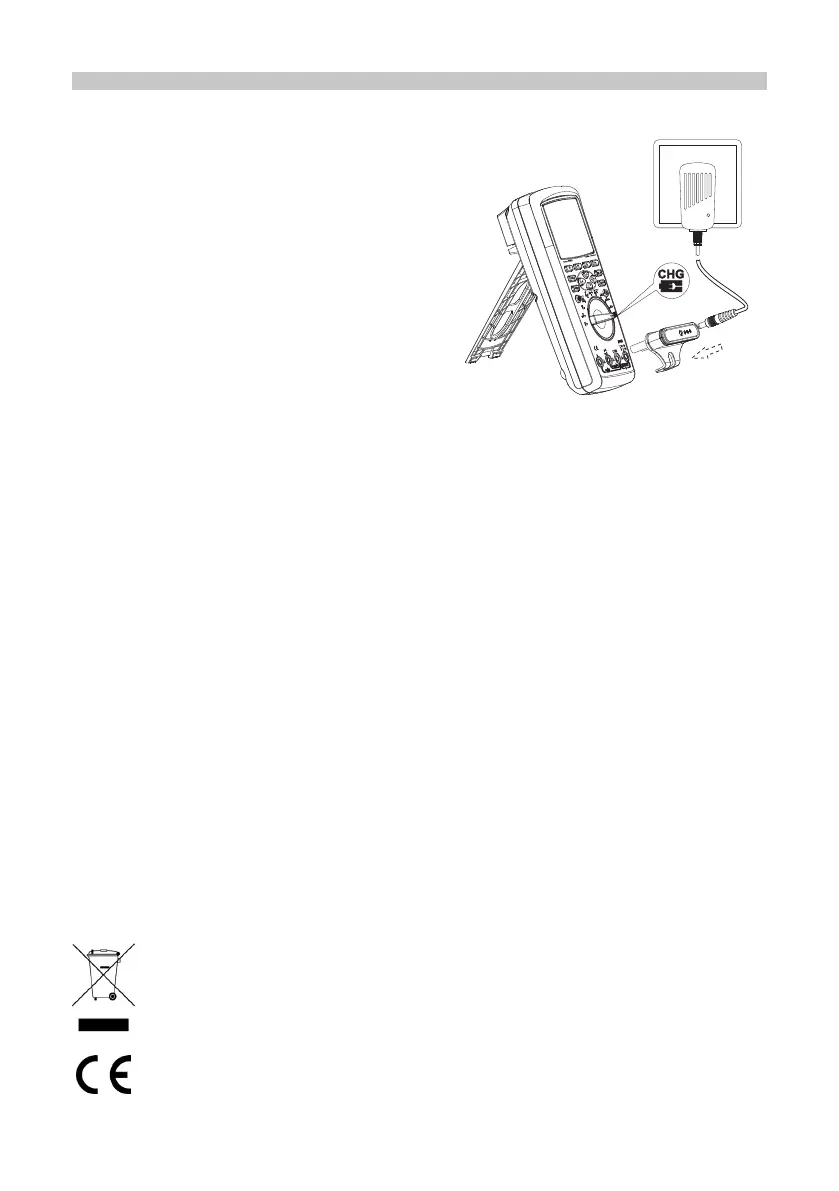
• Set the rotary switch to “CHG” and the
display will read “please plug in AC
adapter!”
• Connect the power connector to the four
terminals in the meter, then insert the
power adaptor into the power connector.
• “Charging...” on the display indicates that it
is charging.
• When the battery is fully charged, the red
light is off and it will no longer charge.
Made in China. www.premierfarnell.com
V.1.0
INFORMATION ON WASTE DISPOSAL FOR CONSUMERS OF
ELECTRICAL & ELECTRONIC EQUIPMENT.
This symbol indicate that separate collection of Waste Electrical and Electronic
Equipment (WEEE) or waste batteries is required. Do not dispose of these items with
general household waste. Separate for the treatment, recovery and recycling of the
materials used. Waste batteries can be returned to any waste battery recycling point
which are provided by most battery retailers. Contact your local authority for details of
the battery and WEEE recycling schemes available in your area.


 To Previous Page