Upload Setting
Your console is capable of sending your sensor data to select internet-
based weather services: Wunderground.com, Weathercloud.net and,
wow.metoffice.gov.uk. User need to register at the select website to get
the station ID and password
a. Upload your weather data to Ecowitt Website
1)
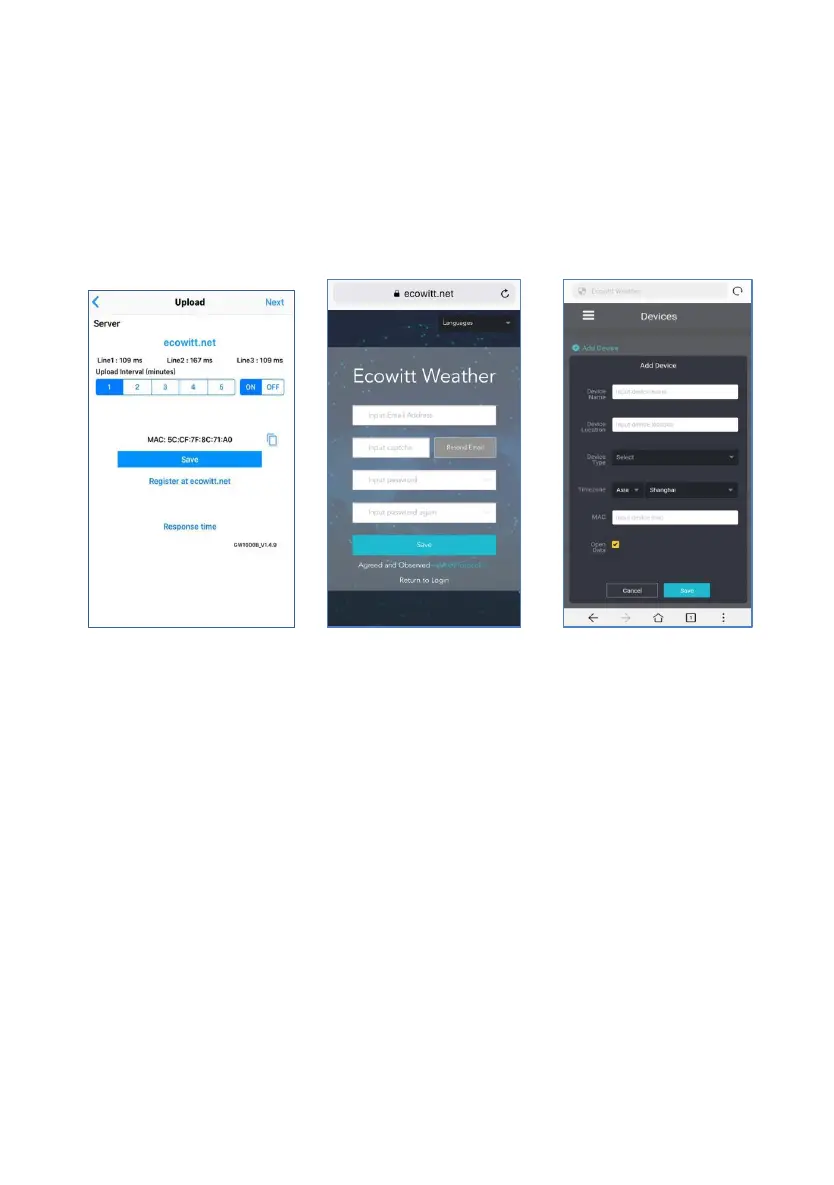
On the ecowitt.net uploading
page, enable the ON
button(displayed blue) and set
the uploading interval time.
Press Save on the page.
Copy the MAC address(will be
used to add the device on the
server later)
Press Register at Ecowitt.net to
open web browser to activating
the Register with Ecowitt.net
option
After add device and upload data
successfully, if you found the
data not reporting to server,
press Response Time to reset
and check the responce status.
2)
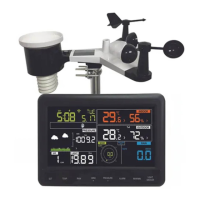
Finish the registration
on the Ecowitt page
If you have account
and password, press
Return to Login to
login the website
3)
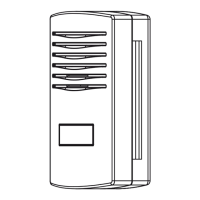
Press the upper left
menu button and select
Devices.
Press Add Device and
input all the information
needed then Press
Save.
If you tick Open data,
your weather data can
be viewed by other
people.


 To Next Page