FUNCTIONALITIES
www.tescometering.com +1 215 785 2338
support@tescometering.com
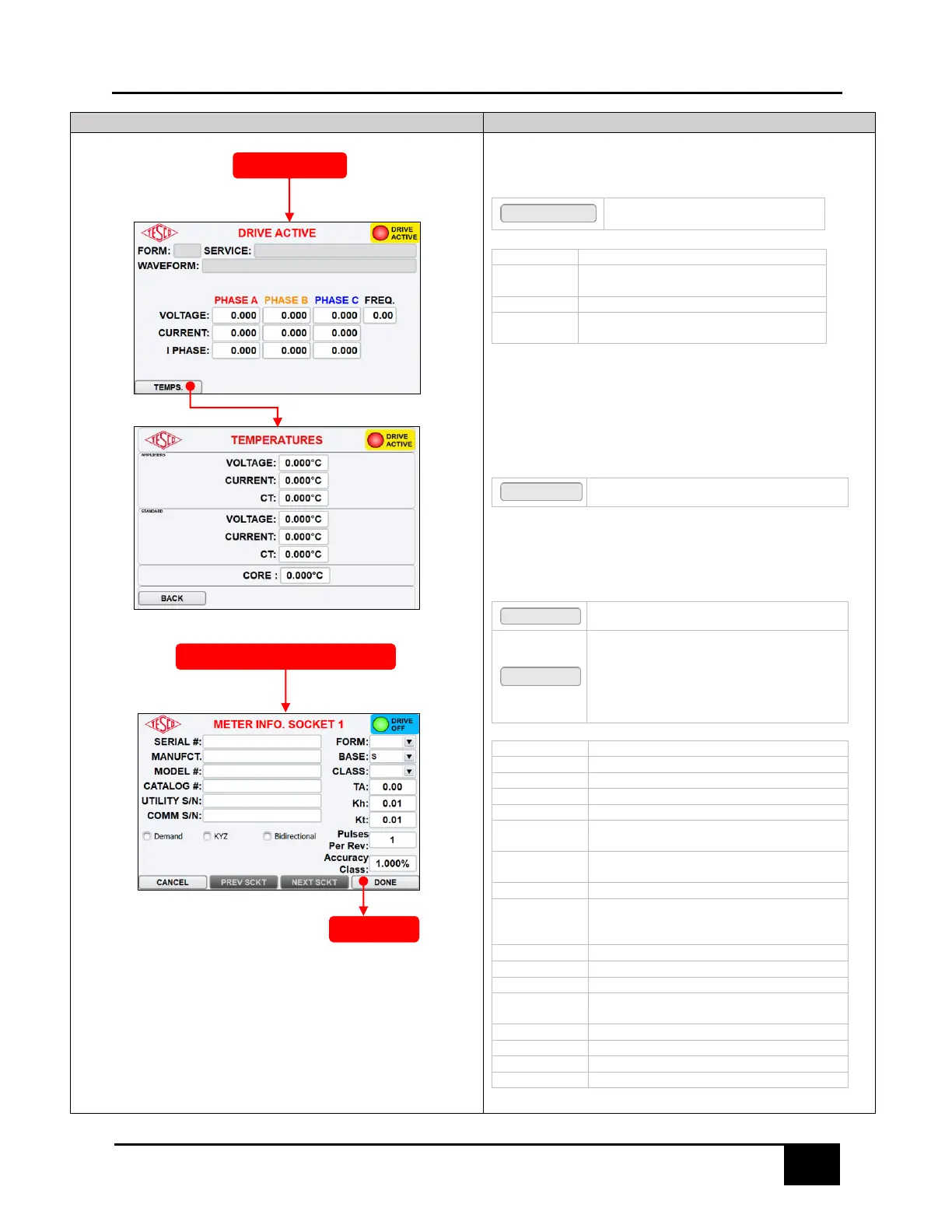
3.3.3.2 DRIVE ACTIVE
This screen displays the operational statistics of the test being conducted.
FUNCTION KEYS
Press to open the TEMPERATURES
screen
Voltage measured by Instrument
Voltage phase angle with respect to
reference frame
Current measured by Instrument
Current phase angle with respect to A phase
voltage
3.3.3.3 TEMPERATURES
This screen displays temperatures of internal circuit boards.
FUNCTION KEYS
Press to return to the DRIVE ACTIVE screen
3.3.3.4 METER INFO SOCKET
This screen allows the user to enter new meter information.
NOTE: Data entry is available only when meter is inserted in socket.
FUNCTION KEYS
Returns to the previous screen.
Saves changes and proceeds to the either of the
following:
- SEQUENCE SETUP (when performing
SEQUENCE TESTING)
- SINGLE TEST SETUP (when performing
MANUAL TEST)
Serial number of the meter
Model number of the meter
Serial number provided by Utility (if applicable)
Serial number of communication device (if
applicable)
Form number of the meter (auto-populates the
default Kh in the Kh field)
Meter base (S, K, A, etc…)
Meter class (determines maximum current and
auto-populates the default test amps in TA
field)
Test Amps (RMS of a full load test)
Watt hours per revolution of disk
Number of pulses in every revolution of the
disk. Integer >= 1
Select if meter has demand functionality
Select if meter has KYZ functionality
Select if meter has bidirectionality functionality
SINGLE TEST SETUP /
SEQUENCE SETUP



 To Next Page