FUNCTIONALITIES
www.tescometering.com +1 215 785 2338
support@tescometering.com
3.3.10 SYSTEM INFORMATION
3.3.10.1 SYSTEM INFORMATION
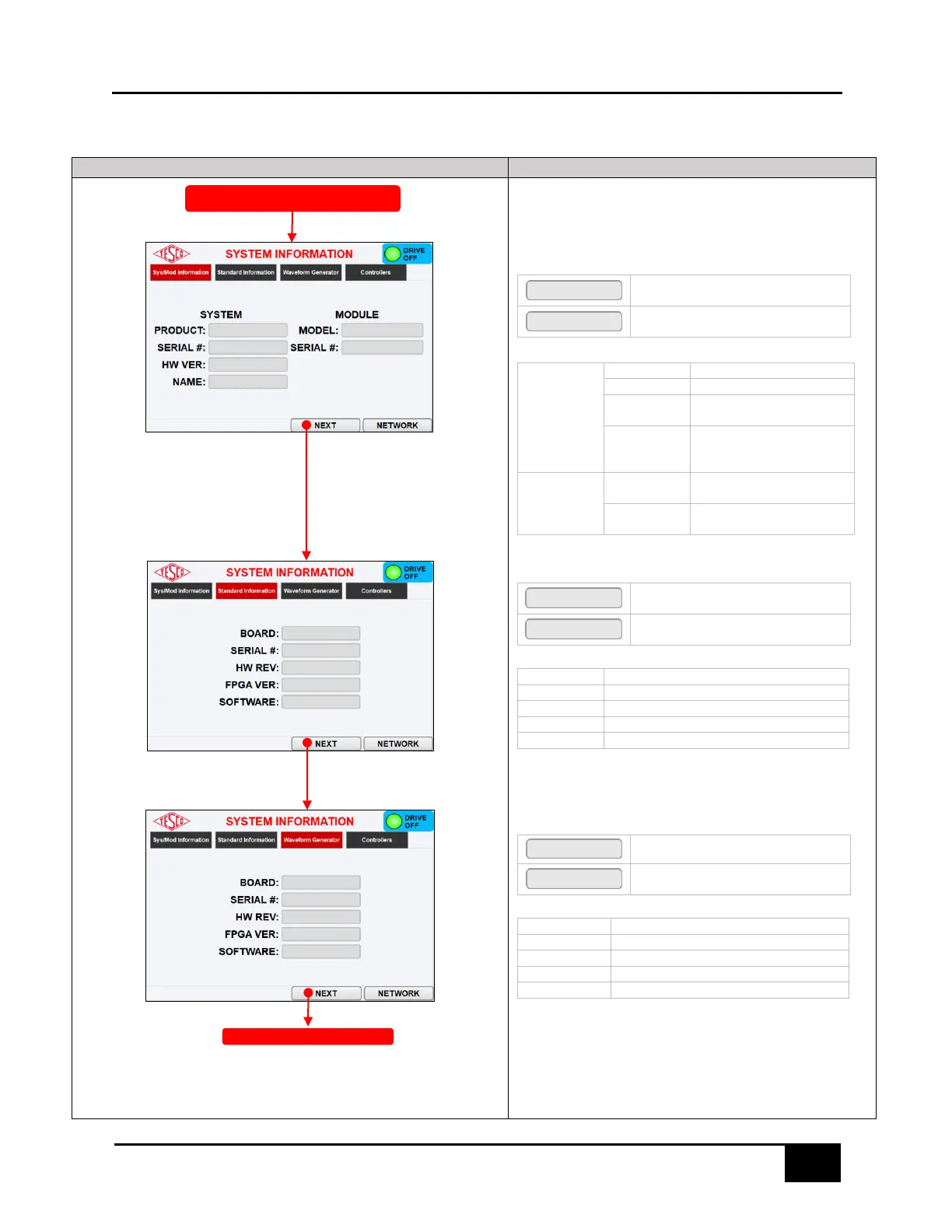
This screen displays information about the hardware configurations,
firmware revision levels and network configuration
SYSTEM/MODULE INFORMATION TAB
KEYPAD &FUNCTION KEYS
Press to open the STANDARD
INFORMATION tab
Press to open the NETWORK SETUP
dialog box
Product name of the device
Serial number of the device
Hardware version of the
device
Displays the name of the
system. Can be updated by
the user through TMA
Displays the model name of
the device
Displays the serial number of
the device
STANDARD INFORMATION TAB
KEYPAD &FUNCTION KEYS
Press to open the WAVEFORM
GENERATOR tab
Press to open the NETWORK SETUP
dialog box
Displays the physical board type
Displays the serial number of the board
Displays the HW rev of the board
Displays the FPGA binary version
Displays the application SW version
WAVEFORM GENERATOR TAB
KEYPAD &FUNCTION KEYS
Proceeds to the CONTROLLERS tab.
Press to open the NETWORK SETUP
dialog box
Displays the physical board type
Displays the serial number of the board
Displays the HW rev of the board
Displays the FPGA binary version
Displays the application SW version
SYSTEM INFROMATION (CONTROLLERS)



 To Next Page