OPERATIONS MANUAL
+1 215 785 2338 www.tescometering.com
support@tescometering.com
3.3.4 SINGLE TEST SETUP
3.3.4.1 SINGLE TEST SETUP
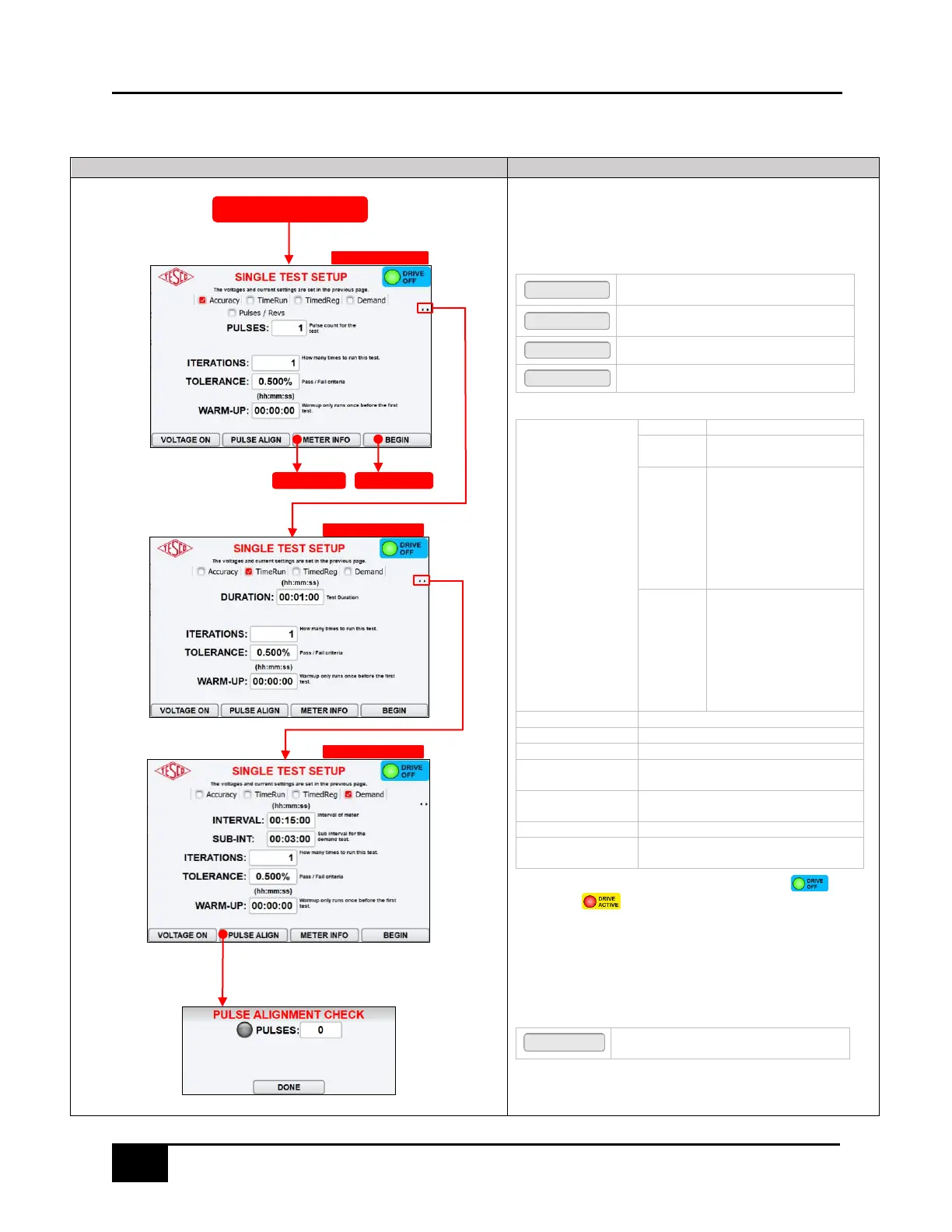
This enables the configuration of the desired single test to be
conducted.
FUNCTION KEYS
Press to enable service voltage to the
socket
Press to align optical pickup. Refer to §3.4
for additional information on this feature.
Press to return to the METER INFO screen
Press to open SEQUENCE ACTIVE screen
Performs test with a
predefined duration
Prompts the user for the
meter’s measured register,
runs a test for a predefined
duration. Then prompts
the user for the meter
register again and uses that
as meter’s measured
power.
When running a demand
test and the meter is in
Test mode, the time
entered for the INTERVAL
needs to be the meters
Test Mode Interval which is
not always the same as the
normal Demand Interval.
Enables counting of pulses
Enables setting the test duration
Enables setting the interval of meter
Enables setting the sub interval for the
demand test
Number of times the test will be
repeated
Tolerance needed for pass/fail criteria
Period of time for meter to stabilize prior
to test execution
WARNING: If either VOLTAGE ON or LOAD ON is enabled, the indicator
will change to . This indicates there is potential and or/ current present
at the meter terminals.
3.3.4.2 PULSE ALIGNMENT CHECK
This will apply voltage and current to the meter, so that the optical
probe can be aligned with the meter’s pulse output.
FUNCTION KEYS
Press to close the PULSE ALIGN CHECK
dialog box
TimeRun / TimedReg toggled



 To Next Page