FUNCTIONALITIES
www.tescometering.com +1 215 785 2338
support@tescometering.com
3.3.5 TEST SELECTION
3.3.5.1 TESTS
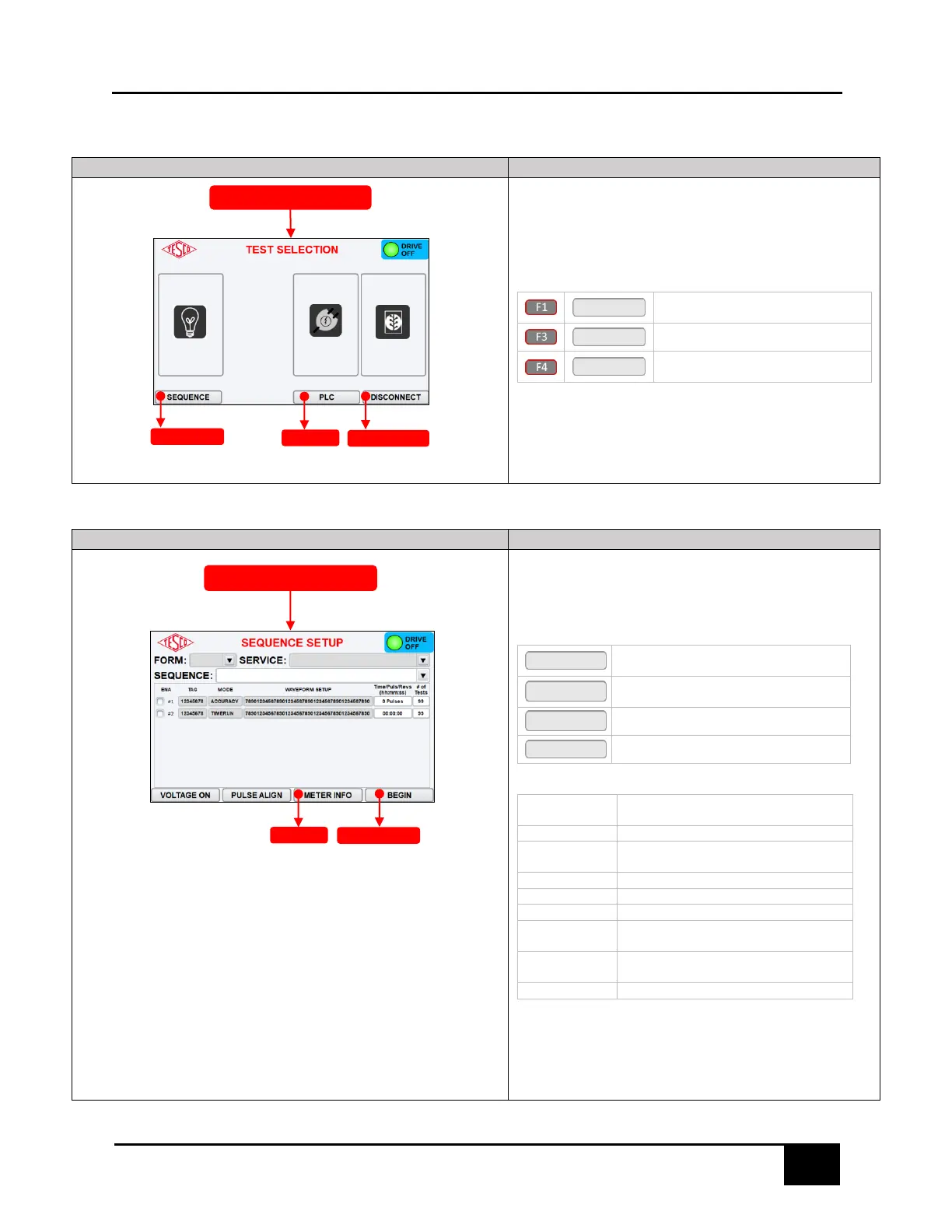
The TEST SELECTION screen consists of the following function
buttons: MANUAL, PLC, & DISCONNECT. Press arrow keys to navigate
through the menu or directly press the function keys.
KEYPAD & FUNCTION KEYS:
Press to open METER INFO screen.
Refer to §3.3.3.4 for additional info.
Press to open the PLC TEST screen
Press to open the DISCONNECT TEST
screen
3.3.6 SEQUENCE TESTING
3.3.6.1 SEQUENCE SETUP
This enables the selection of the desired test sequence to be
conducted. To change FORM and SERVICE, return to METER
INFORMATION.
KEYPAD & FUNCTION KEYS
Press to enable service voltage to the
socket
Press to enter pulse alignment mode and
show the number of pulses from the meter.
Press to return to the METER INFO screen
Starts the sequence test.
Form number of the meter (auto-
populates the default Kh in the Kh field)
Services available for selected meter form
Sequences available for selected meter
form
Toggle to enable or disable a test selection
Alias or brief description of the test
Waveform setup of the test
Input time, pulses, or revolutions for
selected test type
Number of times the test will be repeated



 To Next Page